
Build Automated Decision Workflows with Jev in ADP
Learn how to integrate TypeSafe Jev into Tencent Cloud ADP to automate high-volume classification, scoring, and routing with lower latency and cost.


Jev is a TypeSafe System One model for automated decisions. It does not write a response or hold a conversation. It returns a structured answer that a system can use immediately: a selected option, a score, or a probability.
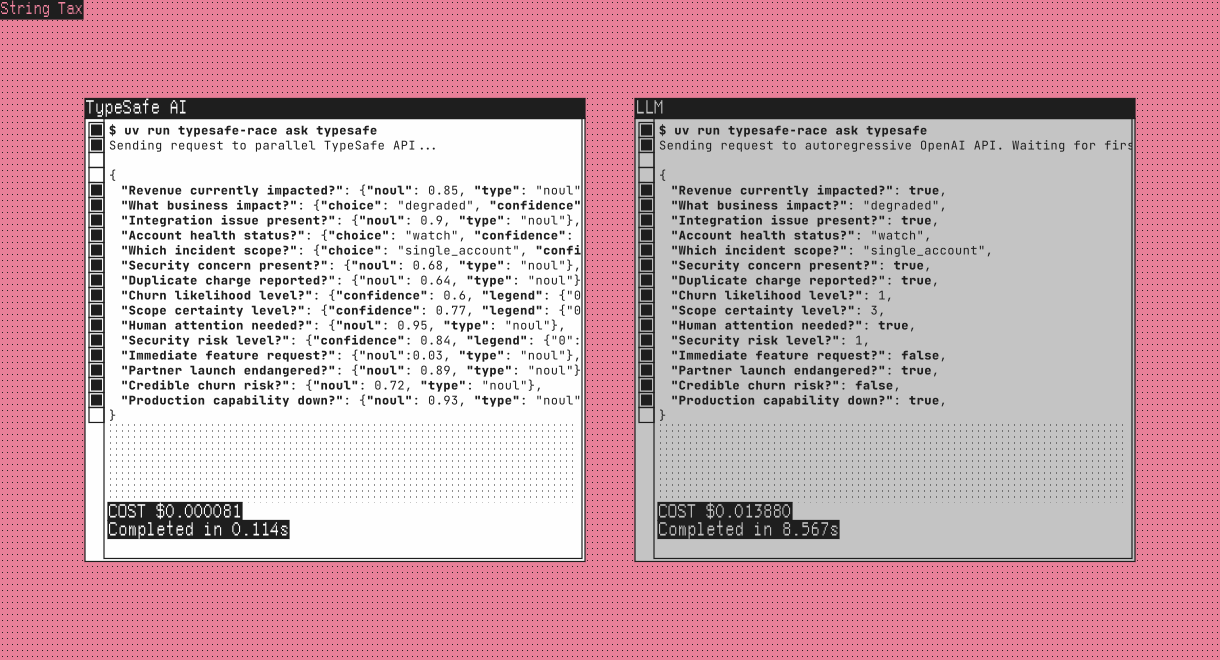
That makes Jev a useful addition to Tencent Cloud ADP when a workflow needs to decide where work goes next. The jev-typesafe Skill is available in ADP. For a production decision path, the recommended pattern is to call Jev directly from a Workflow CODE node and route on its result.
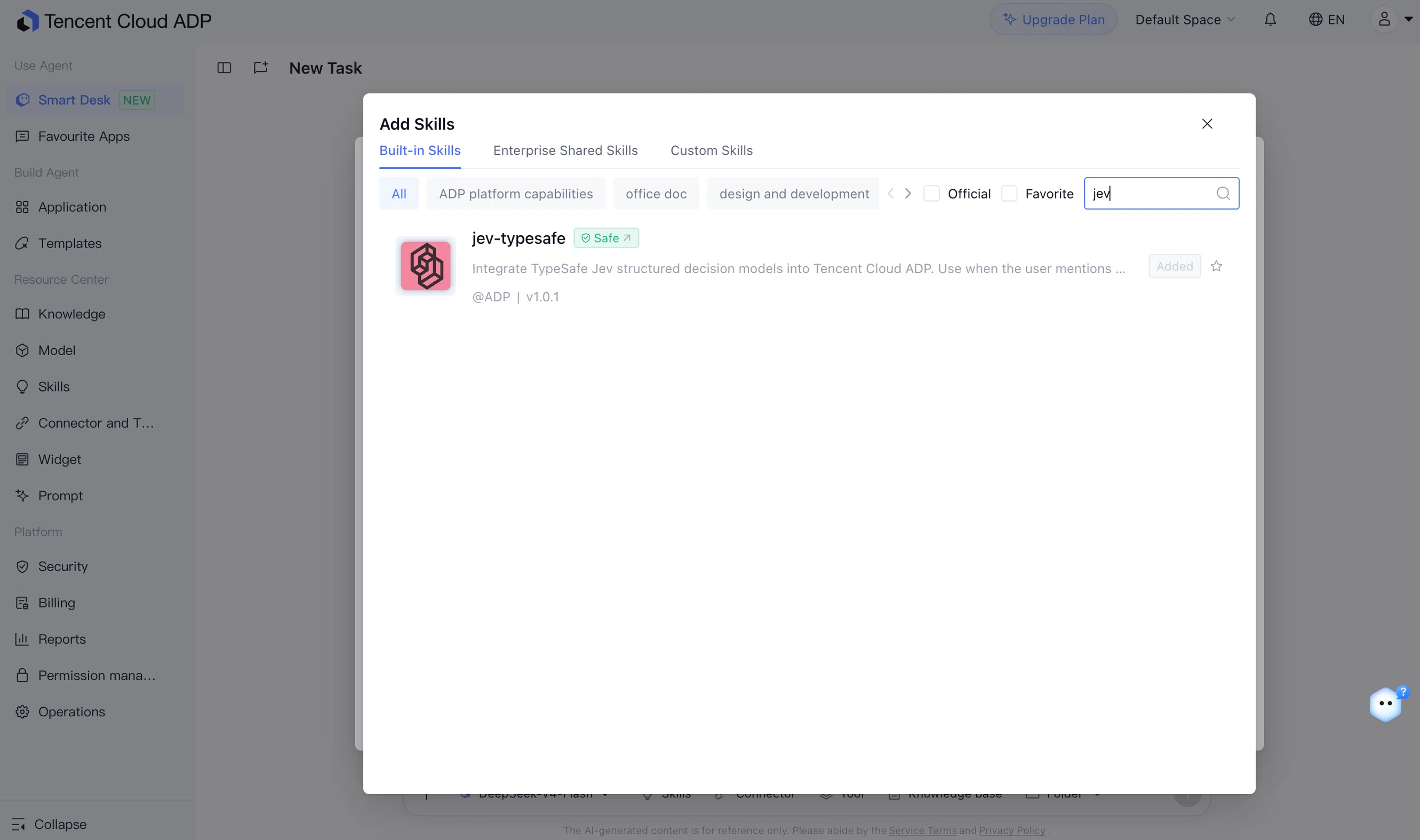
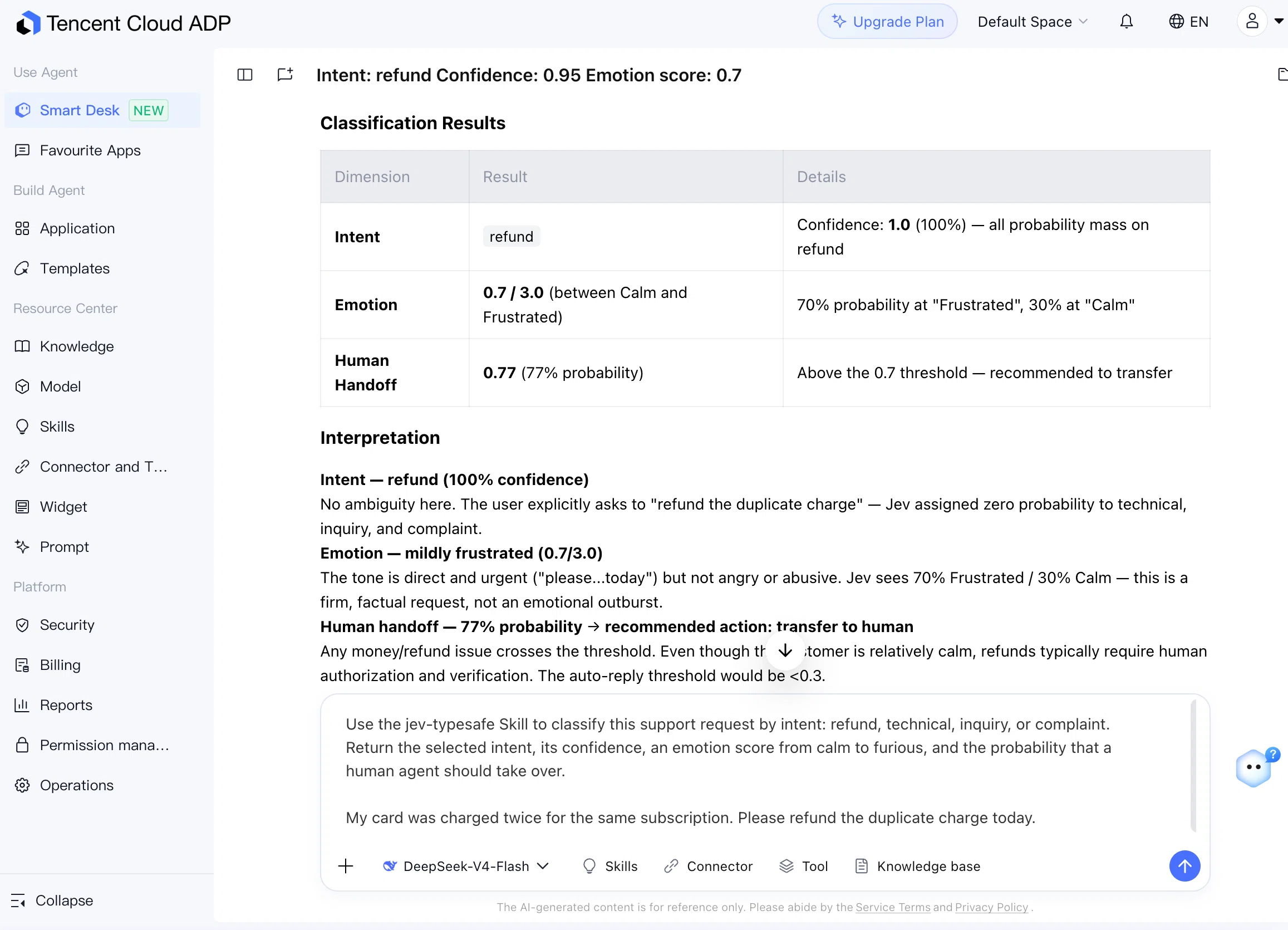
You can also test Jev directly in the ADP Smart Desk by adding the jev-typesafe Skill from the built-in skill library.
What Jev does
Many operational tasks end with a small set of possible actions. A ticket needs to reach the right queue. A piece of content needs a review decision. A risk signal needs a severity level. Those results should be structured enough for the next system step to consume without parsing a paragraph of generated text.
Jev is designed for that type of work. It accepts an input state and returns typed decisions with probabilities or confidence values. The three core question types are:
| Question type | Output | Example use |
|---|---|---|
| Choice | One option and its probability | Route a ticket by intent |
| Score | A value on a defined scale | Grade customer frustration |
| Noul | A probability between 0 and 1 | Decide whether a human should review the request |
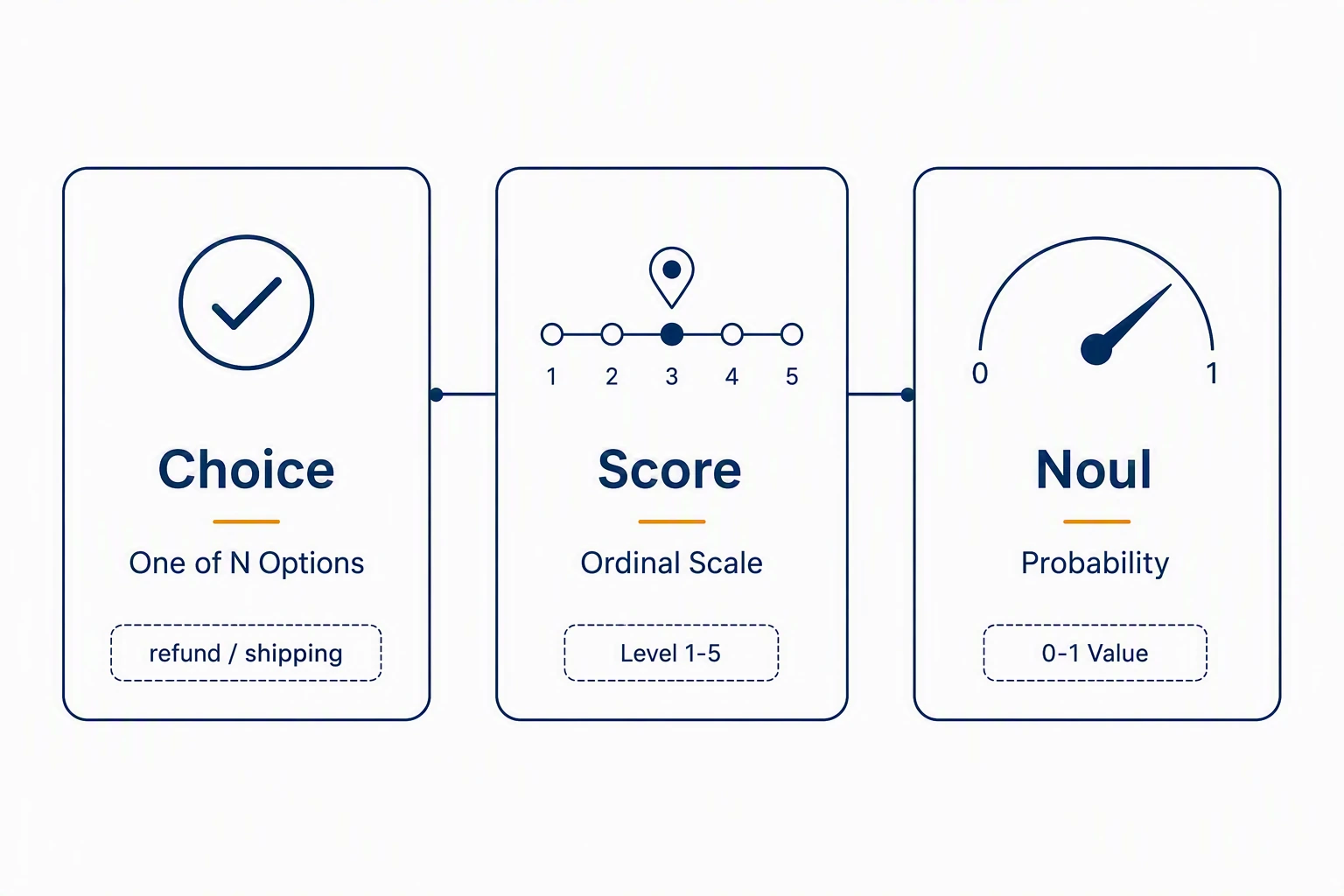
Choice works well when the options are stable. A support workflow might use refund, technical, inquiry, and complaint. Score is useful when the result belongs on a scale, such as calm through furious. Noul is useful when the workflow needs a threshold, for example whether the probability of human handoff is high enough to transfer the ticket.
When to use Jev
Jev is suited to high-volume decisions with clear criteria. Intent classification, content pre-filtering, lead qualification, risk screening, and quality grading all fit this pattern.
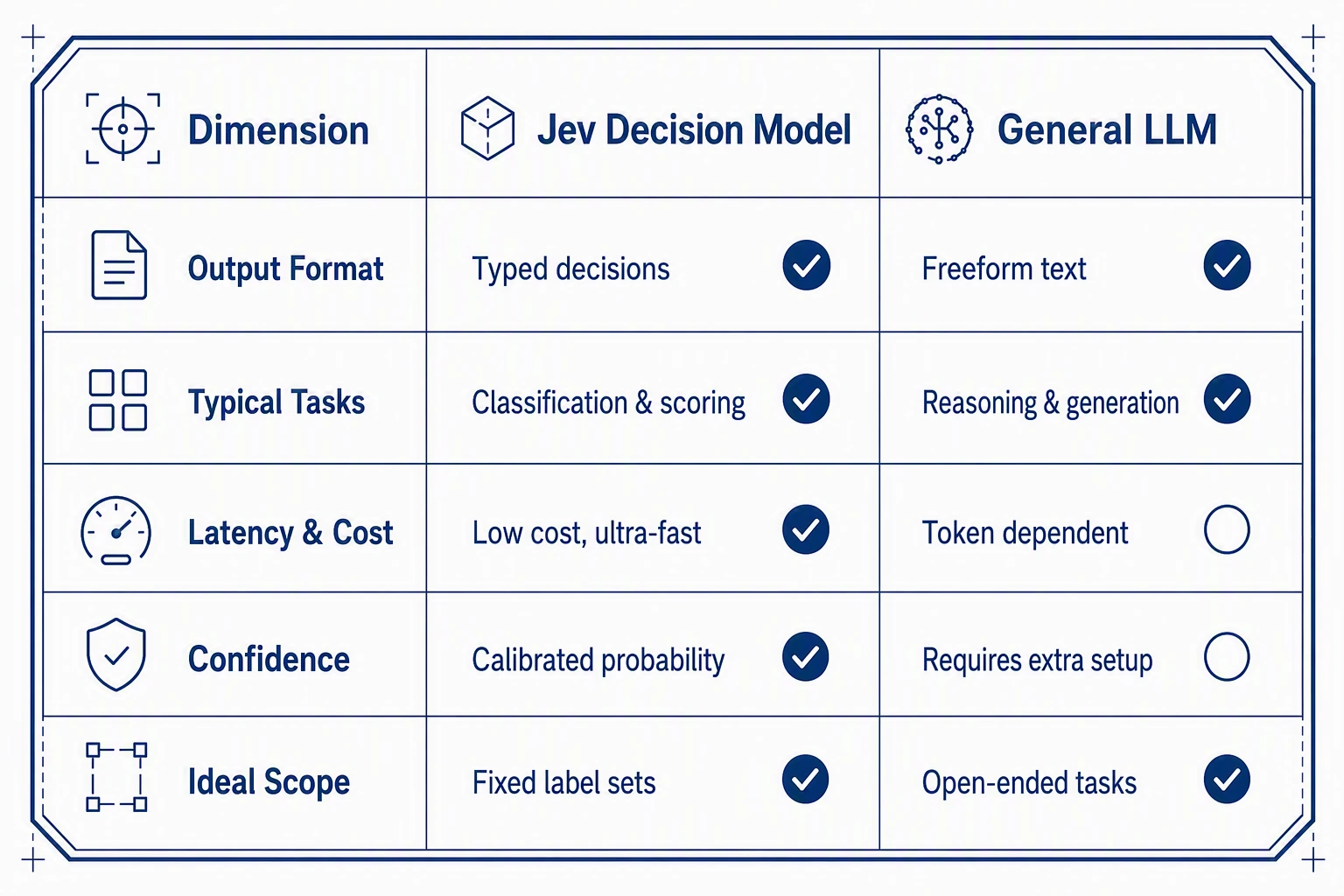
A general-purpose LLM is still the better fit when the application must explain a conclusion, write a customer response, summarize a document, or work through an open-ended request. The two can sit in the same workflow. Jev can classify and route first; an LLM can generate text only on the branch that needs it.
Put Jev in a Workflow CODE node
Create a single-workflow application in ADP. Store the TypeSafe API key as an application variable, then add a CODE node after the START node. The node receives the user message through SYS.UserQuery, calls the Jev API, and returns the values required by the next node.
START → CODE: call Jev → CONDITION: route result → downstream action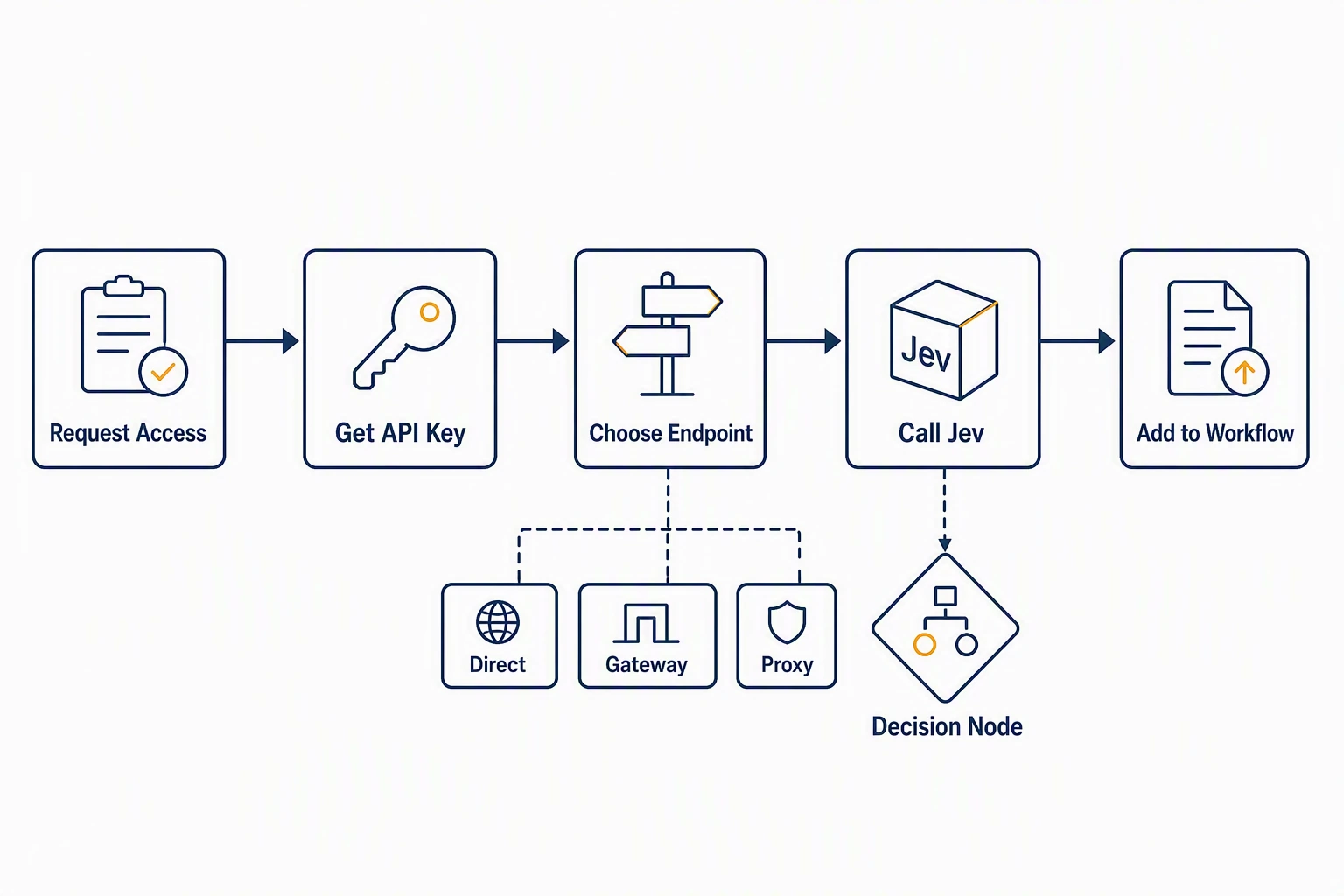
For a ticket-triage workflow, the CODE node can ask Jev for the ticket intent, a customer emotion score, and the probability that a human agent should take over. Keep the questions and category definitions close to the business rule. A workflow needs a fixed set of labels that downstream conditions can act on.
The CODE node should return a dictionary, not a JSON string. ADP serializes the return value for downstream nodes. When building request objects inside the node, use dict() and assignments rather than bare dictionary literals, because the editor resolves template syntax in code strings. Use the exact Content-Type header key when sending the JSON request.
Build a ticket-triage workflow
The workflow receives a customer ticket, sends it to Jev, and returns intent, emotion_score, handoff_probability, and action. A CONDITION node then sends it to the right branch.
| Handoff probability | Workflow action |
|---|---|
| Below 0.3 | Auto-handle the request |
| 0.3 to below 0.7 | Send to a review queue |
| 0.7 or higher | Transfer to a human agent |
An LLM node can be added after the low-risk branch to draft a reply. It should not be responsible for the routing decision itself.
The same pattern can be applied to content review, lead scoring, and quality checks. The decision labels and thresholds change; the workflow shape stays the same.
Test the route, not only the answer
Test with real or representative inputs before releasing the application. Include a routine inquiry, a refund request, a technical failure, and a complaint. Check the returned intent and score, then check that the CONDITION node selects the expected branch.
| Test input | Expected workflow outcome |
|---|---|
| “What are your business hours?” | Inquiry, low handoff probability |
| “I was charged twice. Please refund me.” | Refund, human handoff |
| “The app crashes when I sign in.” | Technical issue, review or handoff |
| “Your service has been terrible.” | Complaint, human handoff |
In an interactive test with a refund inquiry, Jev classifies the intent as refund with 100% confidence, estimates the emotion score at 0.7 / 3.0 (mildly frustrated), and flags an escalating 0.77 human-handoff probability, triggering a transfer recommendation.
API errors, empty results, and low-confidence decisions need an explicit fallback. In most operational workflows, routing those cases to review is safer than forcing an automated outcome.
Turn a decision into an operational flow
A model result is only one part of the system. ADP provides the surrounding workflow: data preparation, decision calls, threshold branches, downstream actions, and evaluation.
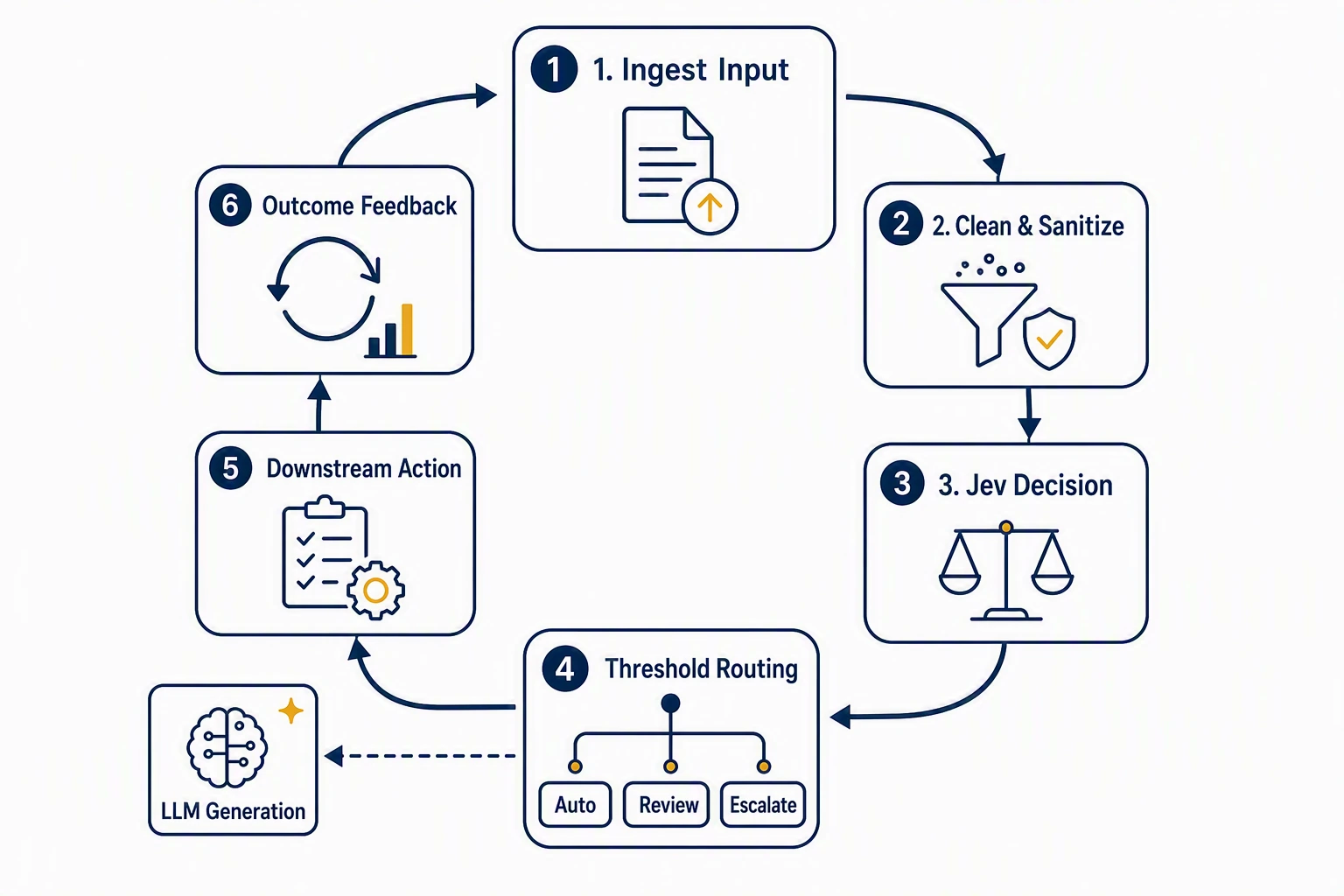
For a support workflow, a low-risk route can draft a standard reply, a middle route can create a review item, and a high-risk route can notify a human team with the ticket’s intent, score, and probability. Store the later human outcome as well. It gives the team evidence for adjusting category definitions and thresholds.
Choose the model by the work that follows
The key question is whether the application needs a typed decision, generated language, or both.
Use Jev when the result must be routed, scored, or compared against a business threshold. Use a general-purpose LLM when the result must be explained or written for a person. Combine them when a workflow first needs a decision and then needs language.
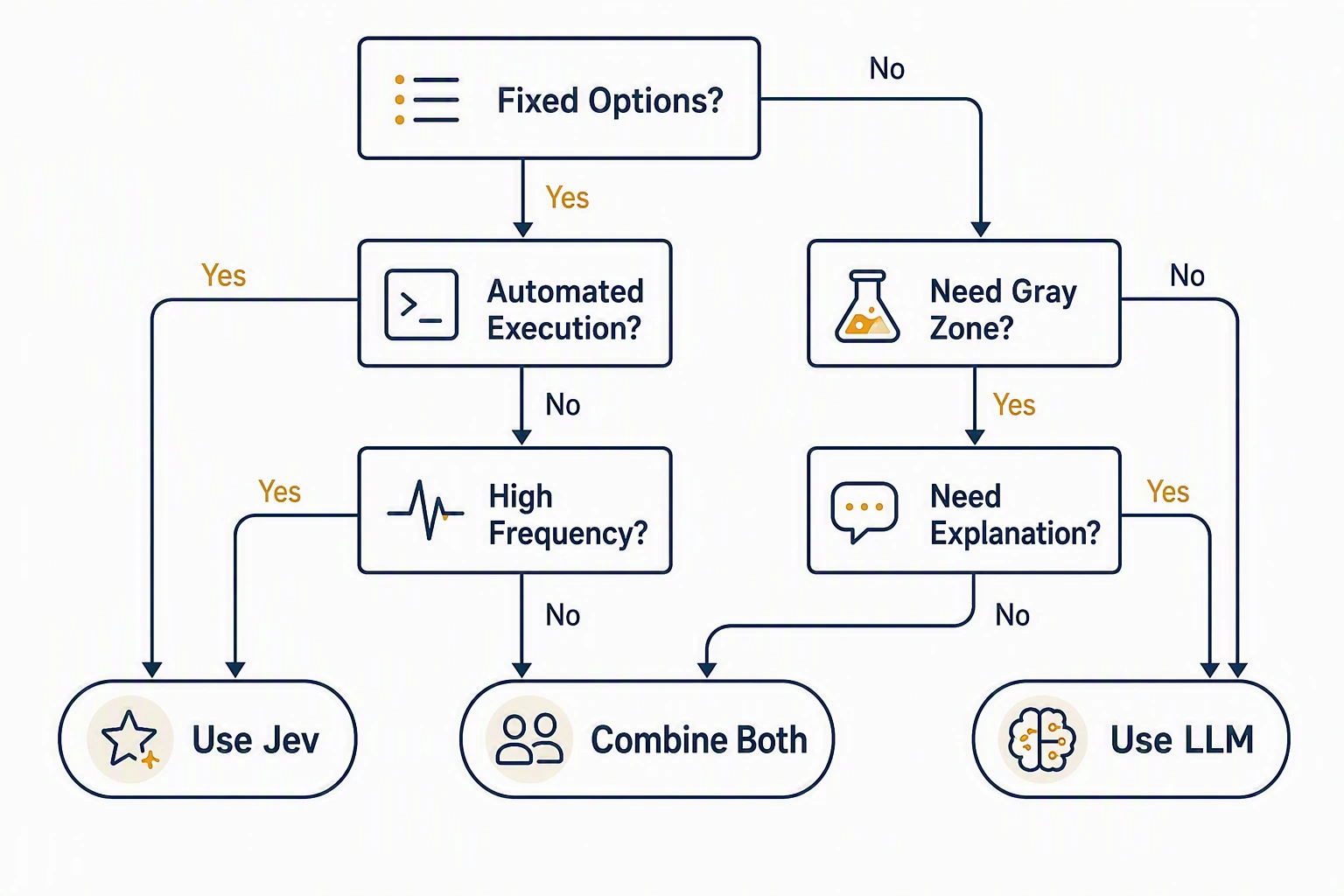
Start with one decision and a small test set. Once the route is stable, connect the branches to the systems and teams that will use the result.
Access paths
TypeSafe opened public signup on September 21, 2026. The homepage now says there is no waitlist. Create an account and generate a key directly:
- Official console. Sign in at the TypeSafe AI Console and create a
TYPESAFE_API_KEY. - Hosted gateways. Call the model through Vercel AI Gateway or Cloudflare Workers AI. The gateway model ID is
typesafe/jev. - Aggregators. On OpenRouter, the model ID is
typesafe/jev-latest. That ID belongs to the aggregator, not to the official request body. - Playground. TryJev offers a no-key demo for a first look. It is not a production path.
The published cost figure is $0.042 per million input tokens, with output tokens free. TypeSafe also states the same rate as $42 per billion input tokens. The target latency range in the launch notes is 70–500 ms.
import requests

response = requests.post(
    "https://api.typesafe.ai/v1/systemone",
    headers={
        "Authorization": "Bearer YOUR_API_KEY",
        "Content-Type": "application/json",
    },
    json={
        "model": "jev-latest",
        "state": "My card was charged twice for the same subscription. Please refund the duplicate charge today.",
        "questions": {
            "routing": {
                "type": "choice",
                "instructions": "Route this ticket to a team",
                "criteria": {
                    "refund": "Refunds and duplicate charges",
                    "shipping": "Delivery problems",
                    "billing": "Invoices and billing disputes",
                },
            },
            "is_refund": {
                "type": "noul",
                "instructions": "The user explicitly asks for a refund",
            },
        },
    },
)

print(response.json())
In ADP, put this call inside the CODE node described above. A node before it cleans the ticket. A node after it routes on the returned probabilities.
What the 500-ticket comparison showed
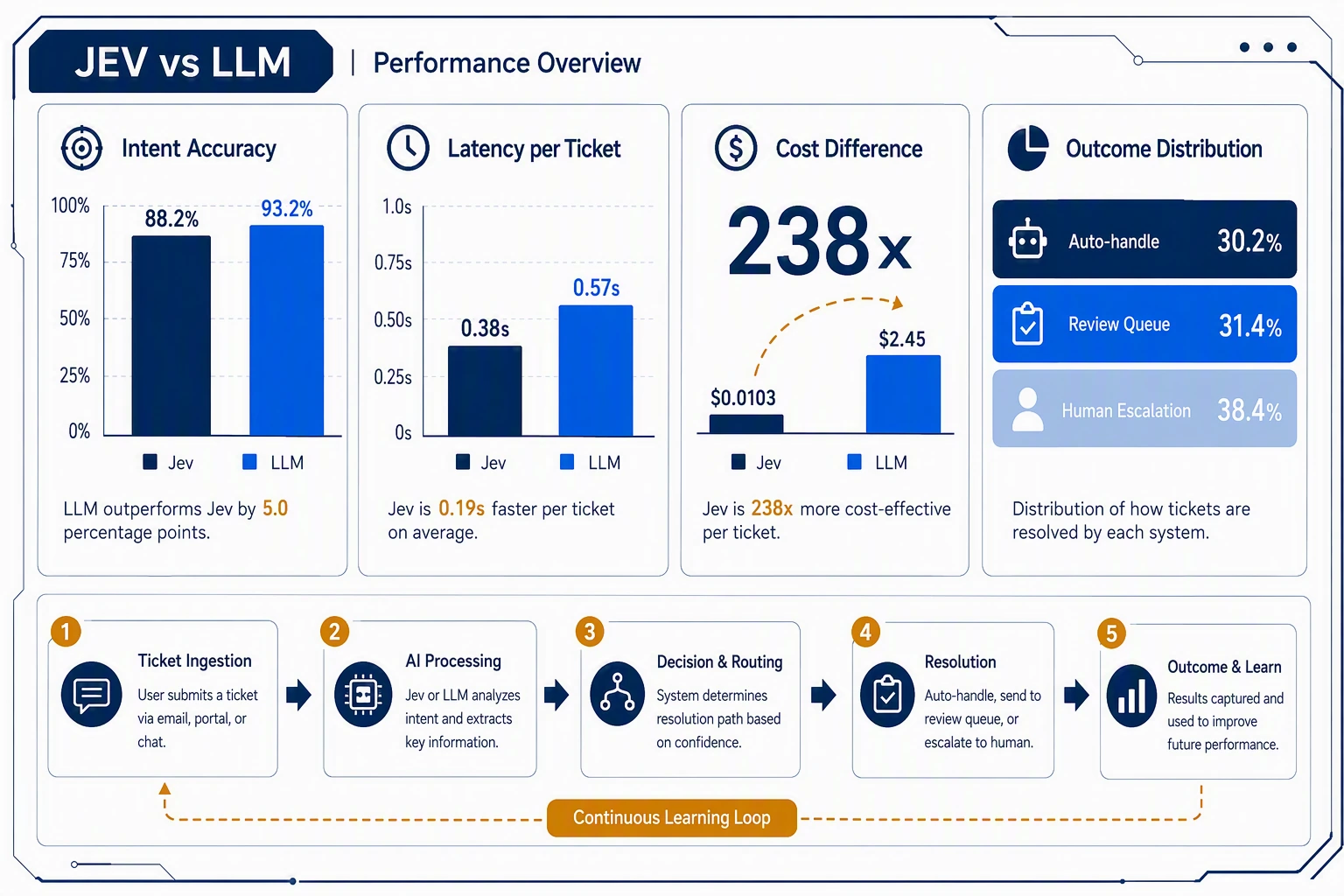
Two matching ADP applications ran the same three decisions on the same 500 simulated support tickets: intent, emotion score, and whether a human should take over. The tickets covered refund, technical failure, billing inquiry, pre-sales inquiry, and complaint. Calls ran 10 at a time and were aligned by sample ID.
Jev cost comes from the input-token usage returned by the API. The LLM cost is an estimate: about 500 input tokens and 80 output tokens per call.
| Metric | Jev | General-purpose LLM |
|---|---|---|
| Intent accuracy | 88.2% | 93.2% |
| Intent accuracy, empty results excluded | about 93.5% | 93.2% |
| Emotion score MAE | 0.29 | 0.16 |
| Human-handoff accuracy | 86.6% | 89.8% |
| Speed | 0.38 s per ticket | 0.57 s per ticket |
| Cost for 500 tickets | $0.0103 | about $2.45 |
| Confidence | yes, mean 0.96 | no calibrated confidence |
| Gray zone that can be routed | 31.4% | none; output is usually binary |
| Empty result or failure rate | 5.6% | 0 |
The LLM is a little more accurate. After empty Jev responses are removed, intent accuracy is close. Jev is about 33% faster on this set, and the cost gap is about 238 times. The LLM cost is an estimate, so use it as an order of magnitude, not an invoice.
Jev also returns a handoff probability, which is what makes the three-way route possible:
| Probability | Tickets | Share | Suggested action |
|---|---|---|---|
| Below 0.3 | 151 | 30.2% | Auto-handle |
| 0.3 to below 0.7 | 157 | 31.4% | Review queue |
| 0.7 or higher | 192 | 38.4% | Transfer to a human |
The same run showed two limits. 5.6% of Jev requests returned an empty result. Heated refund and technical-failure messages were sometimes labeled as complaints. Tighten the criteria wording, retry empty calls, and keep a fallback model. Do not treat the raw probability as a production rule until it has been checked on labeled tickets.
Questions worth answering before you pick a model
Are the options or the decision rule stable? refund, shipping, billing, and complaint are stable. So is “did the user ask for a refund?” Jev fits those. An open request that first needs a goal, a search, and an explanation does not.
Will software act on the result? If the output creates a ticket, blocks a request, or transfers a case, a typed value and a threshold matter. If the output is a report or a reply for a person to read, use a general-purpose LLM.
Is the volume high enough for the cost gap to matter? A few dozen calls a day will not show it. Tens of thousands to millions of decisions a day will. Check ADP platform pricing separately at ADP pricing.
Do you need a gray zone? A review queue needs a probability and a threshold. Jev returns both. A general-purpose LLM can be asked to emit a confidence number, but that number still has to be calibrated on your data.
Do you need an explanation or a written reply? Use a general-purpose LLM for that. Jev can decide first. The LLM writes only on the branch that needs text.
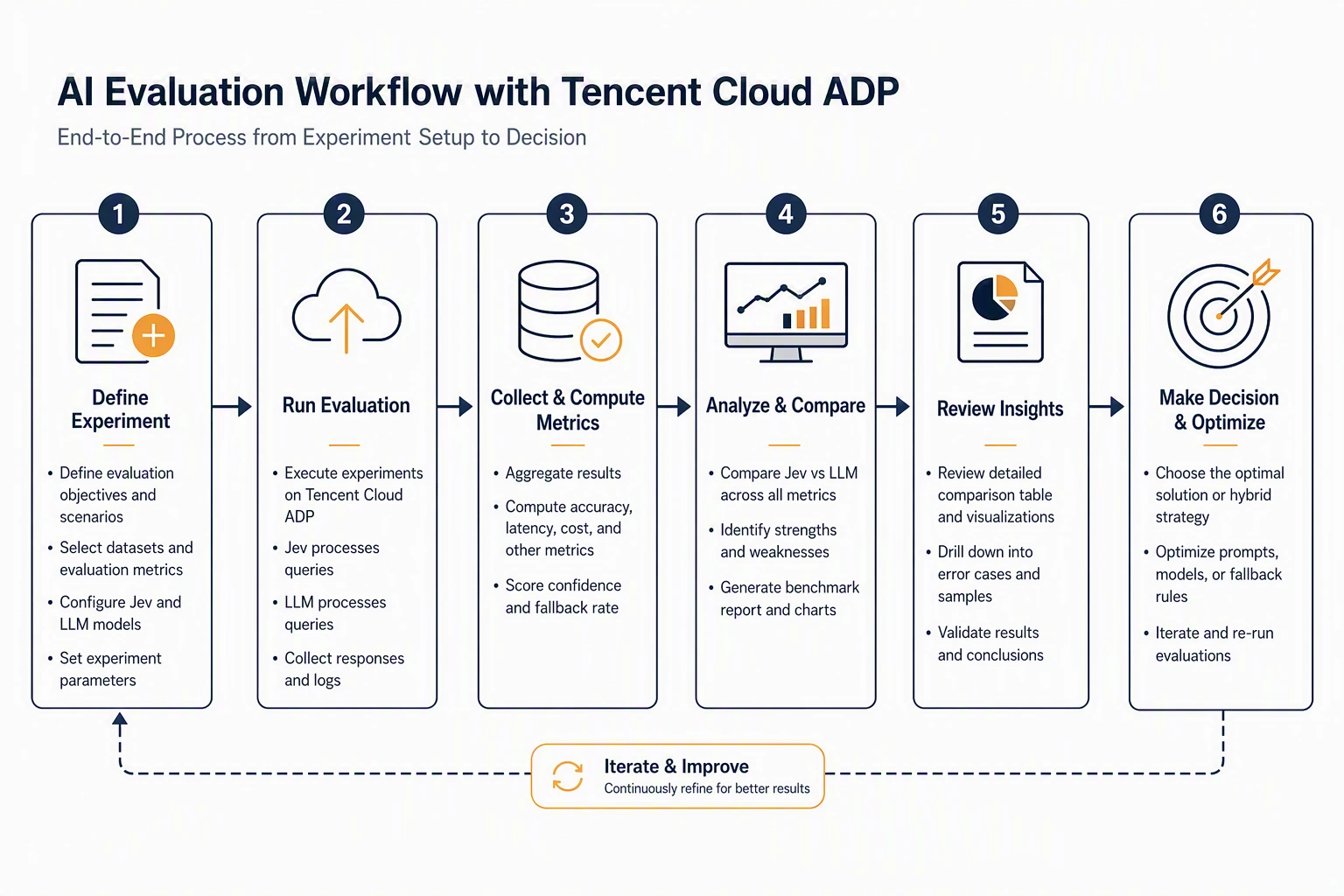
Put the decision under evaluation
A single good example is not a rollout. Before release, keep a small evaluation loop:
- Label a set that includes the main categories, edge cases, failures, and high-risk tickets.
- Track accuracy, recall, false blocks, misses, emotion MAE, human time saved, latency, and cost per decision.
- Set the auto-handle, review, and escalation bands from the risk the business will accept.
- Route empty results, low confidence, and API failures to review or a backup model.
- Log the input, the output, the probability, the threshold, the action taken, and the later human outcome.
- Fold human corrections back into the next evaluation set.
FAQ
Can Jev replace every general-purpose LLM call?
No. Use it for classification, scoring, and yes-or-no probabilities. Keep a general-purpose LLM for conversation, summaries, writing, explanations, and multi-step reasoning.
How is Jev different from JSON mode?
JSON mode asks a generative model to emit text in a fixed shape. Jev is built to return a typed decision and a probability. Both still need to be checked on your own tickets.
Can the probability drive a live decision?
It can be an input. It should not go live before you measure accuracy, misses, and review volume at each threshold on historical tickets.
What if Jev returns nothing, or the confidence is low?
Retry the failed call. Send low-confidence results to review. On a critical path, call a backup model. The ADP run had a 5.6% empty-result rate, so the fallback is part of the workflow, not an optional extra.
Does every high-volume decision need Jev?
No. If volume is low and the current LLM path is already stable and affordable, leave it. Jev is worth testing when volume is high, latency matters, and the workflow needs a probability to split traffic.
What does ADP do in this setup?
ADP is the workflow around the model call: data preparation, the Jev call, the threshold branch, the optional LLM reply, human review, logs, and the next evaluation. The model returns a decision. The workflow is what makes that decision operational.

Start building today
If you need more support, please contact us