
An OpenClaw's Enterprise Journey
From a personal desktop assistant to a registered digital employee on the enterprise roster

Summary
You have an OpenClaw running locally. It browses the web, writes code, processes files — a capable personal AI assistant. You start to wonder: could this OpenClaw become a reliable work partner across the enterprise? Could you use it at work, and even try out the OpenClaws your colleagues have built? But then the questions start: How do you onboard it? How do you manage it? How do you make it remember company knowledge? How do you know if it is doing a good job?
We are not here to discuss platform philosophy. We cover one specific thing: how a single OpenClaw goes from a standalone local tool to a fully managed enterprise digital employee inside ADP Agent Portal. From 30-second onboarding to connection management, chat proxying, collective memory injection, group collaboration, and observability tracing — every step maps to a real feature module in Agent Portal.
Key takeaways:
- One command completes OpenClaw-to-Portal onboarding: zero modification, 30 seconds to go live
- Unified management gives enterprises clear visibility into how many OpenClaws they have, where each one is, and its current status
- Chat adaptation lets employees talk to OpenClaws directly inside Portal with a native-like experience
- The collective memory system is the real transformation from personal tool to enterprise asset — a personal OpenClaw only remembers your things; an enterprise OpenClaw remembers the whole company's knowledge
- Observability gives managers the first-ever daily work report for each OpenClaw: what it did, how much it cost, and where it got stuck
1. The Starting Point: A Great OpenClaw, and an Unmanageable Situation
OpenClaw is an exciting product.
It can control browsers, read and write files, execute code — a personal AI assistant that genuinely gets work done. Many people find that once they start running an OpenClaw locally, they quickly become dependent on it. It is not a chat toy. It is a true personal assistant.
But the problem appears at the step from "one person using it" to "the whole company using it."
When 10, 50, or 200 employees are each running their own OpenClaw, the situation quickly becomes unmanageable:
- Cannot find them: Zhang's OpenClaw runs on his own machine. If Li wants to use it, she has to ask Zhang for the link.
- Cannot manage them: IT has no idea how many OpenClaws are running across the company, what models each one connects to, or how many tokens they consume.
- Cannot remember: Each OpenClaw only remembers its owner's preferences. Company product manuals, customer preferences, business rules — it knows nothing about any of them.
- Cannot see: What did the OpenClaw do? Did it do well? Where did it get stuck? How much did it cost? — All of it is a black box.
This is not an OpenClaw problem. It is a common challenge that any personal AI assistant faces in enterprise scenarios.
What ADP Agent Portal does is help enterprises bridge the gap from "personal tool" to "enterprise asset." Let us follow one OpenClaw through its entire journey of becoming an enterprise digital employee.
2. 30-Second Onboarding: From Local OpenClaw to Enterprise OpenClaw
The first step for a OpenClaw entering the enterprise system is "checking in."
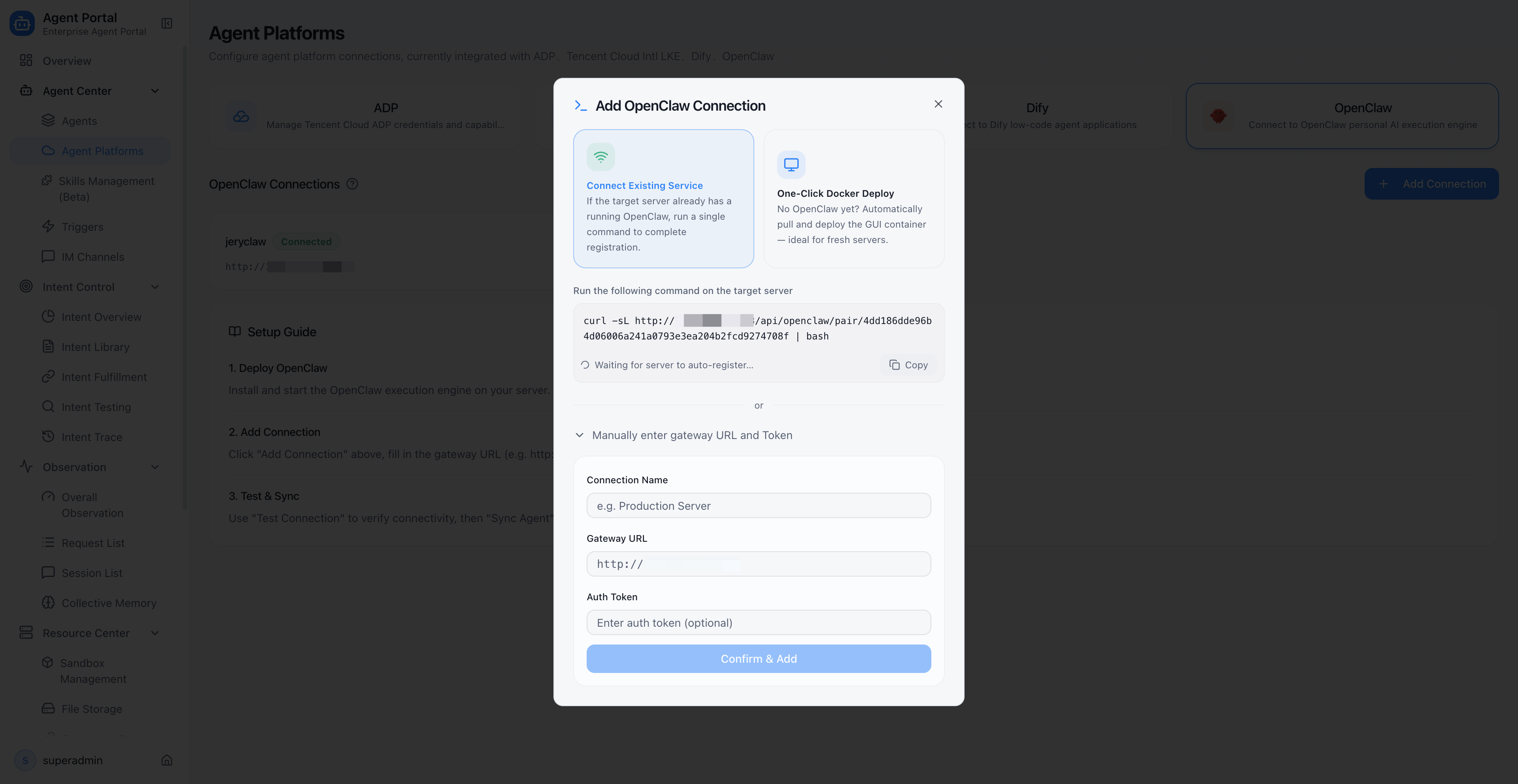
In ADP Agent Portal, an administrator generates a deployment token through the management console. This token is valid for 10 minutes and is bound to the current user, Portal URL, and version information.
Once an employee receives the token, they run a single command in the terminal:
- If OpenClaw is not yet installed locally, the script automatically pulls the Docker image, starts the service, and completes registration — one-click deployment
- If OpenClaw is already running locally, the script automatically detects it, reads the authentication credentials, and completes pairing — one-click pairing
The entire process requires no changes to OpenClaw's configuration, no manual Gateway address entry, and no understanding of the underlying protocol. Thirty seconds later, the OpenClaw appears in Portal's management view.
For users who prefer not to use the command line, Portal also provides a manual form as a fallback — just enter the Gateway address and token to complete the connection.
Key point: Zero-modification onboarding. The OpenClaw is still the same OpenClaw, but it has gone from being a standalone local tool to a member of the enterprise management system.
3. Connection Management: Building a File for Every OpenClaw
After the OpenClaw checks in, the enterprise needs to know: How many OpenClaws do we actually have? Where is each one? What is its status?
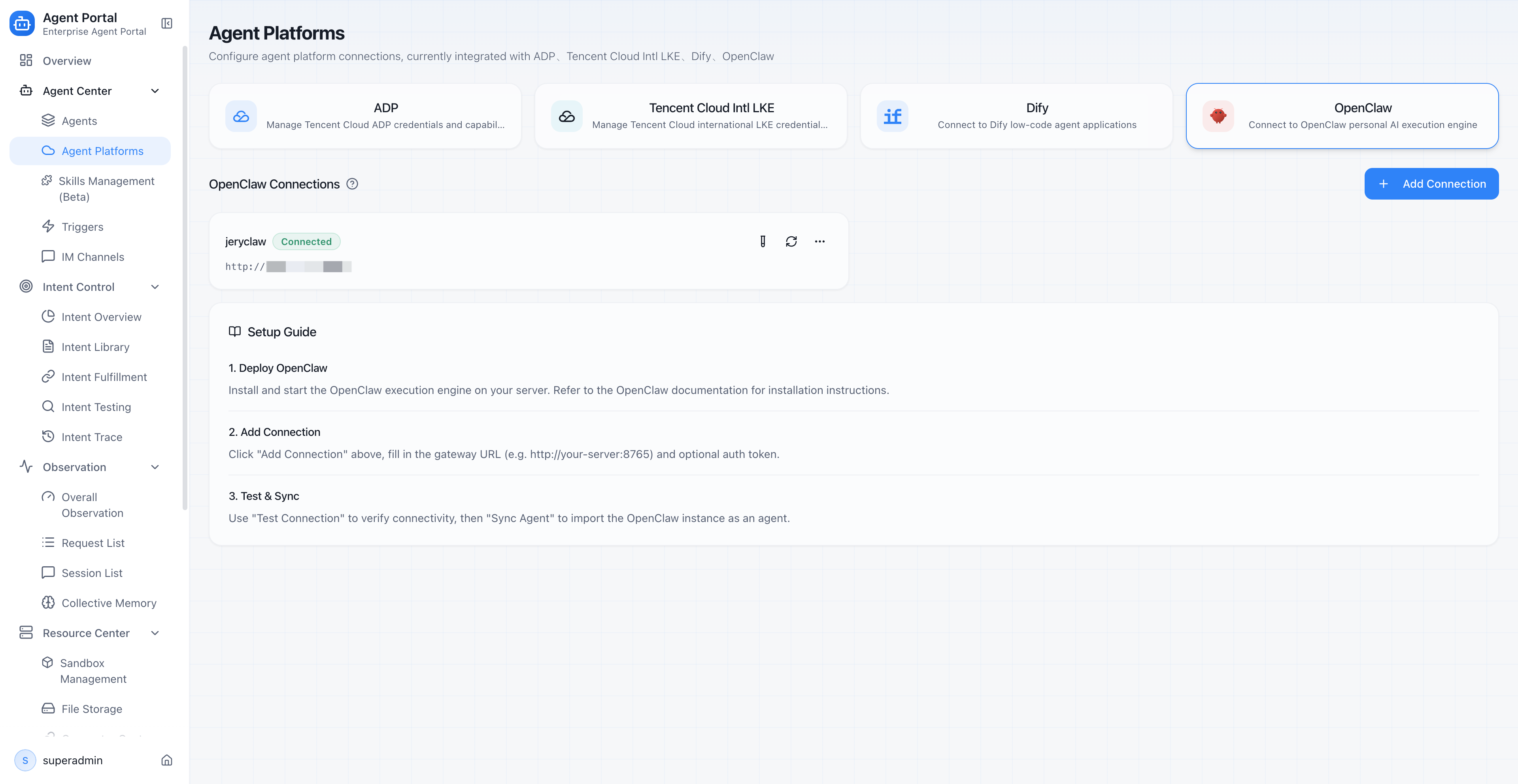
Portal's connection management module maintains a complete file for every OpenClaw:
| Management capability | Description |
|---|---|
| Connection list | One page shows all OpenClaw connections, including name, address, and current status |
| Three-state status management | Each connection has three states: connected, disconnected, or error — administrators see everything at a glance |
| Connectivity testing | One-click test to check if a OpenClaw is online, returning version number and host information |
| Agent synchronization | Sync OpenClaw instances as agent assets in Portal, adding them to the unified directory |
| Edit and delete | Modify connection details or remove decommissioned OpenClaws to keep the asset directory clean |
This means the enterprise has, for the first time, a "OpenClaw roster." IT administrators do not need to check machine by machine. They open Portal and see the global status.
When a OpenClaw loses its connection, Portal displays a dedicated status badge in the agent list, preventing employees from sending requests to an offline OpenClaw.
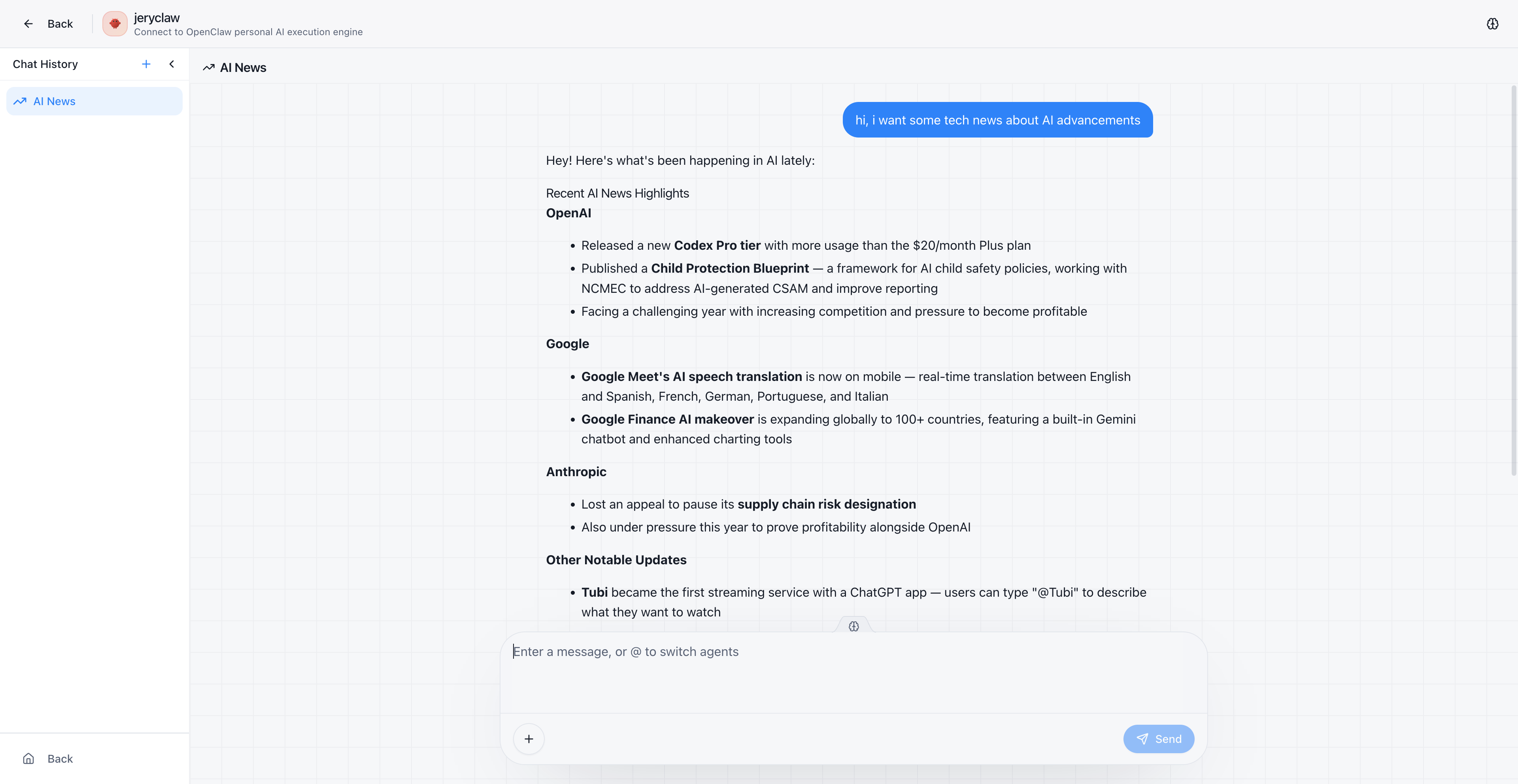
4. Seamless Chat: OpenClaws Work Directly Inside Portal
The OpenClaw is onboarded and registered. The next critical question is: Can employees talk to the OpenClaw directly inside Portal?
The answer is yes, and the experience is nearly identical to local usage.
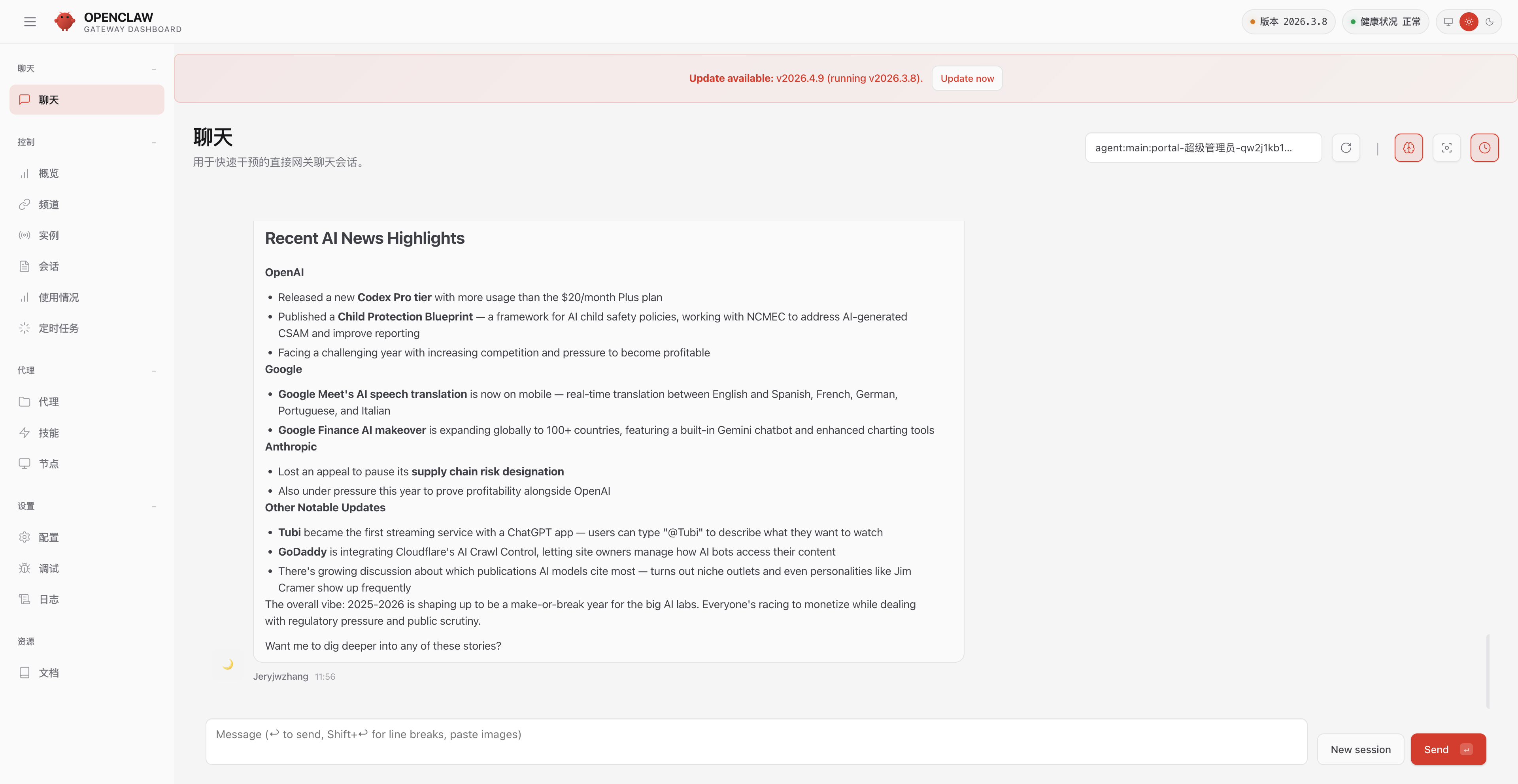
Portal's chat adaptation layer does one critical thing: it establishes a WebSocket connection to the OpenClaw Gateway and relays the OpenClaw's replies to the frontend in real time. For employees, they type a request in Portal's chat interface, and the OpenClaw's reply streams back in real time — just like it does locally.
More importantly, media files generated during task execution — browser screenshots, generated images, exported files — are viewable directly inside Portal. The media proxy module automatically recognizes media paths returned by OpenClaw and converts them into Portal-accessible URLs.
Throughout the process, employees never need to know the OpenClaw's Gateway address or connect directly to its local service. All communication goes through Portal's backend proxy, with authentication credentials injected automatically.
What does this mean? Employees just open Portal, find the right OpenClaw, and start chatting. Protocol conversion, authentication injection, and media proxying all happen transparently.
5. Console Proxy: Administrators Manage OpenClaws Remotely
Beyond letting employees chat with OpenClaws, administrators sometimes need direct access to a OpenClaw's console — to check configurations, adjust parameters, or troubleshoot issues.
Before Portal, this meant SSH-ing into an employee's machine or asking them to share a console link. With dozens or hundreds of OpenClaws across the company, this approach simply does not scale.
Portal's console proxy solves this. Administrators click "Management Console" in Portal and get full access to the OpenClaw's console interface directly in the browser.
Behind the scenes, this is a complete reverse proxy mechanism:
- Authentication credentials are injected automatically — no manual token entry needed
- Network requests in the console page are rewritten to route through Portal's proxy path
- WebSocket connections are proxied to maintain real-time console interactivity
- User permissions are verified to ensure only authorized personnel can operate
In one sentence: Administrators never need to leave Portal to remotely manage any OpenClaw.
6. Collective Memory: Teaching OpenClaws What the Company Knows
This is the most differentiated capability Portal brings to OpenClaw.
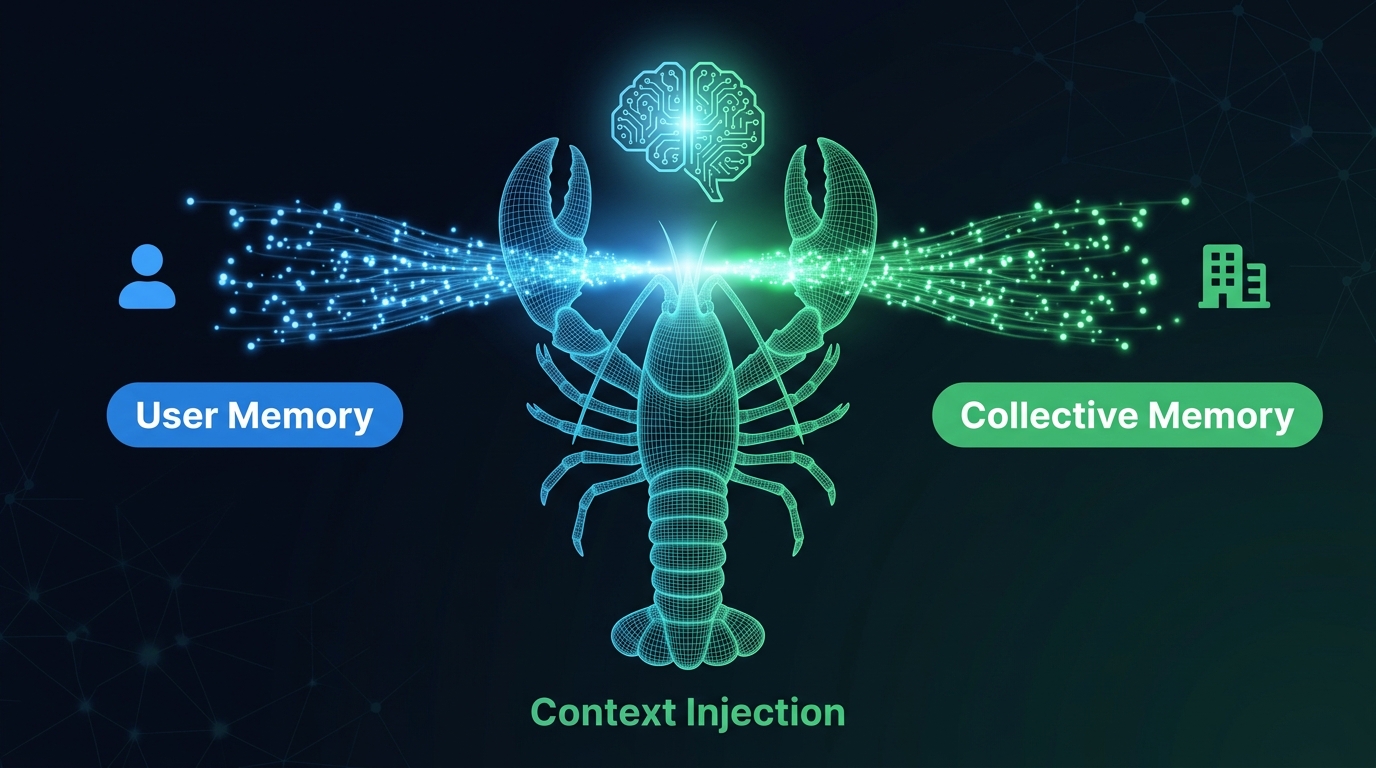
A personal OpenClaw only remembers what you tell it. Your file preferences, your coding style, your favorite toolchain — it knows these well. But the company's pricing strategy, customer-specific requirements, team coding standards, last week's meeting decisions — it knows nothing about any of them.
Portal's collective memory system changes this.
Where does memory come from?
Collective memory has two sources:
- Automatic extraction: When employees chat with OpenClaws, the system automatically identifies and extracts valuable information from conversations. For example, if an employee mentions "Our API gateway address changed to xxx," this information is automatically extracted as a memory entry.
- Manual addition: Administrators can proactively add enterprise-level knowledge entries, such as product manual summaries, customer preferences, and business rules.
How is memory used?
Every time an employee starts a conversation with a OpenClaw, Portal automatically injects relevant collective memories into the session context. When the OpenClaw answers questions, it can reference this enterprise-level knowledge — not just its own training data and personal memory.
Memory management mechanisms
| Dimension | Description |
|---|---|
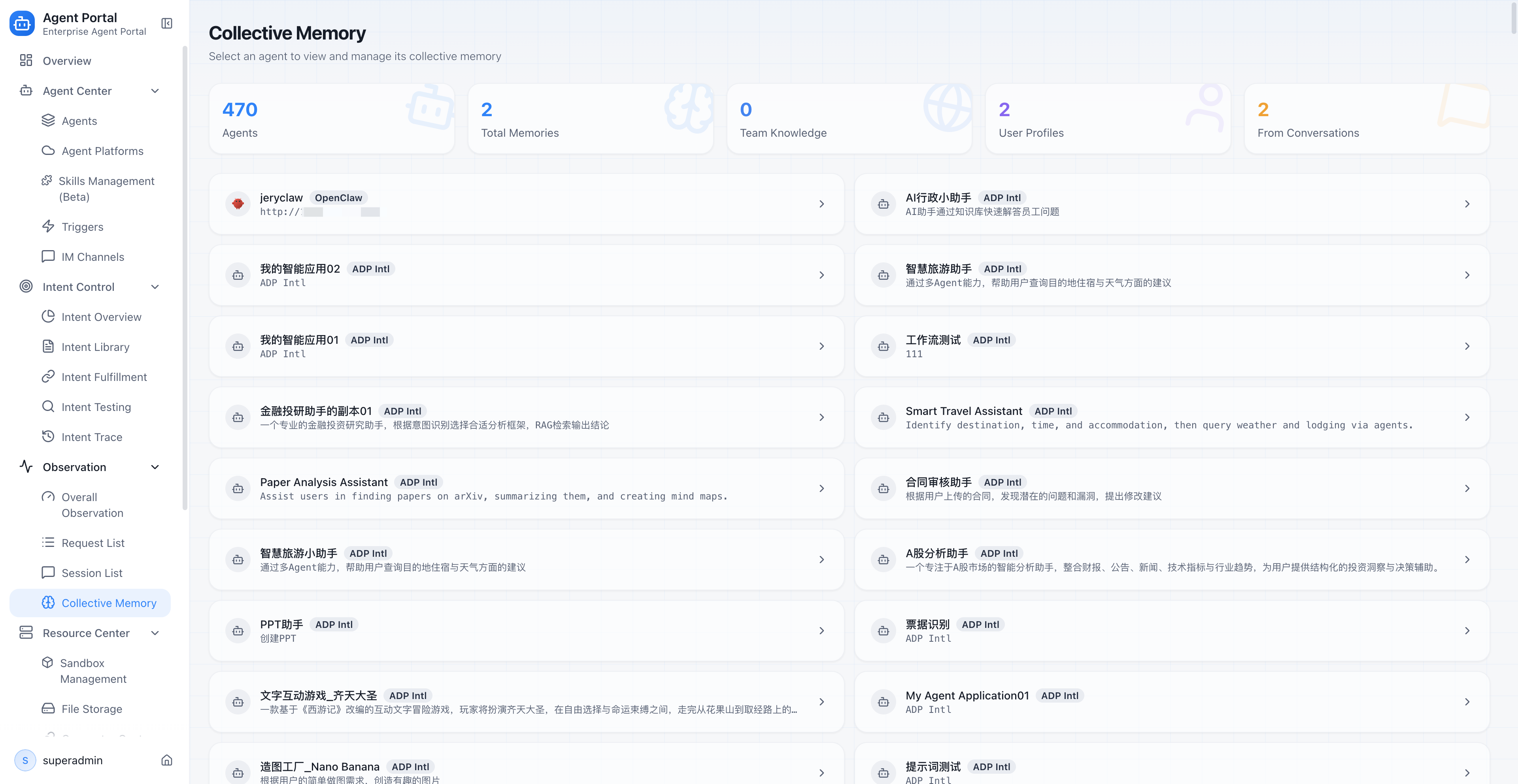
| Scope | Supports global memory (shared company-wide) and user memory (personal) — two distinct scopes |
| Priority | Supports P0 through P4 priority levels, ensuring critical information is injected first |
| Deduplication | Variable-key-based deduplication prevents duplicate memories from consuming context window space |
| Source tracking | Every memory entry is tagged with its source type — auto-extracted from group chat or manually added by an administrator |
| Overview statistics | The management page displays total connections, total memories, and distribution across global/user/auto-extracted categories |
Why is this a transformation?
Because this is the dividing line between "personal tool" and "enterprise asset."
An OpenClaw that only remembers personal preferences is still fundamentally a personal tool. An OpenClaw that remembers company knowledge, team standards, and customer preferences is a true enterprise digital employee.
Collective memory turns the OpenClaw from "a smart but uninformed new hire" into "a veteran employee who knows how the company works."
7. Group Collaboration: OpenClaws Stop Working Alone
No matter how capable a single OpenClaw is, there are things it is not good at.
In enterprise scenarios, many tasks naturally require multiple roles working together: a customer service OpenClaw handles client interactions, a knowledge base agent retrieves product information, and a workflow agent submits tickets. If every OpenClaw works in isolation, complex tasks cannot be completed efficiently.
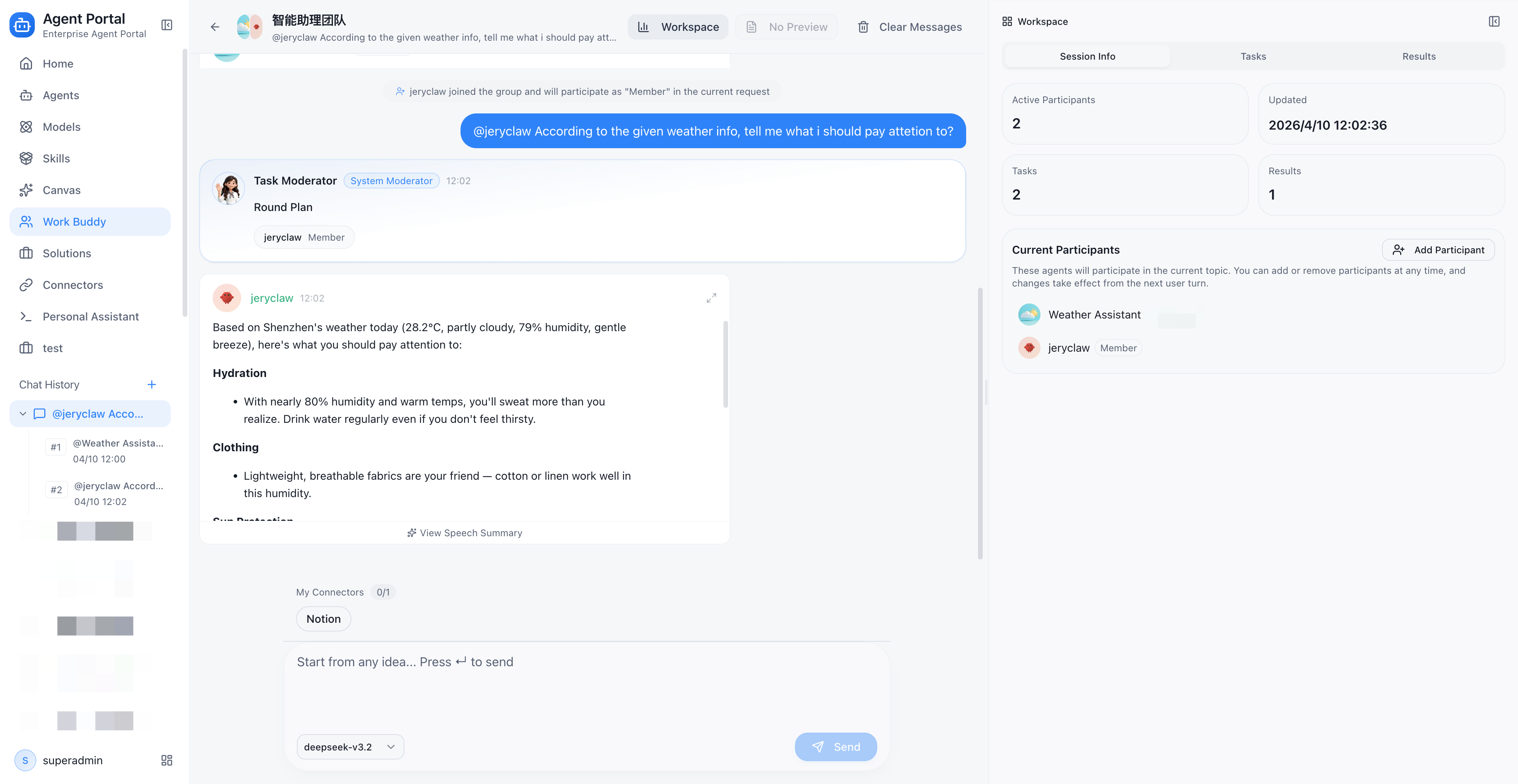
Portal's group collaboration capability lets OpenClaw participate as a group member in multi-agent collaborative execution:
- Join groups: OpenClaw can be added to a "project team" to work alongside other types of agents
- Dedicated executor: Portal provides a dedicated group execution logic for OpenClaw, ensuring its behavior within groups meets expectations
- Session reuse: Within the same group topic, the OpenClaw reuses session context to maintain conversation continuity
- Memory injection: Group chat paths also support collective memory injection, so the OpenClaw can reference enterprise knowledge even in group settings
Example: In a customer inquiry group, a customer service agent understands the customer's intent, OpenClaw queries real-time data in the browser, and a knowledge base agent retrieves product documentation. The three collaborate to complete a full customer service interaction, instead of one OpenClaw shouldering all the work alone.
8. Observability: A Daily Work Report for Every OpenClaw
One of the top questions enterprise managers ask: What did the OpenClaw actually do? Did it do well? How much did it cost?
Without unified observability, these questions are nearly impossible to answer. Each OpenClaw runs independently, data is scattered everywhere, and management sees only vague bills.
Portal brings OpenClaw's runtime data into a unified observability system:
Platform-level filtering
In the Trace list, administrators can filter by platform type to see only OpenClaw invocation records. No need to switch between multiple systems — one dashboard shows the full picture.
Call chain tracing
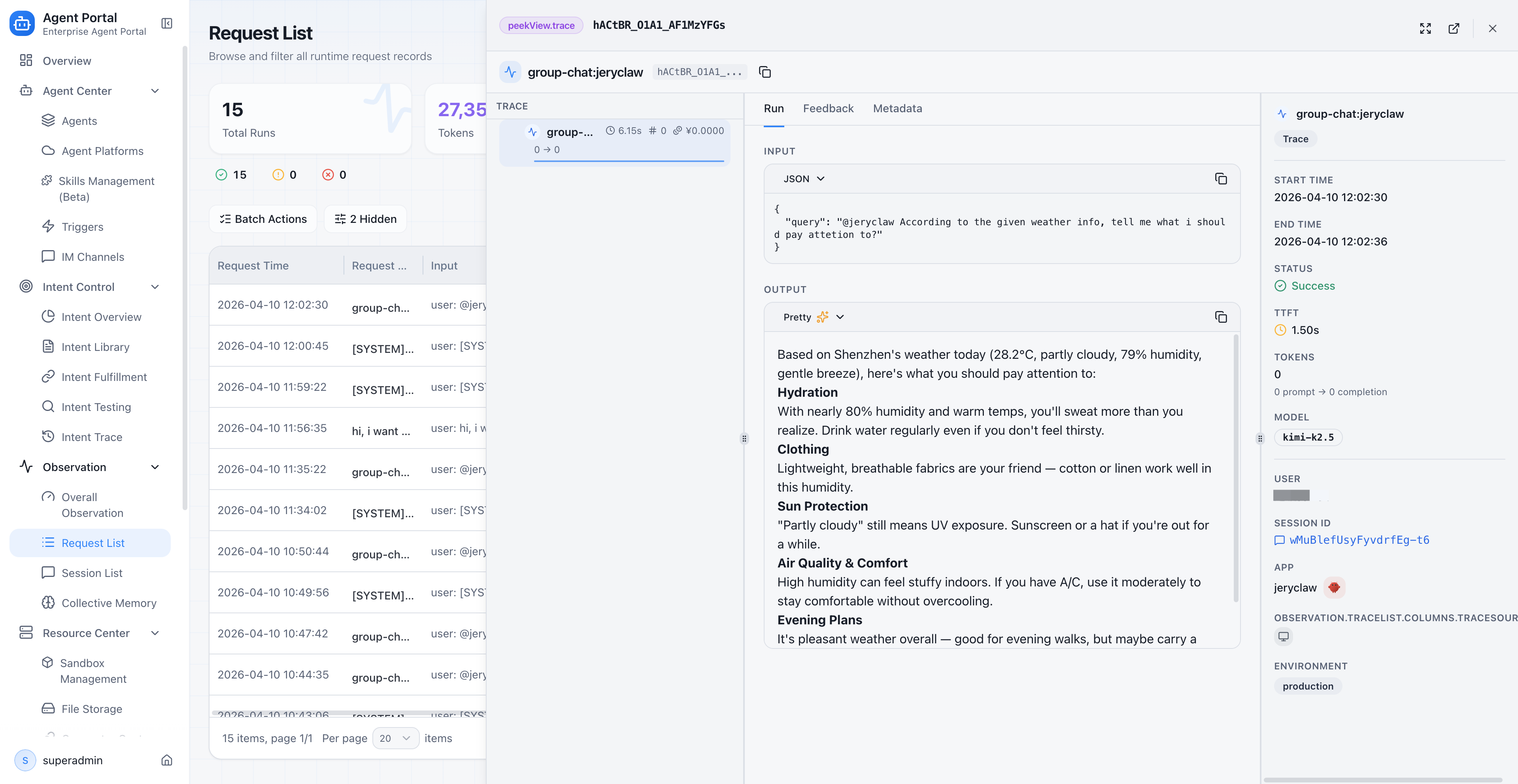
Every OpenClaw execution is recorded as a complete Trace call chain with Span-level detail. When an execution goes wrong, administrators can drill down into the specific session to trace which step failed — was it a slow model call, a tool execution failure, or a network timeout?
Token and cost tracking
Token consumption and cost data from each OpenClaw session are automatically backfilled into Portal's observability system. Enterprises can clearly see:
- How many tokens each OpenClaw consumed per day
- Which scenarios have the highest costs
- Whether cost trends are rising or falling
Session list
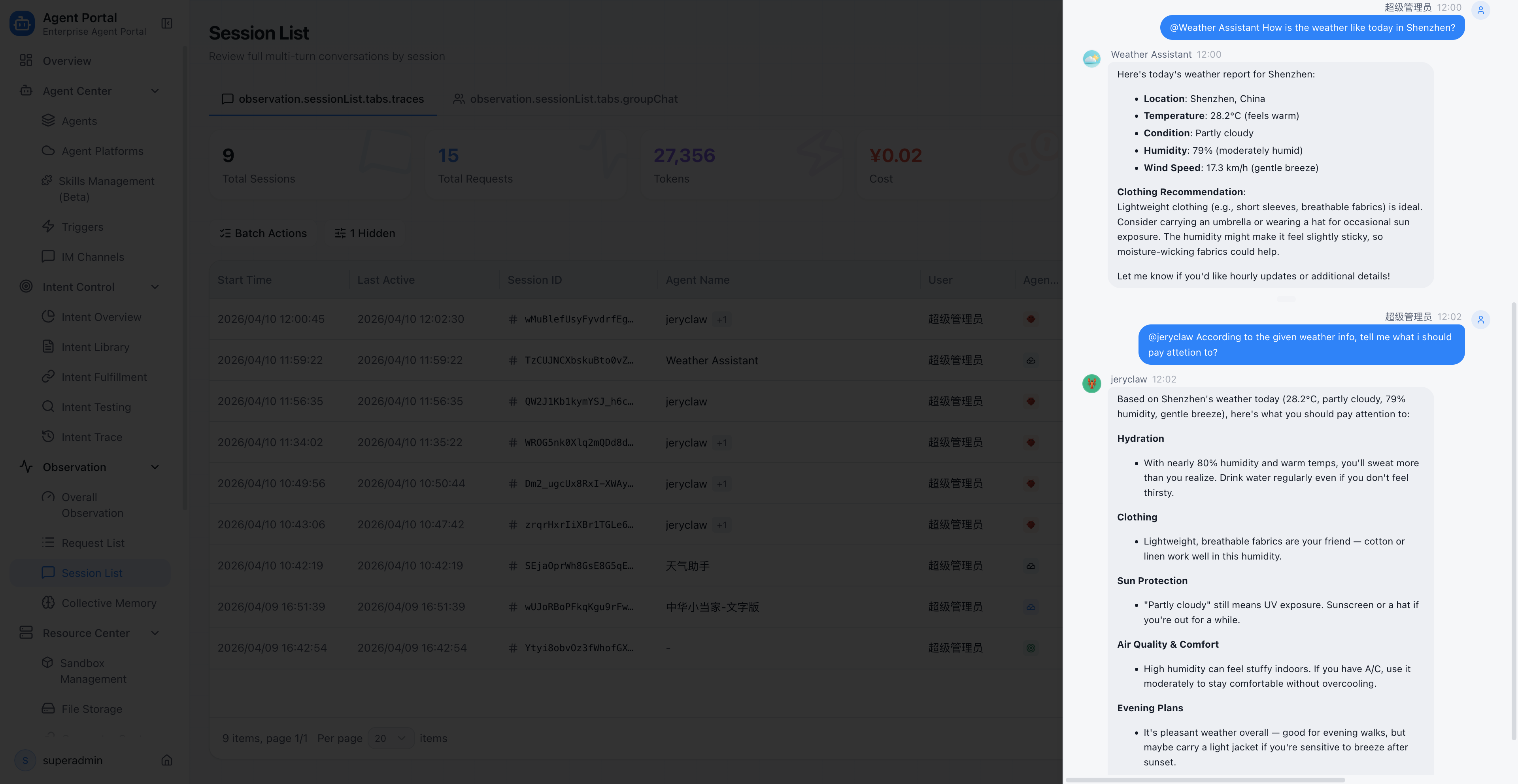
All OpenClaw sessions are included in Portal's unified Session list. Administrators can review the complete content and execution process of any conversation.
The value of this observability stack goes beyond "seeing what is happening." It turns OpenClaws from "running" to "manageable":
| Observability capability | Management action it drives |
|---|---|
| Call volume statistics | Identify which OpenClaws are most active and which scenarios have the highest usage |
| Success rate monitoring | Find OpenClaws with high failure rates; prioritize investigation and optimization |
| Latency analysis | Locate performance bottlenecks, such as a particularly slow tool invocation |
| Token cost attribution | Identify high-cost scenarios; allocate budgets rationally |
| Error chain tracing | Pinpoint root causes quickly; reduce mean time to repair |
9. Unified Asset Directory: OpenClaws Get an Employee Roster
After all the previous steps, this OpenClaw has completed its full transformation from "personal tool" to "enterprise digital employee."
In Portal's agent asset directory, OpenClaw is registered with vendor='openclaw' in the unified agents table, managed alongside ADP-native agents, Dify applications, and other agent types.
But Portal does not flatten all agents into an identical management experience. It provides differentiated management for OpenClaw:
- Differentiated action menus: In the OpenClaw agent's action menu, "Edit" is replaced with "Open Console," because the OpenClaw's configuration should be managed in its own console
- Status badges: When a OpenClaw's connection drops, the agent list displays a dedicated "Connection Lost" badge instead of a generic "Offline" label
- Personal connection editing: Employees can edit their own OpenClaw connection details, such as changing the Gateway address
In one sentence: The OpenClaw is no longer a wild animal roaming outside the system. It is a registered employee on the enterprise roster — with an ID, a status, and a management entry point.
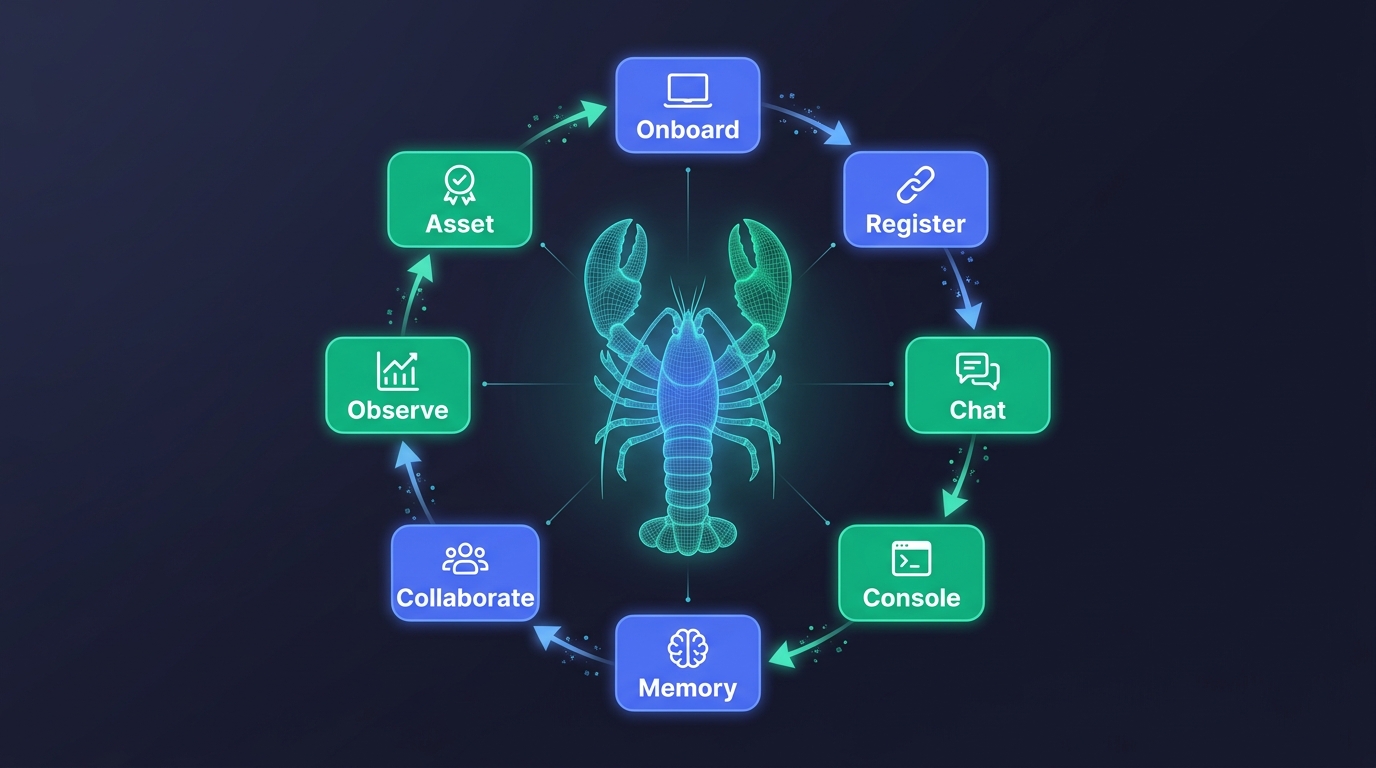
10. An OpenClaw's Complete Enterprise Journey
Let us review the full journey this OpenClaw has traveled:
Local execution       One-click onboarding     Connection registry
[Personal desktop] ──→ [30s deploy/pair] ──→ [Status management]
                                                    │
                                                    ▼
Portal chat      ←──  Media proxy     ←──  Auth injection
[Unified chat UI]     [Images/files]       [Auto credentials]
     │
     ▼
Collective memory       Group collaboration     Observability
[Enterprise context] ──→ [Multi-agent collab] ──→ [Trace/Token/Cost]
                                                    │
                                                    ▼
                                          Unified asset directory
                                       [Registered enterprise employee]
From start to finish, this OpenClaw was never modified. It is still the same OpenClaw that browses the web, writes code, and processes files. But through Portal's management framework, it gained capabilities that are impossible in personal use:
- Discoverable and accessible by enterprise employees (unified entry)
- Remembers company knowledge (collective memory)
- Collaborates with other enterprise agents (group collaboration)
- Visible and evaluable by managers (observability)
- Part of the enterprise asset system (unified directory)
This is what "OpenClaw manager" truly means: not creating another OpenClaw, but turning existing OpenClaws into enterprise digital employees.
FAQ
Q1: Does onboarding to Portal require modifying OpenClaw?
No. Portal's onboarding is "zero modification" — registration is completed through a one-click deployment script or pairing script without changing any OpenClaw configuration or code. The OpenClaw is still the same OpenClaw; it just gains an enterprise management layer.
Q2: What happens when a local OpenClaw goes offline?
Portal's connection management module monitors connection status in real time. When a OpenClaw disconnects, its status automatically switches to "disconnected," and the agent list displays a dedicated badge to prevent employees from sending requests to an offline OpenClaw. When the OpenClaw comes back online, the connection recovers automatically.
Q3: Does collective memory expose personal privacy?
No. The collective memory system distinguishes between "global memory" and "user memory" scopes. Global memory is enterprise-level public knowledge visible to everyone. User memory is personal and only injected into that individual's sessions. Administrators can view and manage all memory entries through the management page.
Q4: How is chatting with a OpenClaw in Portal different from chatting locally?
From a user experience perspective, there is almost no difference — the same streaming replies, the same ability to see images and files generated by the OpenClaw. The difference is in the underlying path: Portal chat goes through the enterprise unified proxy, authentication is injected automatically, session data feeds into the observability system, and collective memory is injected into the context.
Q5: How many OpenClaws can an enterprise onboard?
There is no hard limit. Portal's connection management supports managing multiple OpenClaw connections simultaneously, each corresponding to one OpenClaw instance. Enterprises can deploy different OpenClaws by department, team, or scenario, all under unified management.
Q6: Does Portal support private deployment?
Yes. ADP Agent Portal supports private deployment, ensuring core data never leaves the enterprise boundary. This is especially important for industries with strict data security requirements, such as finance, healthcare, and government.
Ready to turn your OpenClaws from personal tools into enterprise digital employees?
→ Fill in the form and Try ADP Agent Portal
Related Reading
· Agent Management Platform for Enterprise AI

Start building today
If you need more support, please contact us