
Connect Enterprise Systems to ADP Claw with OpenAPI
Connect a published ADP Claw application to your business systems, keep enterprise knowledge current, and separate conversation access from configuration and release management.

An agent in a separate chat window adds another place for employees to work. To make it part of a CRM, procurement portal, or operations desk, the business system needs a way to submit tasks, receive results, and keep the agent's knowledge and configuration current.
Tencent Cloud Agent Development Platform (ADP) provides a cloud execution environment through Claw applications. OpenAPI connects those applications to existing systems. An employee can submit an inquiry from a familiar workbench while the agent retrieves business rules, calls authorized tools, and returns a draft for review.
Give the agent a cloud workspace
Claw is one of ADP's application modes. Its independent workspace lets an agent write and run code for multistep tasks. Skills and tools extend what it can do, while the execution environment remains separate from the employee's computer. The official Claw tutorial covers application creation, configuration, testing, and publishing.
Configure the agent's instructions and model, connect the knowledge and tools it needs, and define the permissions around those resources. A platform Space organizes shared resources and access; the agent's execution workspace serves a different purpose. Do not treat the two as interchangeable.
Connect enterprise resources to the application, then choose the business interfaces that will call it. The diagram shows a generic integration design; available tools and channels depend on your configuration.
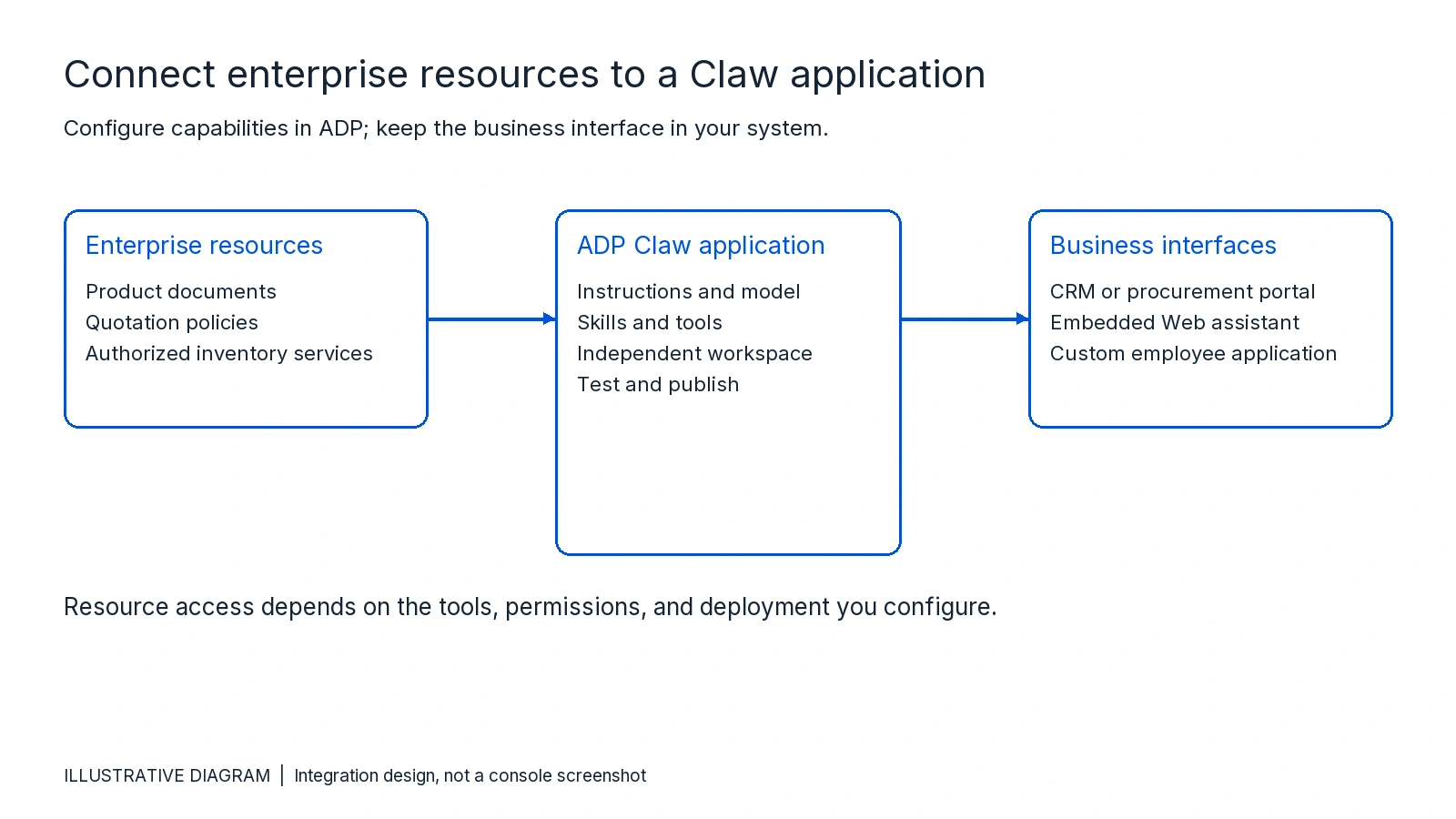
Maintain the agent's capabilities in ADP. Let the business system own its user interface, employee identity, and downstream approval process. This keeps application configuration separate from the systems that call it.
Start with one inquiry task
Consider a generic sales inquiry workflow. This is an illustrative integration example, not a customer deployment or a measured result.
An employee submits a request for a product and specification. The agent identifies the requested items, retrieves the relevant product and quotation rules, queries an authorized inventory tool, and prepares a draft response. An employee checks the draft before sending a quote or committing an order.
The task needs maintained product knowledge, access to live business data, and a conversation interface that returns the result to the workbench. These have different responsibilities. A knowledge base holds reference material; the inventory system remains the source for current availability.
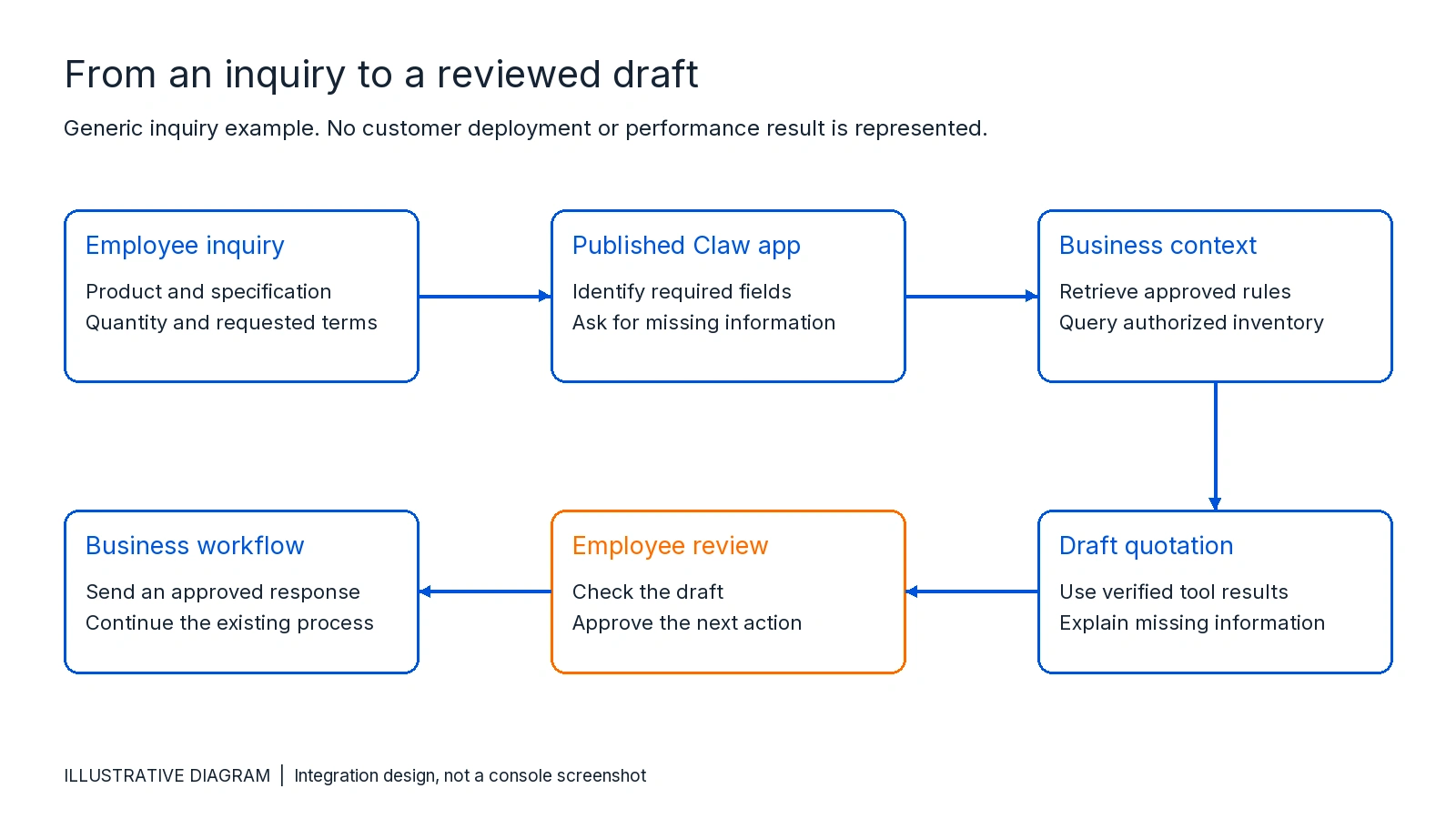
Before adding more tools, test whether the agent can extract the required fields and ask for missing information. Then introduce inventory lookup and quotation rules. A failed lookup should produce a clear explanation or a request for help, not an invented stock level or price.
Keep enterprise knowledge current through APIs
Product documentation and business rules change after launch. A one-time import can leave an agent answering from outdated material.
ADP's API catalog includes knowledge base operations for document import, document updates, and question-and-answer management. Connect the relevant operations to your content maintenance process so approved changes can enter the knowledge base without a separate manual handoff.
Use a named content owner and retain the source revision in your own update process. Check import and processing status before relying on new material. For the inquiry example, maintain product definitions and approved quotation policies in the knowledge base; retrieve changing inventory through an authorized business tool.
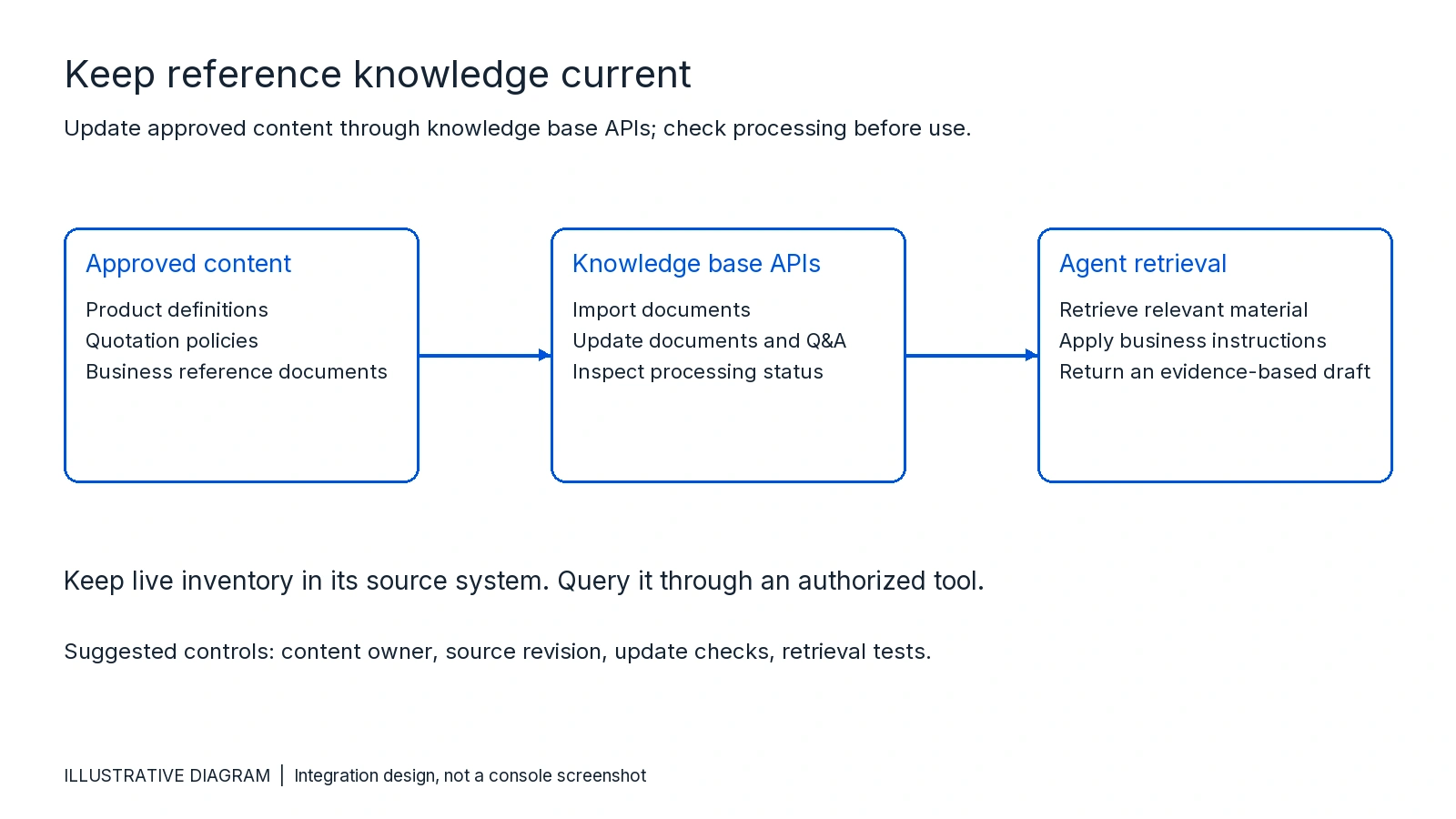
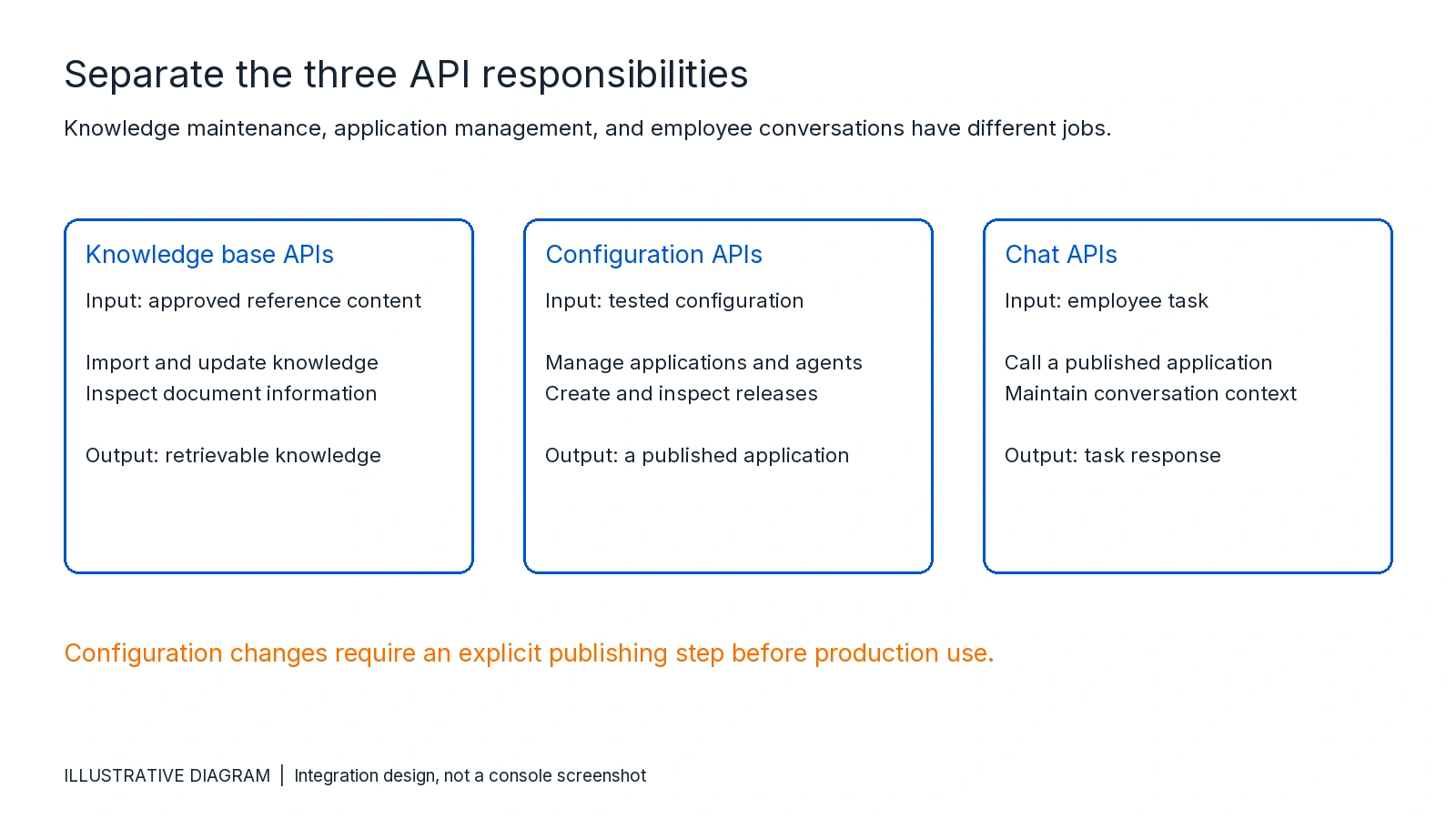
Knowledge maintenance and task execution are separate paths. The first updates what the agent can retrieve. The second submits a task to an application that is already published.
Manage configuration and publishing separately
As applications grow, teams may want to create agents, revise instructions, or manage releases from their own provisioning and deployment processes. Configuration APIs support that work. They complement console-based setup rather than requiring every team to automate immediately.
The official API catalog groups application management, Agent APIs, release management, and knowledge base APIs separately. It includes operations to create and modify applications and agents, create a release task, inspect release records, and roll back a release.
Publish tested application changes explicitly. Do not assume saving a configuration updates the version that employees use. Check release status before treating a new configuration as live, and keep a tested rollback path.
The three integration paths can be designed independently.
For request formats and available operations, use the current API catalog. For developer authentication, follow the Signature v3 documentation, which describes SecretId/SecretKey credentials and signed requests. Use the documented SDK or signing procedure instead of inventing a separate authentication scheme.
Call the published application from your system
After configuration, dialogue testing, and publication, you can obtain the application's AppKey for conversation access. The Chat API overview describes WebSocket and HTTP SSE integration. The HTTP SSE reference documents the application key, visitor identity, conversation identity, and message content required for that interface.
Keep developer credentials on the server. They authorize management operations and must not appear in browser code, client bundles, or logs. Treat the AppKey as a credential too. For an enterprise integration, route requests through your backend so it can authenticate employees and apply the appropriate access rules.
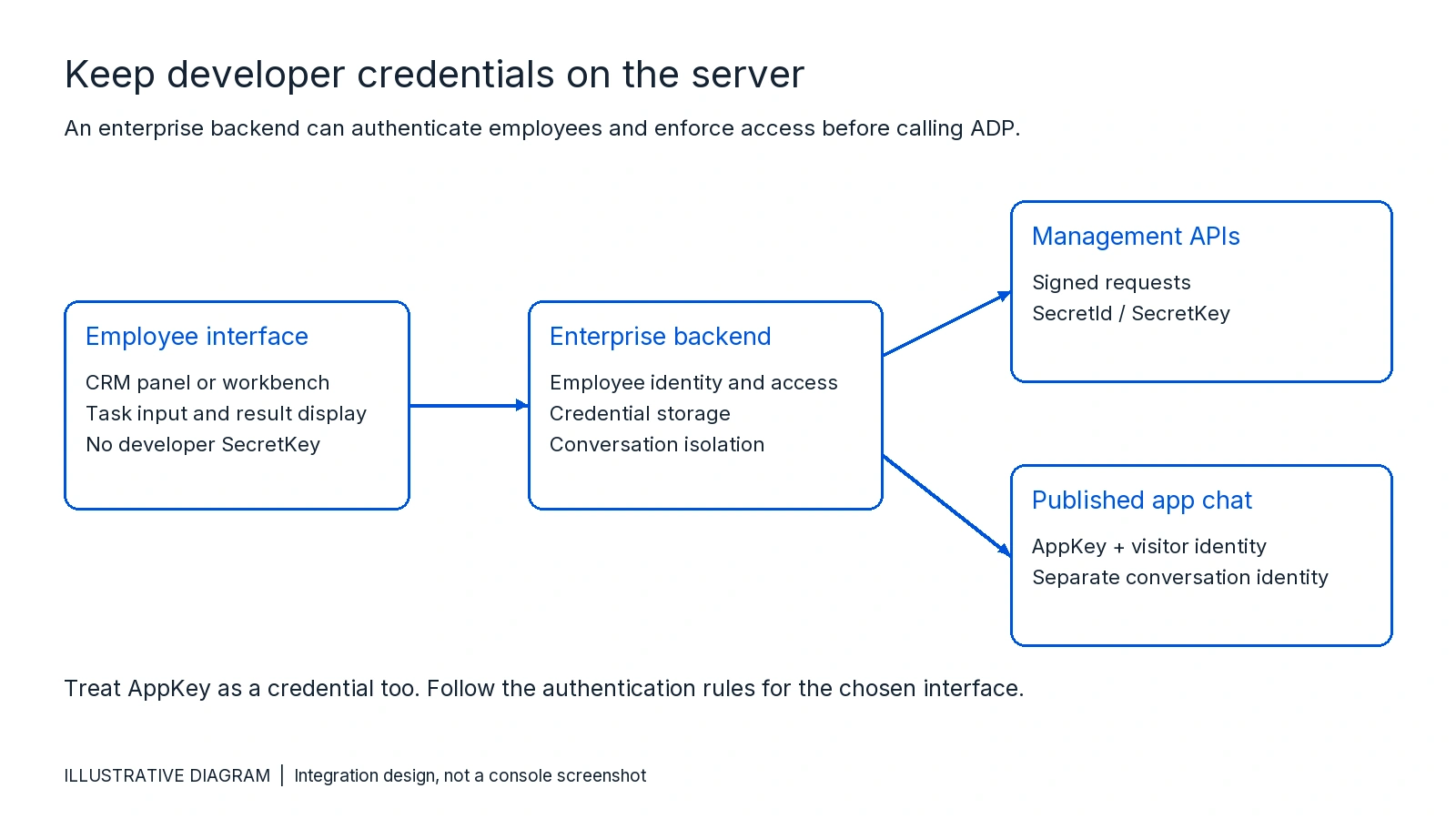
Map each employee to the appropriate visitor identity and keep different users' conversations separate. The SSE documentation warns that reusing a conversation identity across users can mix their message histories. Your backend should also handle errors and incomplete responses rather than presenting partial output as a completed task.
This architecture can support an assistant beside a CRM record or inside an existing workbench. The diagram is an integration design, not a screenshot of an English ADP console or evidence of a deployed customer system.
Use ADP-chat-client to evaluate a Web entry point
For a customizable Web interface with a backend service, see the official ADP-chat-client integration guide. It covers Docker deployment and integration with third-party account systems. It can be a starting point for testing the conversation experience before adapting it to your own product.
Follow that guide's deployment and account configuration instructions. Confirm that the account behind the server credentials has access to the applications you add. For production, the guide recommends HTTPS with a domain and reverse proxy; some browser features may not work correctly over HTTP.
Test the task before expanding access
Build the first Claw application in the ADP console. Configure its instructions, model, knowledge access, and authorized tools, then test the inquiry task in the dialogue interface. Publish the tested application before connecting the business system.
Before making the integration available to a wider group, check missing product specifications, unavailable inventory, stale rules, unauthorized requests, and tool failures. Verify that draft quotations remain subject to the approval process you designed. Test a configuration change and its release, then confirm that the business entry point uses the intended published application.
The same pattern can be adapted to support desks, procurement systems, or employee applications. Choose a bounded task first, keep live business data in its source system, and make the agent's output fit the workflow employees already use.

Start building today
If you need more support, please contact us