
Cowork Cloud VM vs ADP Claw: How Enterprises Should Choose
Cowork now runs inference and the VM in the cloud. This piece compares it with Tencent Cloud ADP Claw and the enterprise checks beyond a cloud sandbox: long tasks, permissions, credentials, audit.

Anthropic's latest architecture change to Cowork has put the "cloud agent" back at the center of enterprise architecture discussions.
According to Anthropic engineer Felix Rieseberg, the previous version of Cowork ran model inference in the cloud and executed tool calls inside a VM on the user's own computer. The local VM brought capability, security, and isolation benefits, but it also cost disk space, battery, and performance. If the user closed the laptop, the task stopped. The new version moves both model inference and the VM to the cloud, with an independent sandbox for every session. When the VM needs files on the user's device, the desktop app handles the file-access tool calls. Anthropic believes this improves mobile use, task continuity, and local battery drain.
This matters to CIOs, CTOs, AI platform leads, and agent architects. Once agents move from "chat enhancement" to "continuous task execution," the runtime shifts from local plugins, desktop clients, and one-off API calls toward cloud sandboxes, long-running task runtimes, access governance, and observability.
Tencent Cloud ADP 4.0 Claw Mode targets the same trend. An agent plans, writes, and runs code in a cloud sandbox, calls enterprise Skills, connectors, knowledge bases, and workflows, and sits inside an AgentOps system that covers build, evaluation, integration, distribution, governance, observability, and optimization. If your team is evaluating cloud-first designs like Cowork's, it is a good moment to ask whether you need a "cloud Claw": an enterprise-grade agent harness.
Key Takeaways
- Cowork's new architecture signals one thing: model inference and the VM execution environment both move to the cloud. That lowers the burden on local devices and frees tasks from depending on a user's computer staying online.
- A local VM suits individual developers and small trials. At enterprise scale it runs into device performance limits, version drift, key distribution, interrupted long tasks, and hard-to-debug environments.
- A cloud sandbox answers "where does the task keep running." Enterprises still need answers to who can call which tools, how credentials are held, how the process is audited, how failures are recovered, and how cost is measured.
- ADP 4.0 Claw Mode integrates the cloud sandbox, Agent Loop, Skills, connectors, knowledge bases, workflows, and permission auditing inside one enterprise agent development platform.
- When choosing a cloud agent architecture, don't stop at "does it have a sandbox." Evaluate the agent harness, access governance, business-system integration, observability, and operations loop.
- Claw Mode fits tasks with open-ended paths, long run times, file handling, or many tools. Workflow fits tasks with fixed rules and strict audit needs. ADP 4.0 supports two-way calls between Claw and Workflow, so the two can be combined.
1. What the Cowork Cloud VM Shift Tells Us
The difference between the old and new Cowork architecture comes down to three changes.
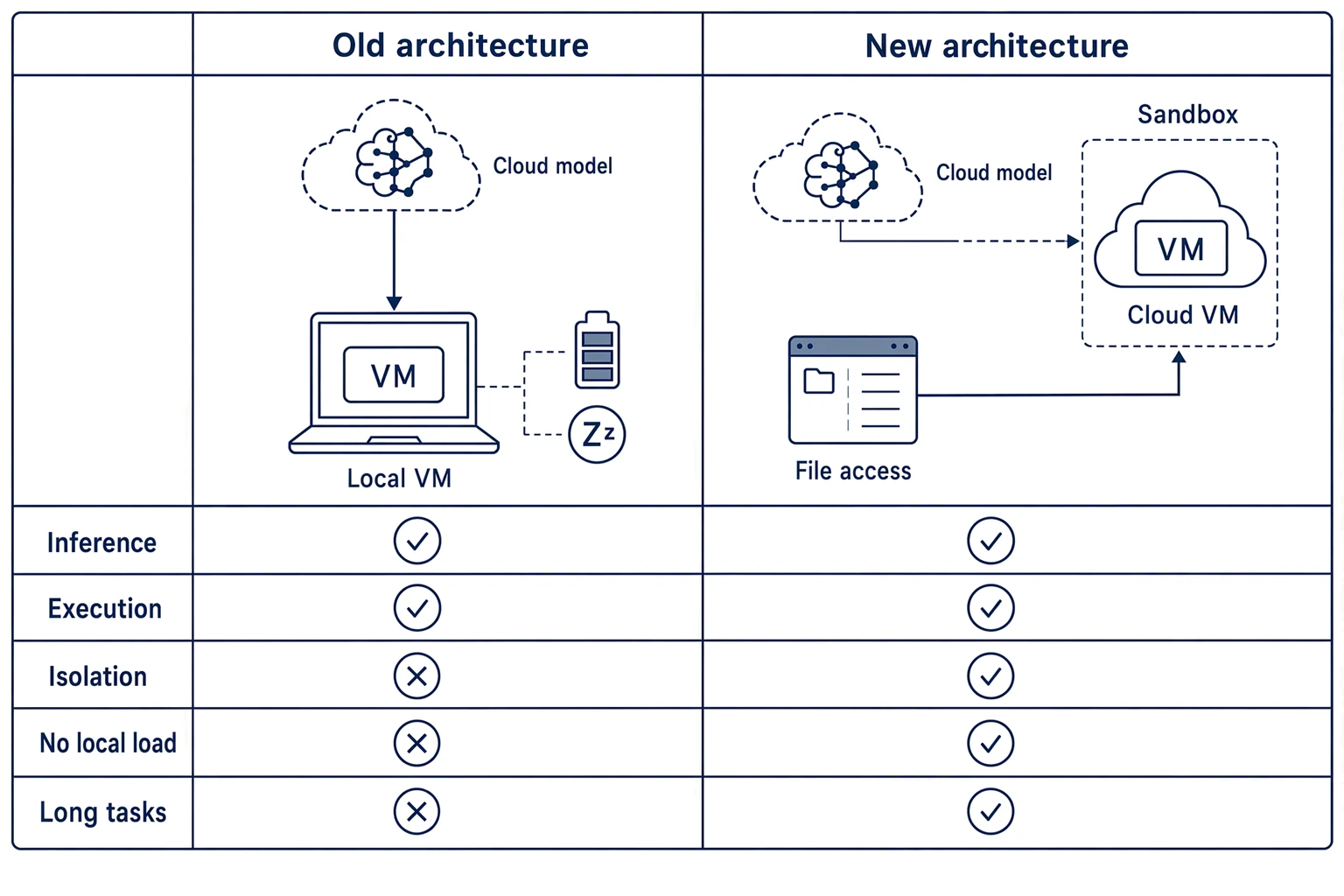
First, both model inference and the VM move to the cloud. In the old version, inference ran in the cloud while tool calls ran in a VM, provided by Anthropic, on the user's computer. In the new version, both run in the cloud.
Second, every session gets its own sandbox. According to Felix Rieseberg, each session in the new Cowork has its own sandbox and shares no state with other sessions. This keeps the isolation the VM provided while lowering the load on local devices.
Third, the local device becomes an access point for the tools that need it. When the cloud VM needs files on the user's device, the desktop app handles the file-access tool calls. The desktop app is still useful, but it no longer carries the full cost of running a VM.
Behind this change is a broader signal: agent products are moving from "local enhancement tools" to "persistent cloud workspaces." Once an agent starts running long tasks, it hits a familiar set of problems:
- User computers sleep, lose connectivity, or shut down.
- A local VM consumes disk, battery, and performance.
- Employee machines differ, which makes troubleshooting expensive.
- Task state has to be saved continuously.
- Enterprises need one place to manage tools, keys, permissions, and audit records.
A stronger model does not fix these. The model understands and decides. Getting the task to actually run takes a runtime, a tool layer, a state layer, a security layer, a feedback layer, and an observability layer working together. That is why the agent harness has become a keyword in enterprise agent architecture.
2. Local VM, Cloud Sandbox, and Cloud Claw Compared
Enterprises usually meet three ways of running agents: a local VM, a general-purpose cloud sandbox, and an enterprise-grade cloud Claw. They are not simple replacements for one another. Each fits a different stage of engineering maturity.
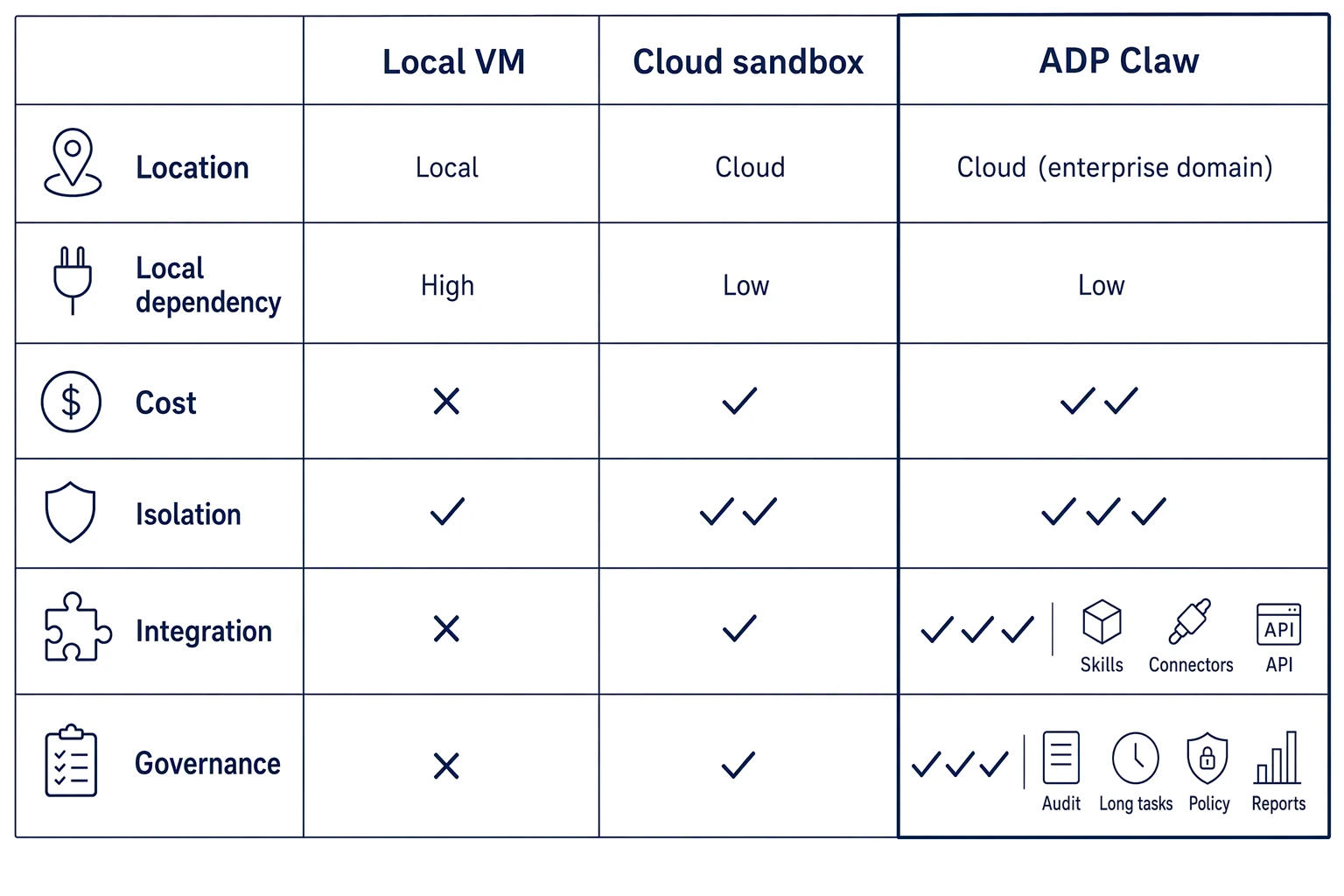
| Dimension | Local VM | General cloud sandbox | ADP 4.0 Claw Mode |
|---|---|---|---|
| Where it runs | The user's computer | Isolated cloud environment | ADP cloud agent runtime and sandbox workspace |
| Local dependency | High; tasks depend on whether the computer is online | Low; tasks can run in the cloud | Low; built for continuous enterprise long tasks |
| Device cost | Uses local disk, battery, and performance | Light local load | Light local load; scheduled centrally by the platform |
| Isolation | Relies on the local VM boundary | Each task or session can be isolated | Sandbox isolation combined with access control, credential hosting, and audit |
| Tool calls | Mostly depend on the local environment | Can connect to cloud tools | Can call Skills, connectors, knowledge bases, and workflows |
| Long tasks | Easily affected by local state | Depends on platform design | Engineering support for cloud long tasks, state return, and process recovery |
| Enterprise governance | Scattered across endpoints; hard to manage | Depends on the product's governance features | Brought into AgentOps with full-lifecycle governance |
| Business integration | Configured endpoint by endpoint | Via API or connectors | Connects enterprise knowledge bases, workflows, and business systems through the ADP platform |
The Cowork change mainly answers "why should the VM move to the cloud." Enterprises that adopt it keep asking the next question: once it is in the cloud, how do you keep it controllable, auditable, reusable, integrable, and operable?
That is the question Tencent Cloud ADP 4.0 Claw Mode is built around. Claw Mode gives the agent an independent workspace where it can write and run Python code, read and write files, and handle long, complex tasks. It is not an isolated sandbox. It runs inside ADP's Agent Workbench, Skills, connectors, knowledge bases, workflows, access control, and observability.
3. Why Enterprises Need a Cloud Claw
Many enterprises start agent trials by giving employees an AI client and then installing plugins, MCP servers, Skills, or scripts. That works for early experiments. Once it spreads across a team, the problems become concrete:
- Some people don't know how to configure MCP.
- Some can't get keys, or use them incorrectly.
- Employees run different versions of the same Skill.
- A long task stalls halfway because the laptop sleeps or the network drops.
- An agent tuned by a business expert is hard for the team to reuse.
- Administrators have no single view of tool calls, failure reasons, or cost.
The first value of a cloud Claw is moving agent execution from personal endpoints into a cloud environment the enterprise can govern. Employees start tasks from the web, WeChat, WeCom, and other entry points. The task runs in the cloud. Tools, keys, and permissions are managed by the platform. The process can be recorded, traced, reviewed, and improved.
The second is that Claw Mode targets tasks where the goal is clear but the path can't be fully planned in advance. A user may know only what they want done, not which system to open, which field to choose, which API to call, or which document to read. These tasks need the agent to loop through understanding the goal, planning steps, calling tools, observing results, and correcting the plan.
For example:
- A legal specialist says: "Review this cloud services sales contract. We are the buyer. Focus on SLA, data security, and payment schedule."
- An operations manager says: "Analyze why East China returns grew last month and prepare a briefing."
- A quality engineer says: "Check whether this defect training set is ready for model training and flag the risks."
- A finance analyst says: "Summarize last week's reimbursement anomalies by department and risk type."
For these tasks, the next step usually depends on what the previous step revealed. Fixed forms and fixed flows struggle to cover every branch. Claw Mode can read and write files, run code, and call Skills and tools inside a controlled sandbox, then use intermediate results for the next decision.
4. ADP 4.0 Claw Through the Agent Harness Lens
Moving an agent from demo to production takes more than the model. More precisely: Agent = Model + Harness. The model understands, reasons, and produces decisions. The harness makes those decisions executable, controllable, recoverable, and measurable in a real environment.
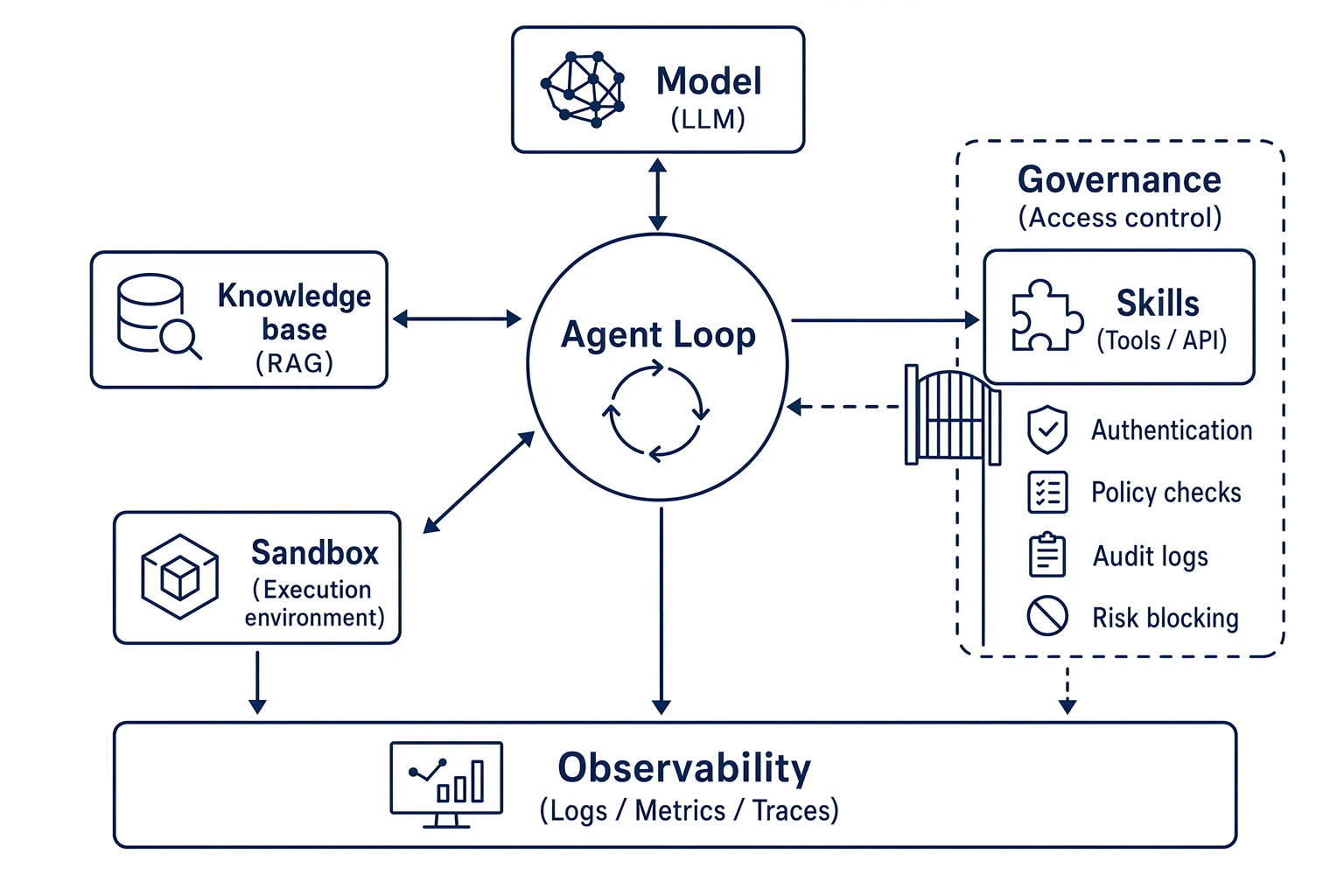
Claw Mode in ADP 4.0 can be read through the harness lens:
- Agent Loop: drives multi-step execution, turning the user's goal into model calls, tool calls, state updates, and the next decision.
- Sandbox / Runtime: an isolated environment that supports code execution, file reads and writes, and a task workspace.
- Skills: reusable professional capabilities such as office documents, image processing, and data analysis. Claw Mode in ADP 4.0 currently supports mounting up to 80 native Skills.
- Connectors: link CRM, ERP, OA, ticketing, enterprise drives, document systems, and other enterprise or external services.
- Knowledge / Retrieval: lets the agent use enterprise knowledge bases in a controlled way, reducing guesswork and repeated interpretation.
- Permission / Policy: limits high-risk operations through enterprise policy, role permissions, tool allowlists, and approval flows.
- Observability / Transcript: records conversations, model calls, tool calls, tool results, errors, latency, and trace data for debugging, audit, and optimization.
- Workflow: carries stable, reproducible, auditable deterministic flows, complementing Claw's open-ended exploration.
ADP 4.0 also gives business users a more approachable entry point. The Agent Workbench generates enterprise applications from natural language, connects enterprise knowledge bases with tools and Skills, plans and runs complex work, and supports live preview in a cloud sandbox. For front-line employees, it lowers the distance from "idea" to "usable agent." For platform teams, it brings building, publishing, distributing, and governing agents into one system.
Enterprises can integrate agents into production through APIs, or publish them to a range of end-user entry points. Teams focused on specific industries can look at ADP's solutions for legal, industrial quality inspection, and B2B trade to assess how Claw Mode connects to existing business systems.
5. Long Tasks: The Cloud Keeps the Work Running
One direct reason Cowork moved the VM to the cloud is to keep work running. Enterprise agents face the same long-task problem.
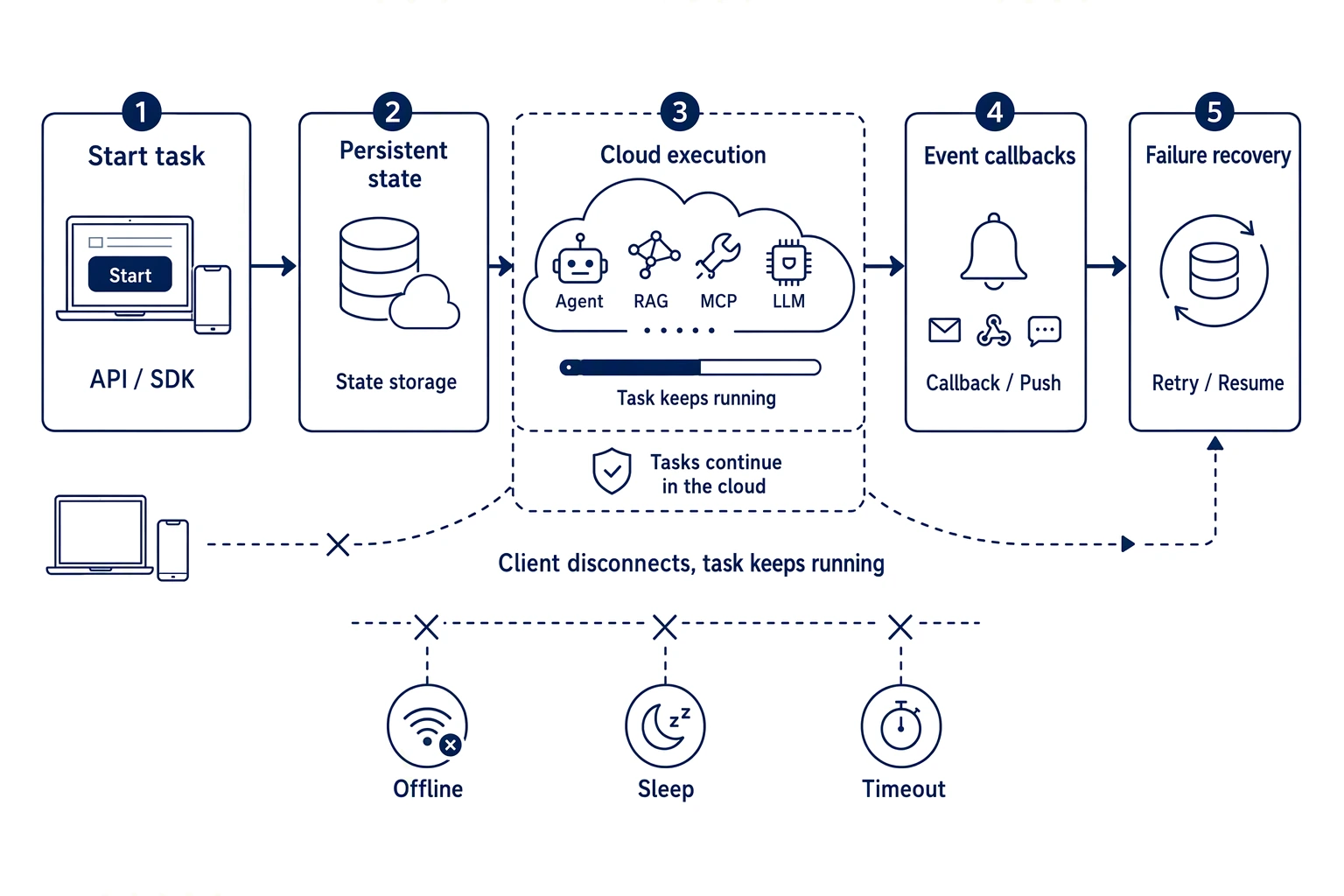
Real business tasks rarely finish in one model call. A task may need to:
- read many documents, spreadsheets, or logs;
- call several system APIs;
- run scripts to clean data;
- wait for external systems to respond;
- ask follow-up questions or revise based on intermediate results;
- keep running after the user disconnects;
- recover from existing state after a failure.
If the agent's key state lives only in model context, local temp files, a client process, or a local VM, a long task is fragile. A sleeping computer, a dropped network, a crashed container, or a tool timeout can interrupt it, and it is hard to take over from outside.
ADP's cloud agent harness separates the Agent Loop, Memory, Sandbox, Tools, and observability. That gives you:
- Session and Memory that can be persisted independently;
- A Sandbox that can be created, replaced, or rebuilt on demand;
- Tool calls and credential access that go through a controlled proxy;
- Execution state and results that return through events;
- Tasks that can resume from historical state after an interruption.
For enterprises, long-task capability decides whether an agent can enter a core process. Contract review, operations analysis, production quality inspection, operations inspection, bid review, and report generation can each run for minutes or longer. Users can't watch a client the whole time, and the task shouldn't depend on one personal computer staying online.
Claw Mode suits these tasks. It can run code, read and write files, and call tools in a cloud sandbox while pushing toward the goal. Employees start the task from the Agent Workbench or a business entry point, and the cloud environment handles the rest.
6. Beyond Sandbox Isolation: Permissions and Credential Governance
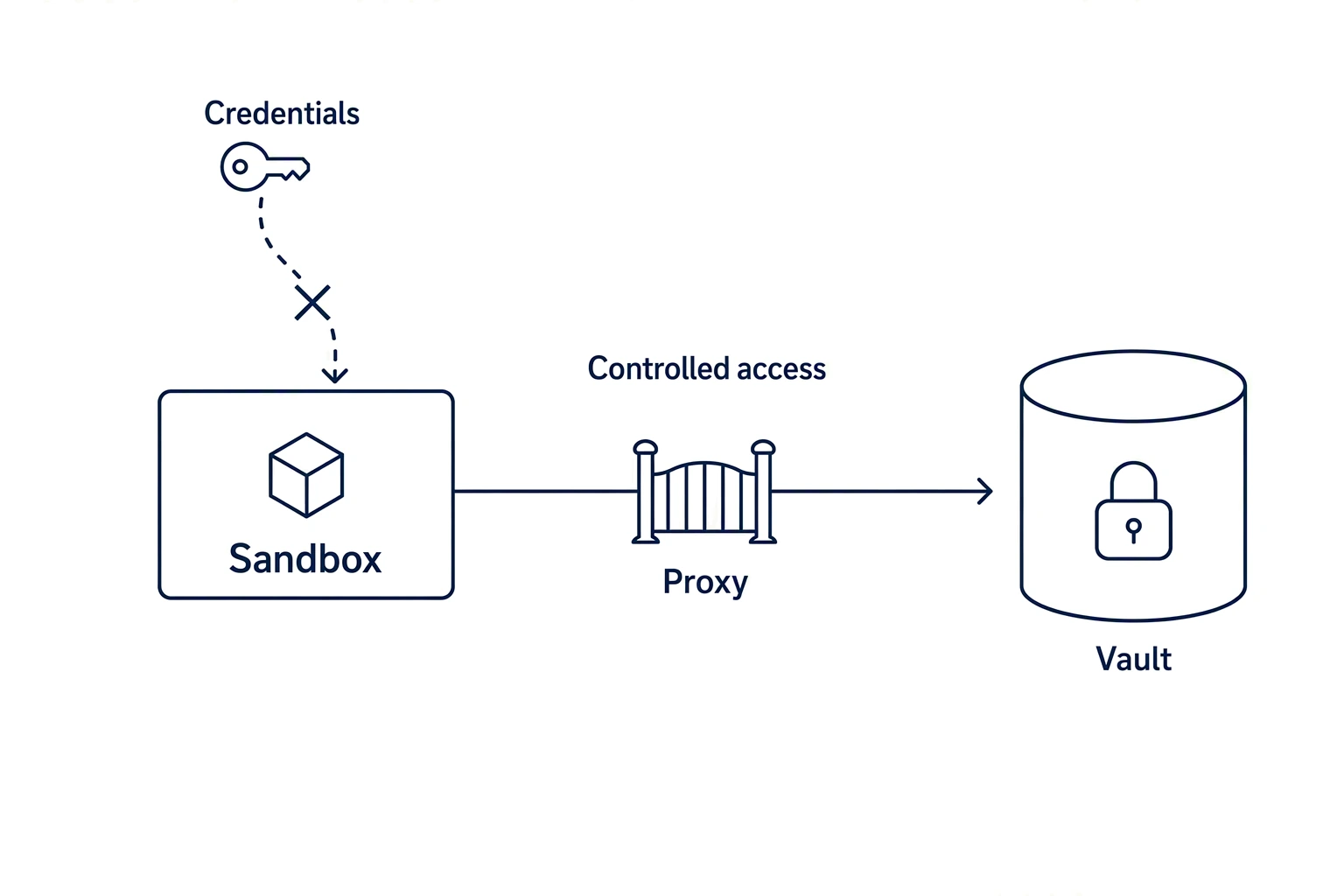
A cloud sandbox is a necessary foundation, but enterprise adoption can't stop at "is there an isolated environment." Once an agent can execute tools, a series of security questions follows:
- Can it read sensitive files?
- Can it reach the production database?
- Can it call paid APIs?
- Can it commit code or change configuration?
- Are tool credentials exposed to the model?
- Do high-risk operations need human approval?
- Can prompt injection push the agent into leaking data or running dangerous commands?
If user data, the code execution environment, tool credentials, and model context all live in one environment, the security boundary blurs. A safer design lets the sandbox focus on isolated execution, keeps credentials in a Vault or behind a Proxy, and has the platform make controlled calls according to permission policy, so sensitive information never enters the execution environment.
Security governance is a core part of ADP 4.0's enterprise capabilities. Permissions are governed at the enterprise, space, and application levels. Skills can go through security scanning and approval. Runtime activity feeds into observability and audit. Personal Skills can also be promoted to enterprise-shared Skills so teams can reuse and manage them in one place.
This matters most to CIOs and AI platform leads. Large-scale agent adoption rarely fails because the model can't answer. It more often stalls because the enterprise isn't ready to let the agent act. A cloud Claw in production has to answer the security team's questions: who authorized it, what it called, what data it touched, whether it overstepped, how failures are handled, and where the audit logs are.
7. Claw and Workflow: Combining Open Exploration with Fixed Flows
Enterprise tasks often have an open part and a fixed part. Take a "returns attribution report."
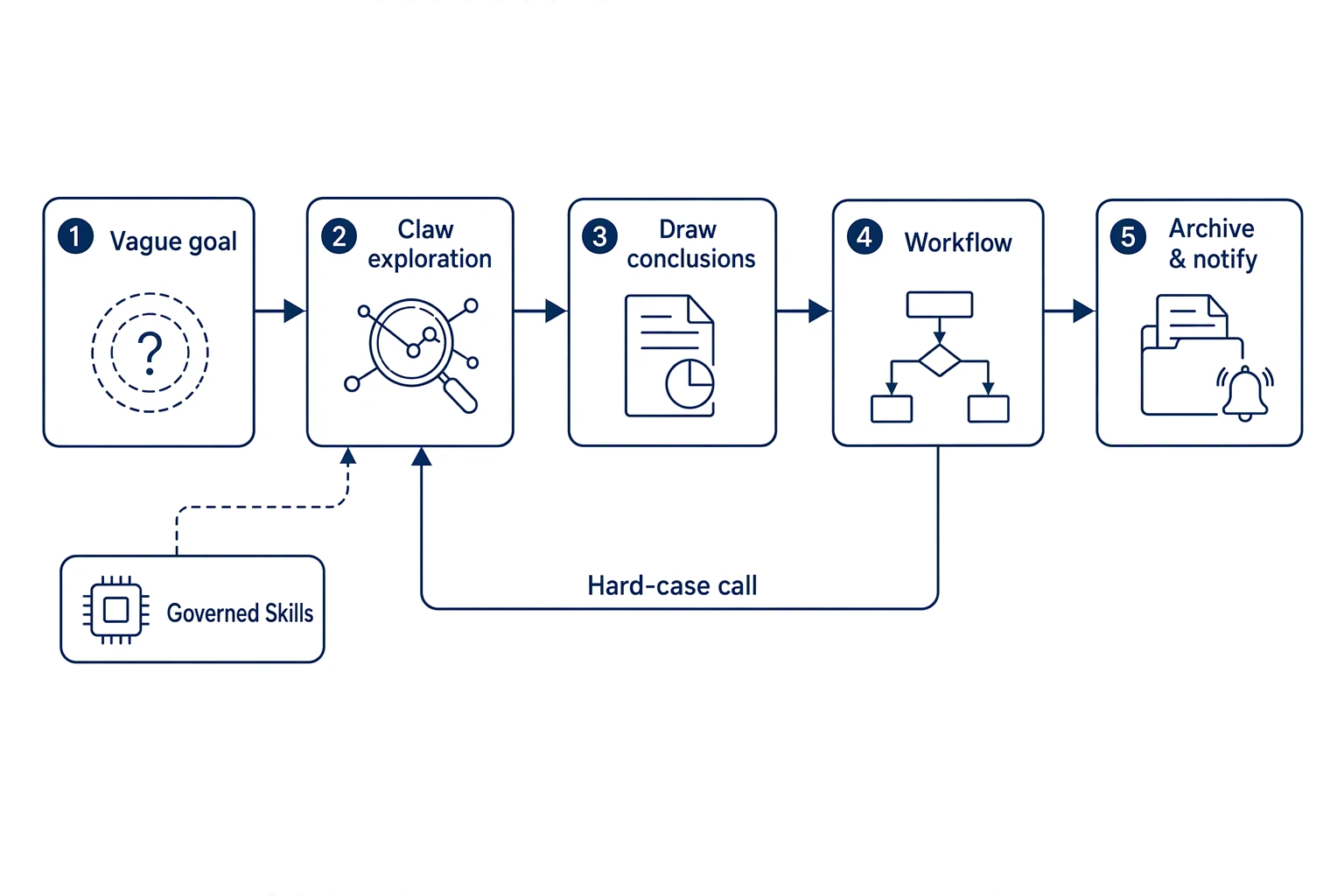
The first half is open. The user says only: "Look at why East China returns rose last month." The agent has to decide which data to look at, how to define an anomaly, whether it needs to handle Excel, CSV, or scanned files, and whether to trace a specific SKU, channel, or shipment batch.
The second half is fixed. After attribution, the result goes into a set report template, a consistent layout, naming-convention archiving, and a sync to a specified system. This part must be reproducible, auditable, and cost-controlled.
Leaving the whole job to a free-running agent weakens compliance and reproducibility. Leaving it all to a fixed workflow makes the vague intent and data anomalies in the first half hard to handle. ADP 4.0's two-way calls between Claw and Workflow offer a better combination for enterprises:
- Claw calls Workflow: Claw cleans the data, locates anomalies, and forms the attribution conclusion. Workflow handles report generation, archiving, and notification.
- Workflow calls Claw: the main flow stays deterministic, and a node that is hard to enumerate calls Claw, for example to parse irregular attachments, handle scanned documents, or write a one-off script to convert a format.
- Claw calls governed Skills: professional capabilities are packaged as reusable Skills, so the agent uses governed capabilities in open-ended tasks.
- Workflow orchestrates several agent capabilities: intelligent nodes sit inside a deterministic flow, balancing automation and autonomous judgment.
This combination is a key reason to choose ADP 4.0 Claw Mode. Claw handles open tasks where the next step depends on the last result. Workflow handles flows that must be consistent every time. With both calling each other, one business task can have flexibility and enterprise-grade control.
8. Choosing a Platform: From "It Runs" to "We Can Operate It"
Anthropic's Cowork change gives enterprises a starting point for a fuller selection framework for cloud agents. Evaluate along these dimensions.
1. Is the runtime in the cloud?
If agent tasks depend on employee computers staying online, scaling up hits a natural ceiling. Check whether model inference, tool execution, file handling, and long-task state can keep running in the cloud.
2. Is the sandbox decoupled from credentials?
A cloud sandbox gives execution isolation, but credential governance matters just as much. Check whether keys are hosted on the platform side, whether access goes through a controlled proxy, and whether they stay out of the model and the code execution environment.
3. Does it support long tasks and recovery?
Enterprise tasks usually involve many steps, tools, and files, and run for a long time. The platform needs state persistence, execution feedback, reconnection after disconnects, exception handling, and the necessary recovery mechanisms.
4. Are tool and business-system integrations mature?
To work in real business settings, an agent must connect to knowledge bases, OA, CRM, ERP, ticketing, document systems, databases, or industry systems. ADP 4.0 lowers the integration barrier through Skills, connectors, knowledge bases, and workflows, and supports API integration of agents into business systems.
5. Is there observability and audit?
Enterprises need to see why an agent did what it did, which tools it called, which step failed, where cost went, and whether a security policy fired. These capabilities decide whether an agent can be operated, reviewed, and improved.
6. Can enterprise assets be reused?
An agent tuned by one employee creates little organizational value if it can't become a shared enterprise capability. ADP 4.0 supports enterprise Skill sharing, prompt template management, application distribution, and enterprise governance, so a business expert's experience becomes a team asset.
7. Is there an industry path to production?
Different business scenarios place different demands on agents. Legal cares about clause review, risk explanation, and text generation. Quality inspection cares about defect data, training strategy, and log troubleshooting. Trade cares about orders, inventory, inquiries, and fulfillment coordination. Enterprises can start from a high-value process in their own industry and expand to more roles and systems over time.
If your enterprise is still at the budget and scale assessment stage, the Tencent Cloud ADP product page has plan and pricing information. Weigh it together with your business scenarios, call volume, and governance requirements to estimate return on investment.
Frequently Asked Questions (FAQ)
1. Are Cowork's cloud VM and ADP Claw Mode the same thing?
We don't recommend treating them as equivalent. The point of Cowork's change is that model inference and the VM execution environment move to the cloud, each session gets its own sandbox, and the desktop app handles the local file access that is still needed. ADP 4.0 Claw Mode is about enterprise agent development and operation. Beyond a cloud sandbox, it includes Skills, connectors, knowledge bases, workflows, access governance, observability and audit, and AgentOps lifecycle capabilities.
2. If an enterprise already has a workflow platform, does it still need Claw Mode?
If the task path is stable, the rules are clear, and the input format is controlled, a workflow platform is usually the better fit. But many business tasks involve vague intent, unstructured files, multi-turn judgment, and on-the-spot handling that are hard to draw as a complete flowchart in advance. Claw Mode handles that kind of open task. It can call a Workflow at key nodes, or be called by one.
3. Is Claw Mode right for every enterprise task?
No. Simple Q&A fits Standard Mode, strongly rule-bound flows fit Workflow, multi-role collaboration fits Multi-Agent, and open-ended long tasks fit Claw. A sounder approach is to combine modes according to task characteristics.
4. Does a cloud sandbox introduce new security risks?
A cloud sandbox provides an isolation boundary, but enterprises still need to manage permissions, credentials, network access, data scope, tool calls, and audit. ADP 4.0 places Claw inside an enterprise AgentOps system and manages Skills, connectors, permissions, and runtime through the platform, which helps reduce the risk of scattered configuration.
5. How does Claw Mode connect to existing business systems?
ADP 4.0 connects to enterprise systems through connectors, Skills, knowledge bases, workflows, and APIs. An enterprise can start with one clear scenario, such as contract review, quality analysis, operations reporting, ticket dispatch, or trade collaboration, and then bring the required data sources, tools, and approval flows under platform governance step by step.
6. What changes for front-line employees with a cloud Claw?
Employees don't need to understand models, MCP, keys, scripts, or complex configuration. They can start tasks in natural language from the Agent Workbench or a business entry point. Complex execution runs in the cloud, and the enterprise manages tools and permissions centrally. For employees, the interaction is closer to "state the goal." For the enterprise, execution stays controllable and traceable.
Summary: Cloud Agents Need More Than a Cloud VM
By moving model inference and the VM to the cloud, Anthropic Cowork shows that agent products are shifting from local enhancement to continuous cloud execution. For enterprises, the question is not simply where the VM lives. It is how to build cloud agent infrastructure that is runnable, governable, recoverable, observable, and integrable.
ADP 4.0 Claw Mode offers a cloud Claw path built for enterprise scenarios. An agent can plan, write, and run code in a cloud sandbox, call governed Skills, connectors, knowledge bases, and workflows, and enter a loop of build, publish, distribute, govern, and optimize through AgentOps. It suits business tasks with a clear goal, an open path, a long run time, and a need for several tools, and it works with Workflow to cover deterministic flows.
If your team is evaluating cloud agents, cloud sandboxes, or an enterprise agent platform, explore Tencent Cloud ADP and try the Agent Workbench and Claw Mode to see how your knowledge bases, workflows, and business systems connect to a cloud agent.

Start building today
If you need more support, please contact us