
Build a Customer Service AI Agent in 6 Steps
A practical guide from knowledge base setup to production deployment

Executive Summary
Customer service is the most common—and most validated—use case for enterprise AI Agents. According to industry data, well-implemented customer service agents achieve 40-70% deflection rates, reducing average handling time from hours to minutes.
But most implementations fail. Not because the technology doesn't work, but because teams skip critical steps or sequence them incorrectly.
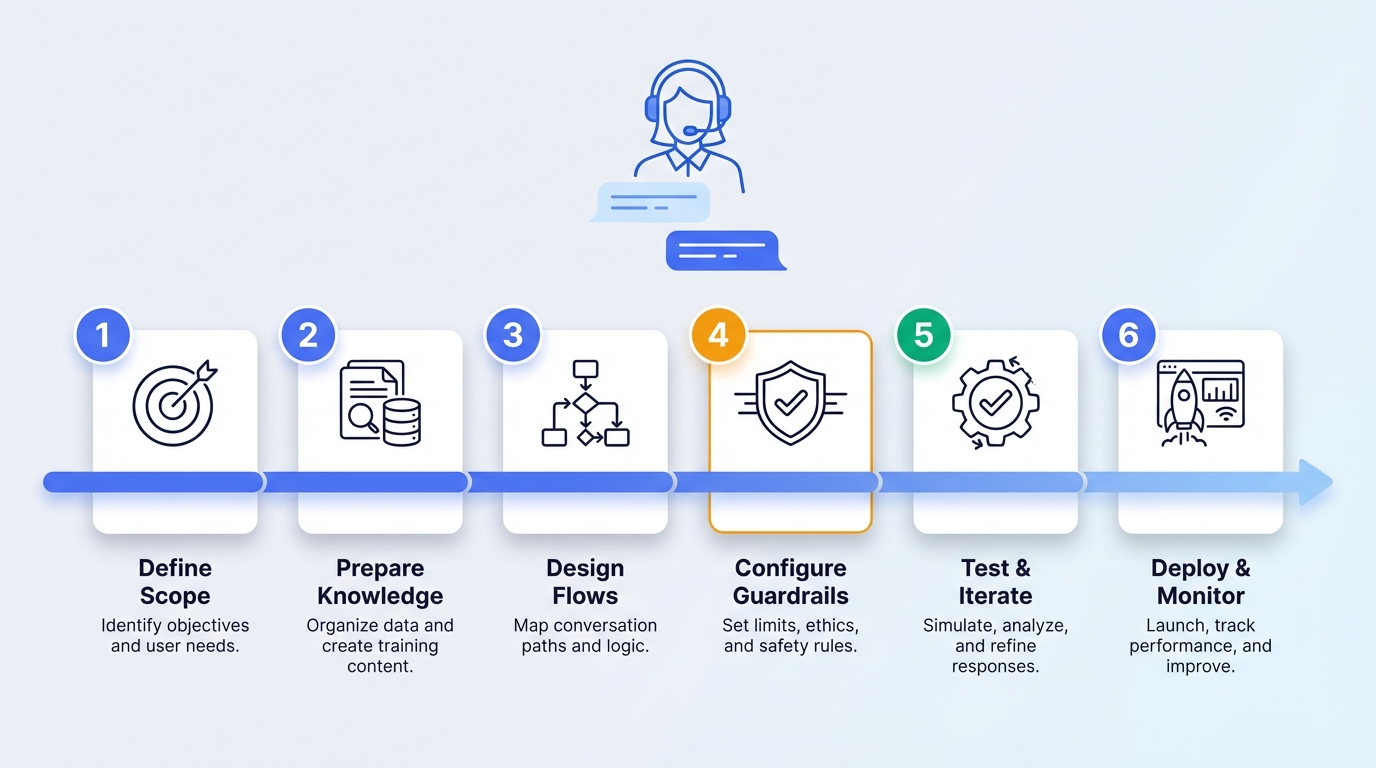
This guide covers:
- Define scope and success metrics (before touching any code)
- Prepare and structure your knowledge base
- Design conversation flows and intent handling
- Configure the agent with guardrails
- Test with real scenarios (not synthetic data)
- Deploy with monitoring and human escalation
What you'll build: A production-ready customer service agent that handles FAQs, order inquiries, and basic troubleshooting—with graceful handoff to human agents for complex cases.
New to enterprise AI Agents? Start with How Enterprises Build AI Agents in Production for the full picture.
Prerequisites
Before starting, ensure you have:
- [ ] Access to an Agent Builder platform (this guide uses Tencent Cloud ADP as reference)
- [ ] Customer service documentation (FAQs, product manuals, policies)
- [ ] Historical support tickets (for testing and intent identification)
- [ ] Access to backend systems (order management, CRM) for integration
- [ ] Defined success metrics (deflection rate, CSAT, resolution time)
Time estimate: 4-6 weeks for a production-ready deployment
Step 1: Define Scope and Success Metrics
Why this matters: 80% of failed AI Agent projects trace back to unclear scope. "Build a customer service bot" is not a scope—it's a wish.
1.1 Scope Definition Framework
Answer these questions before writing any prompts:
| Question | Bad Answer | Good Answer |
|---|---|---|
| What queries will the agent handle? | "Customer questions" | "Order status, return policy, product specs for SKUs 1000-2000" |
| What's the accuracy requirement? | "As accurate as possible" | "85% first-response accuracy, with human escalation for edge cases" |
| What's the latency requirement? | "Fast" | "First token in <3 seconds, full response in <10 seconds" |
| What systems need integration? | "Our backend" | "Order Management API (read-only), CRM (read/write notes)" |
| What's out of scope? | (blank) | "Payment disputes, account security issues, complaints about employees" |
1.2 Success Metrics
Define these before deployment—not after:
| Metric | Definition | Target | Measurement |
|---|---|---|---|
| Deflection Rate | % of queries resolved without human | 50-70% | Tickets closed by agent / Total tickets |
| First Response Accuracy | % of first responses that are correct | 85%+ | Human review sample |
| Resolution Time | Time from query to resolution | <5 min (agent) vs <4 hours (human) | System logs |
| Escalation Rate | % of queries sent to human agents | 20-40% | Handoff events / Total queries |
| CSAT | Customer satisfaction score | ≥4.0/5.0 | Post-interaction survey |
| Cost per Resolution | Total cost / Resolved queries | <$1.00 | Financial tracking |
1.3 The Scope Document
Create a one-page scope document that everyone signs off on:
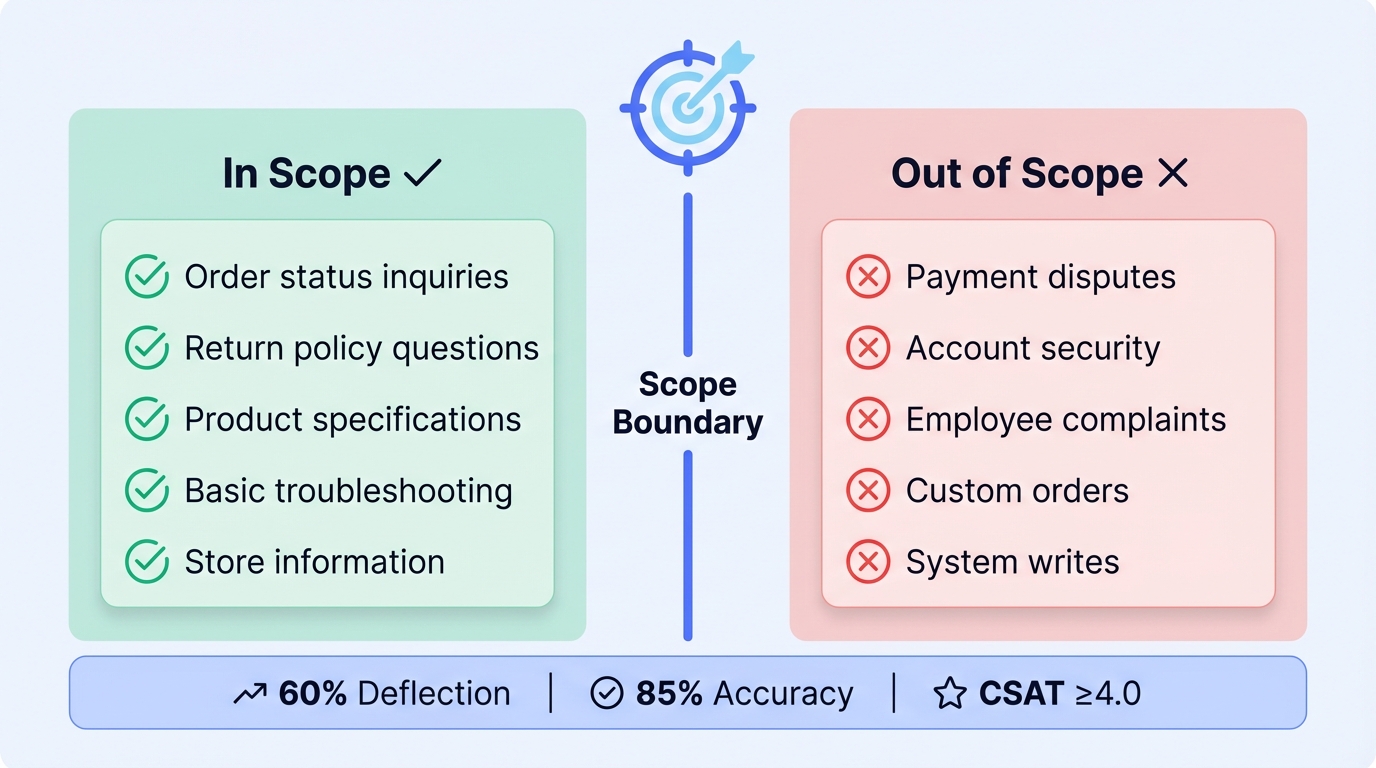
Customer Service Agent Scope
============================

[In Scope]
- Order status inquiries (tracking, delivery estimates)
- Return and refund policy questions
- Product specifications (catalog items only)
- Basic troubleshooting (top 20 issues)
- Store hours and location information

[Out of Scope]
- Payment disputes (→ Finance team)
- Account security (→ Security team)
- Complaints about employees (→ HR)
- Custom orders (→ Sales team)
- Anything requiring system writes beyond CRM notes

[Success Criteria]
- 60% deflection rate within 30 days
- 85% first-response accuracy
- CSAT ≥ 4.0
- <$0.80 cost per resolution

[Escalation Triggers]
- Customer explicitly requests human
- Confidence score < 0.7
- Query matches out-of-scope patterns
- 3+ failed resolution attempts
Step 2: Prepare and Structure Your Knowledge Base
Why this matters: Your agent is only as good as its knowledge. Garbage in, garbage out—but at scale.
2.1 Audit Existing Documentation
Before uploading anything, audit your current knowledge:
| Document Type | Typical Issues | Action Required |
|---|---|---|
| FAQs | Outdated, inconsistent formatting | Update and standardize |
| Product manuals | PDF-only, poor structure | Convert to structured format |
| Policy documents | Legal language, buried answers | Create plain-language summaries |
| Training materials | Internal jargon | Translate to customer-facing language |
| Historical tickets | Unstructured, PII included | Clean and anonymize |
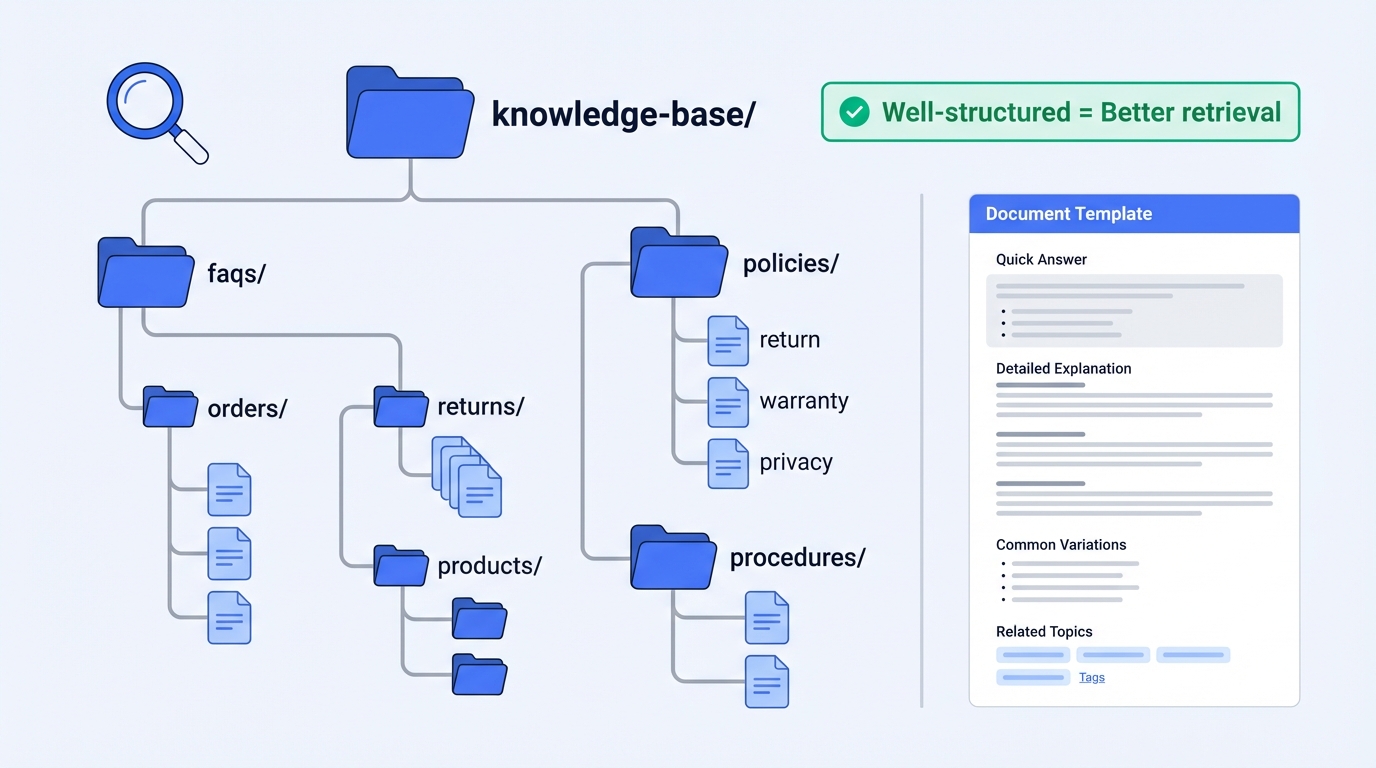
2.2 Knowledge Base Structure
Organize your knowledge for optimal retrieval:
knowledge-base/
├── faqs/
│   ├── orders/
│   │   ├── order-status.md
│   │   ├── shipping-times.md
│   │   └── tracking-info.md
│   ├── returns/
│   │   ├── return-policy.md
│   │   ├── refund-timeline.md
│   │   └── exchange-process.md
│   └── products/
│       ├── product-specs/
│       └── troubleshooting/
├── policies/
│   ├── return-policy-full.md
│   ├── warranty-terms.md
│   └── privacy-policy.md
└── procedures/
    ├── escalation-guide.md
    └── common-resolutions.md
2.3 Document Formatting Best Practices
Each document should follow this structure for optimal RAG retrieval:
[Topic Title]
=============

[Quick Answer]
[One-sentence answer for simple queries]

[Detailed Explanation]
[Full explanation with context]

[Common Variations]
- [Variation 1]: [Answer]
- [Variation 2]: [Answer]

[Related Topics]
- [Link to related FAQ 1]
- [Link to related FAQ 2]

[When to Escalate]
[Conditions that require human intervention]

---
Last updated: [Date]
Category: [orders|returns|products|policies]
Example:
How do I track my order?
========================

[Quick Answer]
You can track your order using the tracking link in your confirmation email, or by entering your order number on our website's Order Status page.

[Detailed Explanation]
Once your order ships, you'll receive an email with a tracking number and link. Tracking updates typically appear within 24 hours of shipment. For orders placed today, expect shipping within 1-2 business days.

[Common Variations]
- "Where is my package?": Check tracking link in confirmation email
- "My tracking hasn't updated": Allow 24-48 hours; contact carrier if no update after 72 hours
- "I didn't get a tracking email": Check spam folder; contact support with order number

[Related Topics]
- Shipping times by region
- Delivery issues and delays
- Missing package claims

[When to Escalate]
- Tracking shows "delivered" but customer didn't receive
- Package stuck in transit for 7+ days
- Customer needs expedited shipping change

---
Last updated: 2025-01-15
Category: orders
2.4 Upload and Index
Using Tencent Cloud ADP (or your platform):
- Upload documents in supported formats (PDF, Word, Markdown, HTML)
- Configure chunking strategy: - Chunk size: 500-1000 tokens (balance context vs. precision) - Overlap: 10-20% (maintain context across chunks) - Preserve structure: Keep headings and lists intact
- Set metadata for filtering: - Category (orders, returns, products) - Last updated date - Confidence level (verified vs. draft)
- Test retrieval with sample queries before proceeding
Step 3: Design Conversation Flows and Intent Handling
Why this matters: Users don't speak in single queries. They follow up, change topics, and express frustration. Your agent needs to handle all of this.
3.1 Core Intent Categories
Map the intents your agent will handle:
| Intent Category | Example Queries | Response Type | Confidence Threshold |
|---|---|---|---|
| Order Status | "Where is my order?", "Track order 12345" | API lookup + RAG | 0.8 |
| Return Request | "I want to return this", "How do I get a refund?" | RAG + guided flow | 0.8 |
| Product Info | "What are the specs for X?", "Is Y compatible with Z?" | RAG | 0.7 |
| Troubleshooting | "It's not working", "Error message XYZ" | RAG + decision tree | 0.7 |
| Policy Questions | "What's your return policy?", "Do you ship to X?" | RAG | 0.8 |
| Escalation Request | "Talk to a human", "This isn't helping" | Immediate handoff | N/A |
| Out of Scope | "I want to complain about your employee" | Polite redirect + handoff | N/A |
3.2 Conversation Flow Design
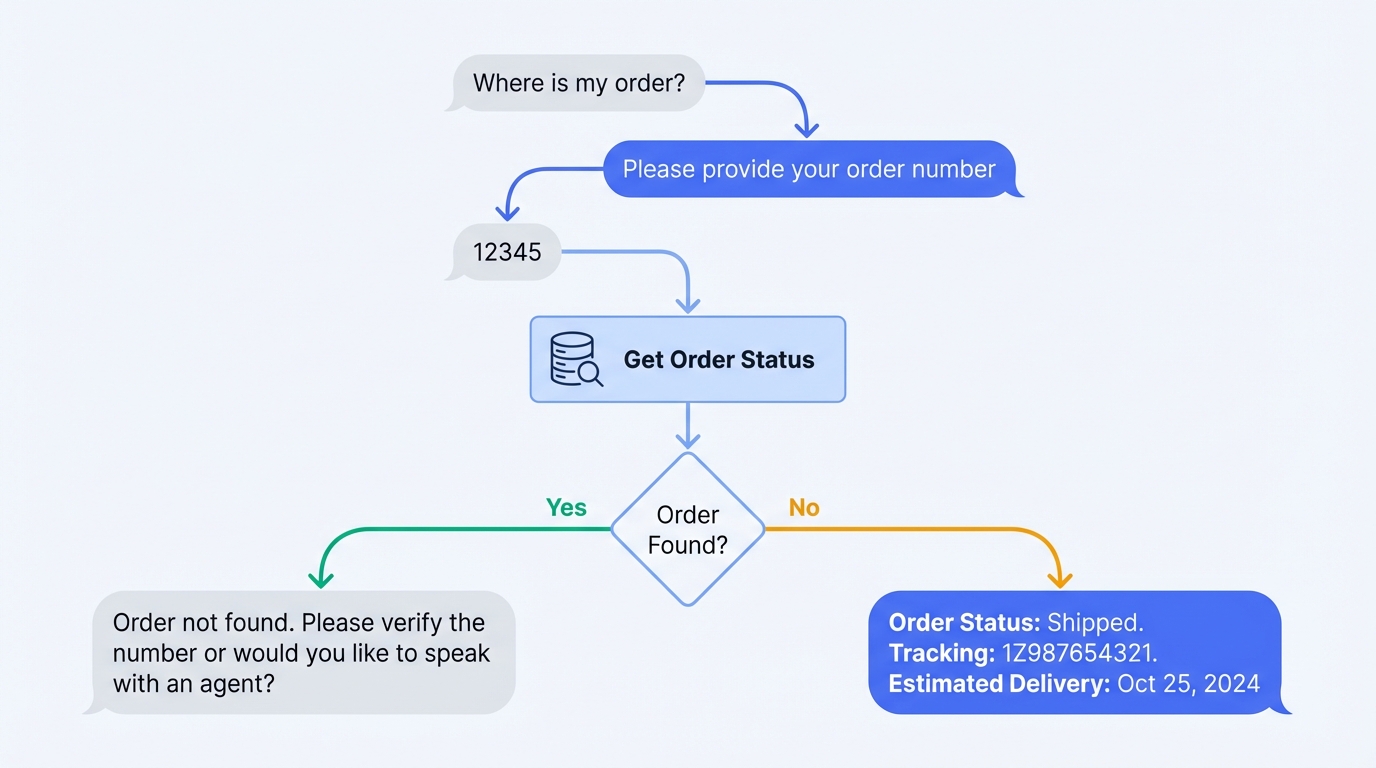
Design flows for multi-turn conversations:
Order Status Flow:
User: "Where is my order?"
    │
    ▼
Agent: "I'd be happy to help you track your order. Could you provide your order number?
        You can find it in your confirmation email."
    │
    ▼
User: "It's 12345"
    │
    ▼
[API Call: Get order status for #12345]
    │
    ├─ Order found ──────────────────────────────────────────┐
    │                                                         ▼
    │   Agent: "Your order #12345 is currently [status].
    │           It was shipped on [date] via [carrier].
    │           Tracking number: [number]
    │           Expected delivery: [date]
    │
    │           Would you like me to send you the tracking link?"
    │
    └─ Order not found ──────────────────────────────────────┐
                                                              ▼
        Agent: "I couldn't find an order with that number.
                Could you double-check the order number?
                It should be in your confirmation email.

                If you're still having trouble, I can connect
                you with a team member who can look it up
                using your email address."
Return Request Flow:
User: "I want to return something"
    │
    ▼
Agent: "I can help you with that. To start the return process,
        I'll need a few details:

        1. Your order number
        2. Which item(s) you'd like to return
        3. The reason for the return

        Let's start with your order number."
    │
    ▼
[Collect: Order number]
    │
    ▼
[API Call: Get order details]
    │
    ▼
[Display items, ask which to return]
    │
    ▼
[Collect: Return reason]
    │
    ▼
[Check: Within return window?]
    │
    ├─ Yes ──────────────────────────────────────────────────┐
    │                                                         ▼
    │   Agent: "Great news! Your item is eligible for return.
    │           I've generated a return label for you.
    │           [Return instructions]
    │
    │           Your refund will be processed within 5-7
    │           business days after we receive the item."
    │
    └─ No ───────────────────────────────────────────────────┐
                                                              ▼
        Agent: "I see this order is outside our 30-day return
                window. However, I can connect you with a team
                member who may be able to help with exceptions.

                Would you like me to do that?"
3.3 Handling Edge Cases
Design responses for common edge cases:
| Edge Case | Detection | Response Strategy |
|---|---|---|
| Frustrated user | Sentiment analysis, keywords ("useless", "terrible") | Acknowledge frustration, offer human handoff |
| Repeated question | Same intent 2+ times | Clarify what's unclear, offer alternative help |
| Topic switch | New intent mid-conversation | Acknowledge switch, handle new topic |
| Ambiguous query | Low confidence score | Ask clarifying question |
| Multiple intents | Multiple intents detected | Address primary first, acknowledge secondary |
Example: Frustrated User Handling
User: "This is useless, I've been trying for 20 minutes!"
    │
    ▼
[Sentiment: Negative, Frustration detected]
    │
    ▼
Agent: "I'm sorry this has been frustrating. I want to make sure
        you get the help you need.

        I can either:
        1. Try a different approach to solve this
        2. Connect you directly with a support specialist

        What would you prefer?"
Step 4: Configure the Agent with Guardrails
Why this matters: An unconstrained agent will hallucinate, make promises you can't keep, and damage customer trust.
4.1 System Prompt Design
Your system prompt is the agent's constitution. Make it specific:
You are a customer service assistant for [Company Name]. Your role is to help
customers with order inquiries, returns, product questions, and basic troubleshooting.

[Core Behaviors]
- Be helpful, concise, and professional
- Always verify order numbers before providing order-specific information
- Never make promises about refunds, compensation, or policy exceptions
- If unsure, say so and offer to connect with a human agent
- Never discuss competitors, internal processes, or employee matters

[Response Guidelines]
- Keep responses under 150 words unless detailed explanation is needed
- Use bullet points for multi-step instructions
- Always confirm understanding before taking actions
- End with a clear next step or question

[Boundaries]
- DO NOT process payments or access payment information
- DO NOT make commitments about delivery dates beyond what tracking shows
- DO NOT discuss or confirm inventory levels
- DO NOT provide legal, medical, or financial advice
- DO NOT engage with abusive language—offer human handoff instead

[Escalation Triggers]
Immediately offer human handoff when:
- Customer explicitly requests it
- Issue involves payment disputes or security concerns
- You cannot resolve after 3 attempts
- Customer expresses significant frustration
- Query is outside your defined scope

[Knowledge Boundaries]
Only answer based on:
- Information in your knowledge base
- Real-time data from connected APIs (order status, tracking)
- General product information from your catalog

If information is not available, say: "I don't have that specific information,
but I can connect you with someone who does."
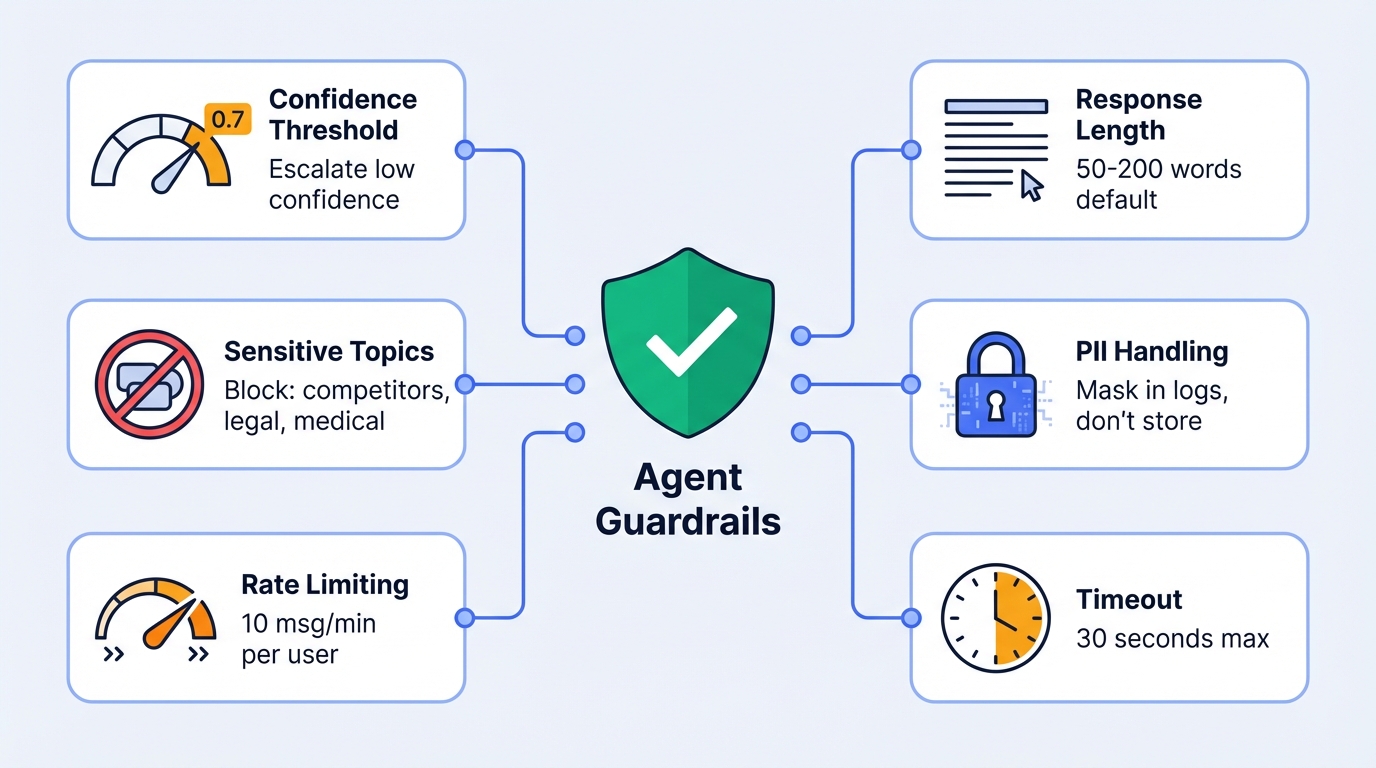
4.2 Guardrail Configuration
Set up technical guardrails:
| Guardrail | Configuration | Purpose |
|---|---|---|
| Confidence threshold | 0.7 minimum | Escalate low-confidence responses |
| Response length | 50-200 words default | Prevent rambling |
| Sensitive topic filter | Block: competitors, legal, medical | Avoid liability |
| PII handling | Mask in logs, don't store | Compliance |
| Rate limiting | 10 messages/minute per user | Prevent abuse |
| Timeout | 30 seconds max response time | User experience |
4.3 Tool/API Configuration
Connect necessary backend systems:
tools:
  - name: get_order_status
    description: "Retrieve order status and tracking information"
    api_endpoint: "/api/orders/{order_id}"
    method: GET
    required_params:
      - order_id
    returns:
      - status
      - tracking_number
      - carrier
      - estimated_delivery
    permissions: read-only

  - name: create_return_request
    description: "Initiate a return request for an order item"
    api_endpoint: "/api/returns"
    method: POST
    required_params:
      - order_id
      - item_id
      - reason
    returns:
      - return_id
      - return_label_url
      - instructions
    permissions: write
    requires_confirmation: true

  - name: add_crm_note
    description: "Add a note to customer's CRM record"
    api_endpoint: "/api/crm/notes"
    method: POST
    required_params:
      - customer_id
      - note_content
    permissions: write
    auto_execute: true  # No confirmation needed
Step 5: Test with Real Scenarios
Why this matters: Synthetic test cases miss the chaos of real customer interactions. Test with actual historical data.
5.1 Test Dataset Preparation
Create a test dataset from historical tickets:
| Test Category | Sample Size | Source | Purpose |
|---|---|---|---|
| Happy path | 50 queries | Top resolved tickets | Verify basic functionality |
| Edge cases | 30 queries | Escalated tickets | Test boundary handling |
| Negative cases | 20 queries | Out-of-scope requests | Verify guardrails |
| Multi-turn | 20 conversations | Complex resolutions | Test conversation flow |
| Adversarial | 10 queries | Intentionally tricky | Stress test guardrails |
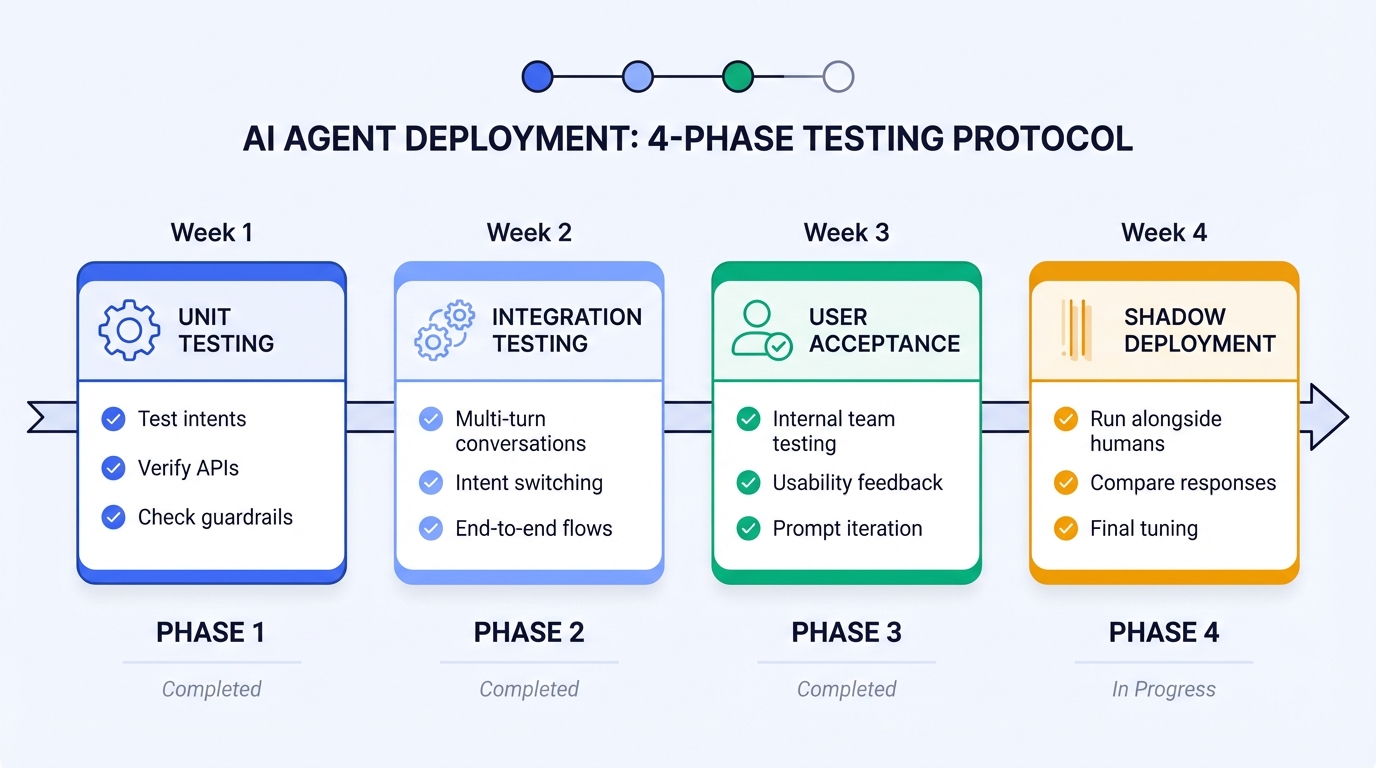
5.2 Testing Protocol
Phase 1: Unit Testing (Week 1)
├─ Test each intent category independently
├─ Verify API integrations work correctly
├─ Check guardrails trigger appropriately
└─ Document failures and fix

Phase 2: Integration Testing (Week 2)
├─ Test multi-turn conversations
├─ Test intent switching mid-conversation
├─ Test escalation flows end-to-end
└─ Verify CRM notes are created correctly

Phase 3: User Acceptance Testing (Week 3)
├─ Internal team tests as customers
├─ Document usability issues
├─ Collect feedback on response quality
└─ Iterate on prompts and flows

Phase 4: Shadow Deployment (Week 4)
├─ Run agent alongside human agents
├─ Compare responses (don't send to customers yet)
├─ Measure accuracy against human responses
└─ Final tuning before go-live
5.3 Evaluation Metrics
Track these during testing:
| Metric | Target | Measurement Method |
|---|---|---|
| Intent classification accuracy | >90% | Compare to human labels |
| Response relevance | >85% | Human review (1-5 scale) |
| Factual accuracy | >95% | Verify against knowledge base |
| Guardrail effectiveness | 100% | All out-of-scope correctly blocked |
| Escalation appropriateness | >90% | Review escalation decisions |
| Response latency | <5 seconds | System logs |
5.4 Common Issues and Fixes
| Issue | Symptom | Fix |
|---|---|---|
| Hallucination | Agent invents policies or promises | Strengthen "only answer from knowledge base" instruction |
| Over-escalation | Too many queries go to humans | Raise confidence threshold, improve knowledge coverage |
| Under-escalation | Complex issues not escalated | Lower confidence threshold, add escalation triggers |
| Repetitive responses | Same answer regardless of context | Improve intent classification, add variations |
| Context loss | Agent forgets earlier conversation | Check context window, implement summarization |
Step 6: Deploy with Monitoring and Human Escalation
Why this matters: Deployment is not the end—it's the beginning of continuous improvement.
6.1 Deployment Strategy
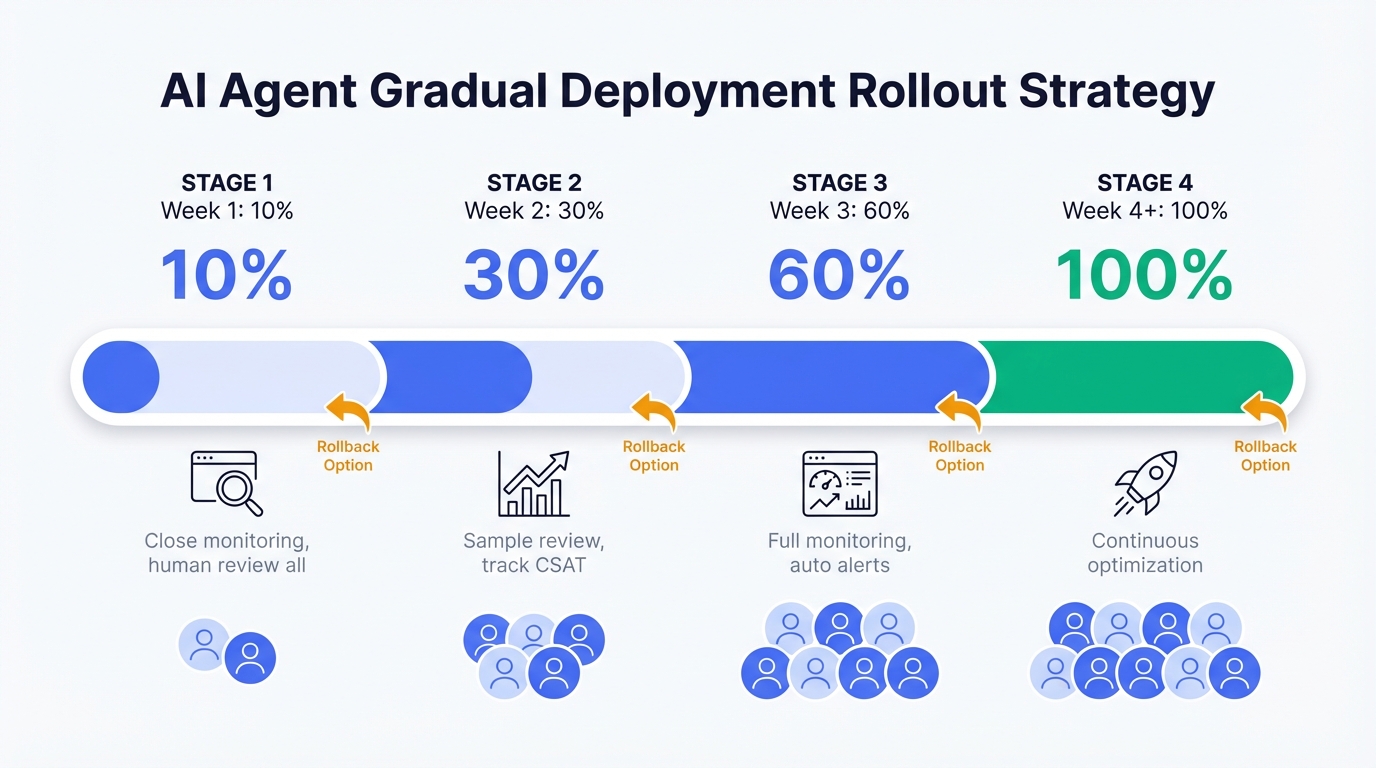
Recommended: Gradual Rollout
Week 1: 10% of traffic
├─ Monitor closely
├─ Human review all escalations
├─ Daily accuracy checks
└─ Quick rollback if issues

Week 2: 30% of traffic
├─ Reduce human review to samples
├─ Track CSAT scores
├─ Compare to human agent performance
└─ Iterate on problem areas

Week 3: 60% of traffic
├─ Full monitoring in place
├─ Automated alerts for anomalies
├─ Weekly performance reviews
└─ Knowledge base updates based on gaps

Week 4+: 100% of traffic
├─ Continuous monitoring
├─ Monthly optimization cycles
├─ Quarterly knowledge base audits
└─ Regular model/prompt updates
6.2 Monitoring Dashboard
Track these metrics in real-time:
| Metric | Alert Threshold | Action |
|---|---|---|
| Deflection rate | <40% for 1 hour | Investigate, possible rollback |
| Escalation rate | >50% for 1 hour | Check for system issues |
| Response latency | >10 seconds avg | Scale infrastructure |
| Error rate | >5% | Immediate investigation |
| CSAT score | <3.5 daily avg | Review recent conversations |
| Confidence score distribution | >30% below threshold | Knowledge base gaps |
6.3 Human Escalation Setup
Configure seamless handoff to human agents:
escalation_config:
  triggers:
    - type: explicit_request
      keywords: ["human", "agent", "person", "representative"]
      action: immediate_handoff

    - type: confidence_threshold
      threshold: 0.7
      action: offer_handoff

    - type: sentiment
      threshold: -0.5  # Negative sentiment score
      action: offer_handoff

    - type: repeated_failure
      attempts: 3
      action: immediate_handoff

    - type: topic_match
      topics: ["payment_dispute", "security", "complaint"]
      action: immediate_handoff

  handoff_message: |
    I want to make sure you get the best help possible.
    I'm connecting you with a team member who can assist further.

    Please hold for a moment—someone will be with you shortly.

    [Summary of conversation will be shared with the agent]

  context_transfer:
    - conversation_summary
    - customer_intent
    - attempted_resolutions
    - customer_sentiment
    - order_numbers_mentioned
6.4 Continuous Improvement Loop
Daily:
├─ Review escalated conversations
├─ Identify knowledge gaps
├─ Fix critical prompt issues

Weekly:
├─ Analyze deflection rate trends
├─ Review CSAT feedback
├─ Update knowledge base with new FAQs
├─ Tune confidence thresholds

Monthly:
├─ Full performance review
├─ Compare to baseline metrics
├─ Major prompt/flow updates
├─ Cost optimization review

Quarterly:
├─ Knowledge base audit
├─ Competitive analysis
├─ Feature expansion planning
├─ ROI calculation and reporting
Conclusion: Start Small, Iterate Fast
The most successful customer service agents start with a narrow scope and expand based on data—not assumptions.
Your first deployment should:
- Handle 3-5 well-defined query types
- Have clear escalation paths
- Include comprehensive monitoring
- Plan for weekly iterations
Resist the temptation to:
- Handle "everything" from day one
- Skip testing with real data
- Deploy without human escalation
- Set and forget
The goal isn't to replace human agents—it's to handle the repetitive queries so humans can focus on complex, high-value interactions.
Ready to build your customer service AI Agent?
→ Start with Tencent Cloud ADP — Knowledge base setup, workflow orchestration, and monitoring included. Deploy your first agent in days, not months.
This article is part of our Enterprise AI Agent series. Related: "Why Most Enterprise AI Agent Projects Fail" and "The Real Cost of Enterprise AI Agents"
Frequently Asked Questions
Q1: How long does it take to build a customer service AI Agent?
A: 4-6 weeks for a production-ready deployment:
- Week 1-2: Scope definition, knowledge base preparation
- Week 3: Agent configuration and flow design
- Week 4: Testing and iteration
- Week 5-6: Gradual deployment and monitoring setup
Rushing this timeline typically results in poor accuracy and high escalation rates.
Q2: What deflection rate should I expect?
A: Realistic targets by maturity:
- Month 1: 40-50% (initial deployment)
- Month 3: 55-65% (after optimization)
- Month 6+: 60-70% (mature deployment)
Anything above 70% usually indicates the agent is handling queries it shouldn't.
Q3: How do I handle queries the agent can't answer?
A: Implement graceful degradation:
- Acknowledge the limitation honestly
- Offer to connect with a human agent
- Provide alternative self-service options if available
- Log the query for knowledge base improvement
Never let the agent guess or make up answers.
Q4: What's the minimum knowledge base size?
A: Quality over quantity. A well-structured 50-document knowledge base outperforms a poorly organized 500-document one. Start with:
- Top 20 FAQs (covers 60-70% of queries)
- Core policies (returns, shipping, warranty)
- Product information for top-selling items
- Common troubleshooting guides
Expand based on actual query gaps.
Q5: How do I measure ROI?
A: Calculate monthly savings:
Monthly Savings = (Deflected queries × Human cost per query) - Agent operating cost

Example:
- 10,000 monthly queries
- 60% deflection = 6,000 queries handled by agent
- Human cost: $5 per query
- Agent cost: $0.50 per query

Savings = (6,000 × $5) - (10,000 × $0.50) = $30,000 - $5,000 = $25,000/month
Q6: Should I use a pre-built solution or build custom?
A: Use a platform (like Tencent Cloud ADP) for:
- Faster time to deployment (weeks vs. months)
- Built-in RAG, workflow, and monitoring
- Lower maintenance burden
- Easier scaling
Build custom only if you have unique requirements that no platform supports and dedicated engineering resources.
For an independent assessment of AI Agent platforms, see IDC MarketScape 2025: AI Agent Platform Leaders.
Q7: How do I handle multiple languages?
A: Options by complexity:
- Separate agents: One per language (simplest, most control)
- Multilingual model: Single agent with language detection (moderate complexity)
- Translation layer: Translate to English, process, translate back (highest latency)
For customer service, separate agents per major language typically perform best.
Q8: What if customers try to abuse the agent?
A: Implement abuse prevention:
- Rate limiting (max messages per minute)
- Profanity/abuse detection with warnings
- Automatic escalation after repeated abuse
- Session termination for severe cases
- Log all interactions for review
Q9: How often should I update the knowledge base?
A: Establish a regular cadence:
- Weekly: Add answers to new common questions
- Monthly: Review and update existing content
- Quarterly: Full audit for accuracy and relevance
- Immediately: When policies or products change
Stale knowledge bases are the #1 cause of declining accuracy.

Hotel Guest Services

Standard
AI customer service for hotel guests, addressing enquiries regarding guest requirements, room controls, and fundamental hotel information.

Start building today
If you need more support, please contact us