
Enterprise AI Coding Assistant Guide | Code Agents
Discover how enterprise Code Agents go beyond GitHub Copilot — enabling non-technical employees to solve business problems with AI-generated code.


Executive Summary
In 2024, the dominant form of AI coding assistance was "code completion" — a developer writes half a line, and AI fills in the rest. GitHub Copilot amassed 1.9 million paying subscribers. Cursor's valuation soared to $9 billion.
But the real transformation isn't happening there.
In 2025, a new paradigm is emerging: Code Agents. They're no longer just tools that help developers write code — they're autonomous digital coworkers that use code to solve problems for everyone in the enterprise, not just programmers.
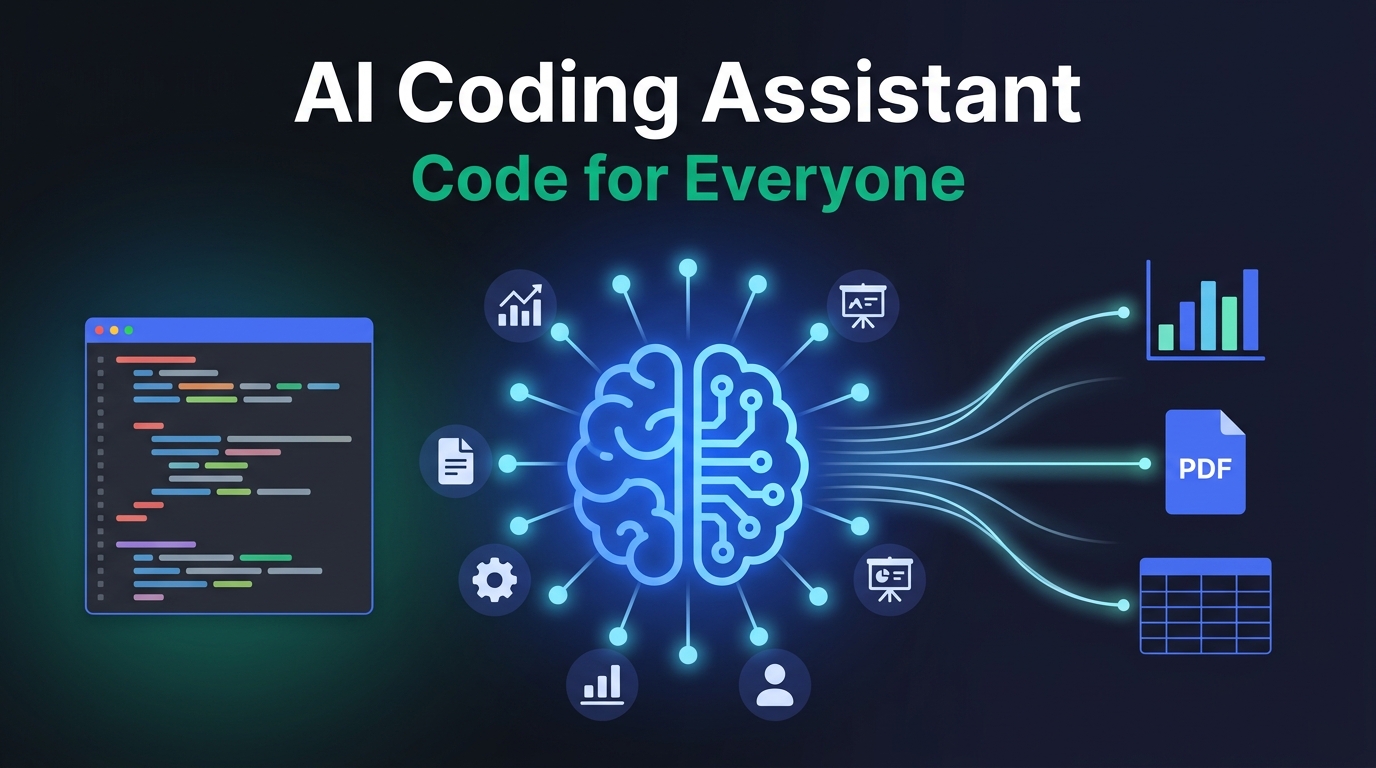
According to Gartner's 2025 report, 75% of enterprise software engineers will use AI coding assistants by 2028, up from less than 10% in early 2024 — a testament to the revolutionary wave it has triggered. More importantly, McKinsey research shows that while AI coding tools accelerate code generation tasks by up to 50%, Code Agents' real value unlock comes from enabling non-technical employees to leverage code for complex business problems.
This article answers:
- What fundamentally distinguishes Code Agents from traditional AI coding assistants?
- Why do enterprises need Code Agents, not just Copilot?
- What does the core architecture of a Code Agent look like?
- Which scenarios are best suited for early adoption?
- How should you evaluate and select a Code Agent platform?
From Code Completion to Autonomous Coding: Three Generations of AI Coding Assistants
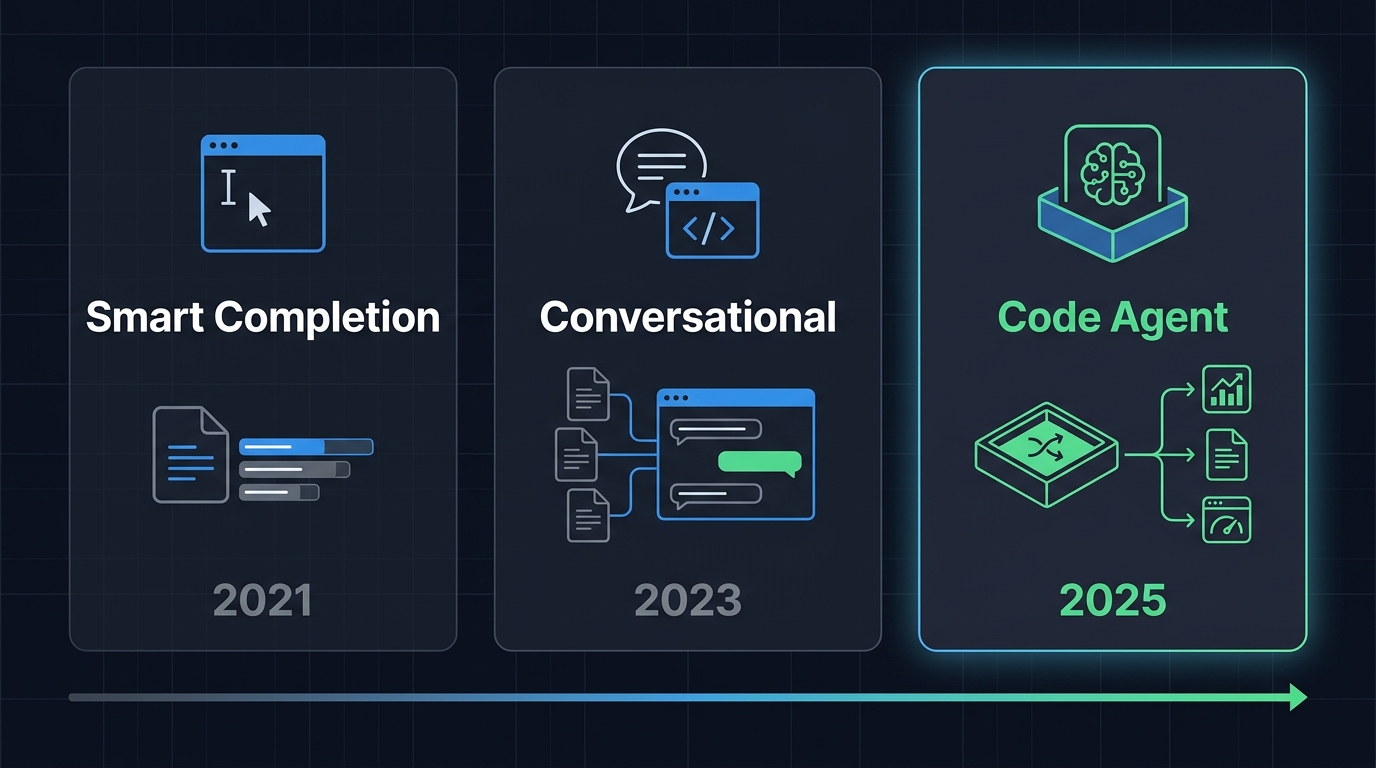
To understand Code Agents, you need to see the full evolution. AI coding assistants didn't appear overnight — they evolved through three distinct phases:
Generation 1: Smart Completion (2021–2023)
Flagship products: GitHub Copilot and Tabnine. Core capability: inline completion and function-level generation — a developer writes a comment or function signature, and AI generates the subsequent code.
Limitations:
- Only works inside an IDE, context limited to the current file
- Cannot understand overall project architecture
- Generated code requires line-by-line human review
- Exclusively for professional developers
Generation 2: Conversational Coding (2023–2024)
Flagship products: Cursor, Claude Code, and ChatGPT. Core capability upgraded to multi-file editing and contextual understanding — developers describe requirements in natural language, and AI modifies code across files.
Limitations:
- Still requires developers to understand code logic
- Cannot independently execute and verify code
- No persistent workspace
- Requires human intervention for debugging
Generation 3: Autonomous Code Agents (2025–)
This is the evolution happening right now. The defining feature: AI has its own independent code workspace, can autonomously write, execute, and debug code, and deliver results to users — who can be anyone, not just developers.
| Dimension | Smart Completion | Conversational Coding | Code Agent |
|---|---|---|---|
| Target Users | Professional developers | People with coding basics | All enterprise employees |
| Interaction | Tab completion | Chat + code editing | Natural language conversation |
| Execution | None | Limited | Independent sandbox |
| Context Scope | Current file | Project level | Project + knowledge base + tools |
| Error Handling | Manual debugging | Semi-automatic | Autonomous retry and fix |
| Output | Code snippets | Code files | Deliverable business outcomes |
Key Insight: The fundamental shift with Code Agents isn't "better code writing" — it's the democratization of programming — enabling non-technical business users to solve problems through code.
What Is a Code Agent? A Precise Definition
The market is full of vague descriptions of Code Agents. Let's start with a precise technical definition:
A Code Agent is an AI agent with an independent code execution environment that receives natural language instructions, autonomously plans, writes, executes, and debugs code, and ultimately delivers usable business outcomes.
Five Core Elements of a Code Agent
1. Sandbox Execution Environment
Code Agents run code in an isolated, secure sandbox. This means:
- Code execution doesn't affect production systems
- Each user's code space is isolated from others
- Enterprise IT can control sandbox permissions and resources
This is fundamentally different from "asking ChatGPT to write a script and running it yourself." A Code Agent writes, runs, and validates — all on its own.
2. Session Management
Each conversation task is an independent session, supporting:
- Maintaining context coherence across multiple conversation turns
- Resuming interrupted tasks
- Session isolation — no cross-contamination
3. Persistent Workspace
Unlike ephemeral chats, Code Agents have persistent storage:
- Session sandbox — isolated execution environment
- Session temp files — cleaned up on exit
- Workspace persistent storage — shared across sessions, retained long-term
This lets Code Agents iteratively refine the same project across multiple conversations, rather than starting from scratch every time.
4. Tool Integration
Code Agents can invoke enterprise knowledge bases, plugins, and APIs:
- Access internal enterprise documents and data
- Call third-party services (databases, analytics tools, etc.)
- Integrate with existing business systems
5. Human-in-the-Loop
Critical operations require human confirmation:
- Operations involving sensitive data
- High-cost API calls
- Decision points requiring business judgment
Litmus Test: If a product can only write code but not execute it, it's a coding assistant. If it can write and execute code but lacks an isolated sandbox, it's a security risk. Only when it combines sandbox execution + persistent workspace + tool integration + human collaboration is it an enterprise-grade Code Agent.
Why Enterprises Need Code Agents (Not Just Another Developer Tool)
Many people's first reaction: "Isn't this just an upgraded Copilot? Our dev team already uses one."
Wrong. Code Agents and Copilot solve fundamentally different problems.
What Copilot Solves: Developers Write Code Faster
GitHub Copilot helps developers boost coding efficiency. Typical use cases:
- Auto-completing boilerplate code
- Generating unit tests
- Explaining unfamiliar codebases
Valuable, yes — but the beneficiaries are limited to the technical team.
What Code Agents Solve: Everyone Uses Code to Solve Business Problems
Code Agents serve the entire enterprise workforce. Typical use cases:
| Role | Pain Point | How Code Agent Solves It |
|---|---|---|
| Financial Analyst | Manually processing Excel for weekly reports every week | Describe requirements in natural language → Agent auto-writes Python scripts for data processing → Outputs visual reports |
| HR Manager | Screening matching candidates from stacks of resumes | Upload resume files → Agent writes parsing scripts → Outputs structured scoring sheet |
| Operations Staff | Exporting data from multiple platforms for cross-analysis | Describe analysis dimensions → Agent writes ETL scripts → Generates comparison dashboard |
| Product Manager | Quick prototype validation of a feature's logic | Describe product logic → Agent writes runnable demo → One-click preview |
| Legal Counsel | Extracting key clauses from contracts for comparison | Upload contract files → Agent writes extraction scripts → Outputs structured comparison table |
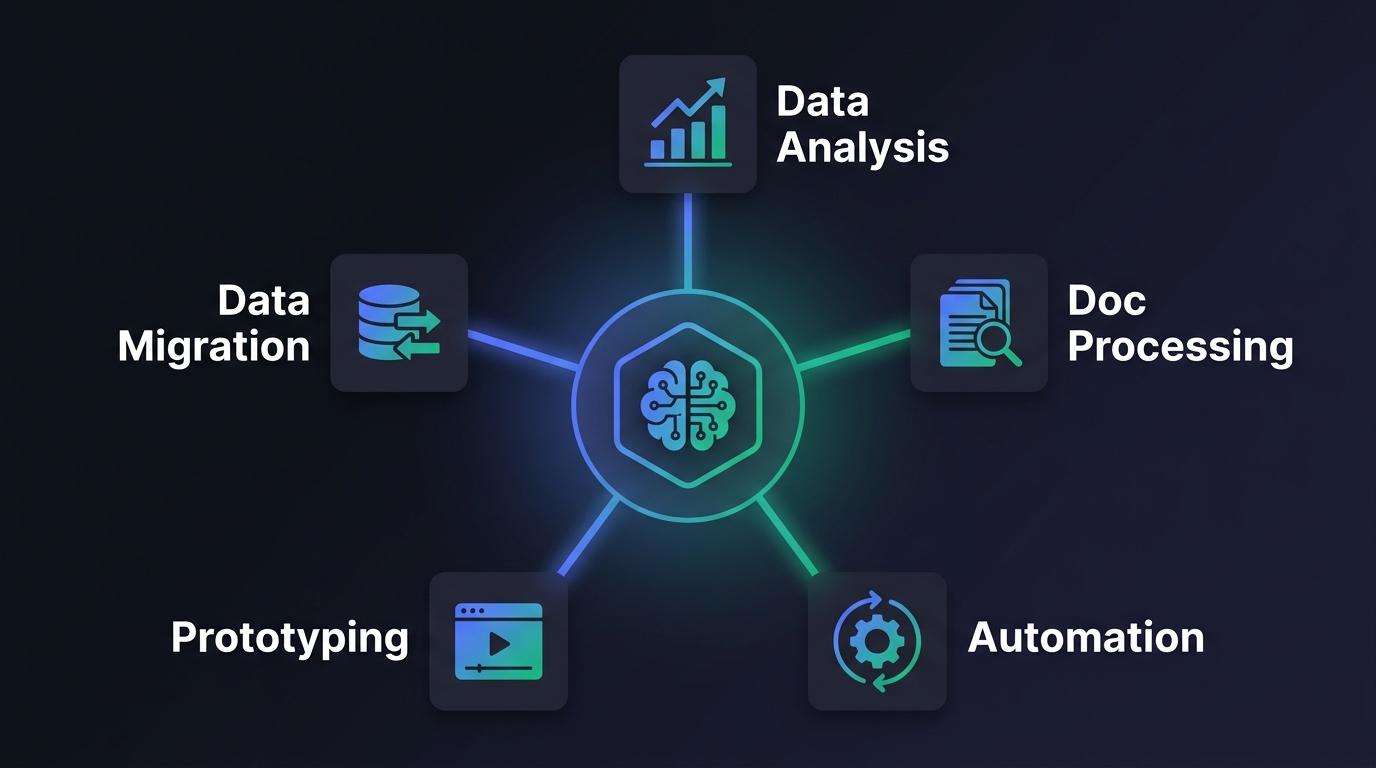
The Core Difference: From "Faster Coding" to "Code for Everyone"
| Dimension | Copilot-Type Tools | Code Agent |
|---|---|---|
| Target Users | Developers | All employees |
| Core Value | 30–50% coding speedup | Business process automation |
| Interaction | Inside the IDE | Natural language conversation |
| Output | Code snippets | Business deliverables (reports/charts/files) |
| Technical Barrier | Programming skills required | Zero coding skills needed |
| ROI Coverage | Technical team | Entire company |
One-liner: Copilot doubles the efficiency of 10 developers. Code Agent gives coding ability to 1,000 non-technical employees. Which is more valuable to an enterprise?
Core Technical Architecture of a Code Agent
Understanding the architecture helps evaluate different platforms' technical maturity. An enterprise-grade Code Agent typically has four layers:
Layer 1: Interaction Layer
Users interact with the Code Agent through natural language. Key design elements:
- File upload and preview support
- Complete conversation history
- Real-time display of code execution results
@mention to invoke specific tools or knowledge bases
Layer 2: Reasoning Layer
The large language model understands requirements, plans solutions, and generates code:
- Task Decomposition: Breaking complex requirements into executable steps
- Code Generation: Selecting appropriate languages and libraries
- Error Fixing: Autonomous debugging when execution errors occur
- Result Validation: Checking whether outputs meet requirements
The reasoning layer's quality depends on the underlying model. Current mainstream choices include DeepSeek V3, Claude, and GPT-4. Enterprises should select the most suitable model for their scenarios — the most expensive isn't always the best.
Layer 3: Execution Layer
This is the core differentiator between Code Agents and regular chatbots:
- Sandbox Environment: Secure, isolated code execution space
- File System: Read/write and persistent file support
- Package Management: Pre-installed common Python libraries (pandas, matplotlib, etc.)
- Resource Controls: CPU, memory, and execution time limits
Layer 4: Integration Layer
Connecting with existing enterprise systems:
- Knowledge Base Access: RAG retrieval of internal enterprise documents
- Plugin System: MCP plugins and custom API calls
- Permission Management: Role-based fine-grained access control
- Audit Logs: Full traceability of all operations
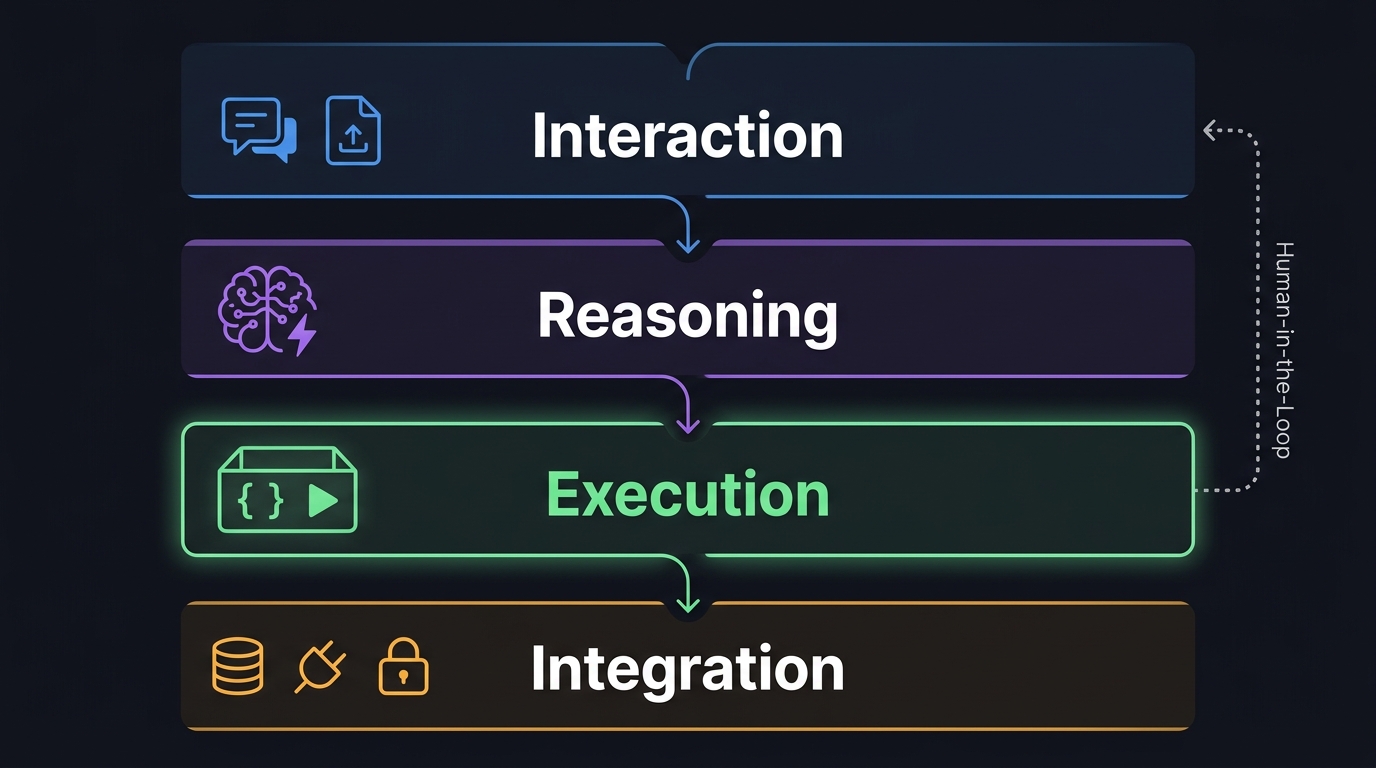
Selection Tip: When evaluating a Code Agent platform, focus on the execution layer and integration layer. The reasoning layer can be supplemented by switching models, but sandbox security and enterprise integration capabilities are the hard requirements.
5 Best Scenarios for Code Agent Early Adoption
Based on implementation difficulty and value return, here are five recommended pilot scenarios:
Scenario 1: Data Analysis & Report Generation ⭐⭐⭐⭐⭐
Pain Point: Business staff spend hours weekly processing Excel manually — writing formulas, creating charts, compiling reports.
How Code Agent Solves It:
- User uploads data files (CSV/Excel)
- Describes analysis needs in natural language: "Summarize this quarter's sales by region, compare with same period last year, identify the 3 fastest-growing regions"
- Agent auto-writes Python scripts using pandas for data processing and matplotlib/plotly for visualization
- Outputs a complete report (PDF/Excel + charts)
Expected Impact: Weekly report creation time reduced from 4 hours to 15 minutes.
Scenario 2: Document Processing & Knowledge Extraction ⭐⭐⭐⭐⭐
Pain Point: Legal, procurement, and compliance teams need to extract key information from large volumes of documents. Manual reading is enormously time-consuming.
How Code Agent Solves It:
- Upload multiple contract/report files
- Describe extraction needs: "Extract payment terms, penalty clauses, and validity periods from all contracts, and create a side-by-side comparison"
- Agent writes document parsing scripts combining OCR and text processing
- Outputs a structured comparison table (Excel)
Expected Impact: Clause comparison across 100 contracts reduced from 2 weeks to 1 hour.
Scenario 3: Business Process Automation ⭐⭐⭐⭐
Pain Point: Cross-system data synchronization and recurring task execution depend on IT scheduling, with long wait times.
How Code Agent Solves It:
- Describe automation needs: "Daily export new customers from CRM, match to knowledge base categories, auto-generate welcome email drafts"
- Agent writes automation scripts, invoking relevant APIs
- Executes after human confirmation
Scenario 4: Rapid Prototyping & Demo Building ⭐⭐⭐⭐
Pain Point: Product managers need to wait for dev sprint allocation to validate ideas, creating long cycles.
How Code Agent Solves It:
- Describe product logic and interaction requirements
- Agent rapidly generates a runnable HTML/JavaScript prototype
- One-click preview, fast iteration
Scenario 5: Data Migration & Format Conversion ⭐⭐⭐
Pain Point: System upgrades require massive data cleaning, transformation, and migration. Manual operations are error-prone.
How Code Agent Solves It:
- Describe conversion rules and target format
- Agent writes ETL scripts with batch processing support
- Validate with sample data first, then execute in full after confirmation
Code Agent vs Market Leaders: How Enterprises Should Choose
Multiple AI coding products exist in the market. Enterprises can easily confuse their positioning during selection. Here's an objective comparison by actual capabilities:
| Product | Type | Core Users | Code Execution | Enterprise Features | Best For |
|---|---|---|---|---|---|
| GitHub Copilot | Code completion | Developers | ❌ | Partial | IDE coding speedup |
| Cursor | Conversational coding | Developers | Limited | ❌ | Project-level coding |
| Claude Code | Terminal agent | Developers | ✅ (local) | ❌ | CLI dev tasks |
| OpenAI Codex | Cloud agent | Developers | ✅ (cloud) | Partial | Automated coding tasks |
| Devin | Full-stack agent | Developers | ✅ (cloud) | Partial | Complete dev tasks |
| Enterprise Code Agent | Employee assistant | All employees | ✅ (sandbox) | ✅ | Business problem-solving |
5 Key Dimensions for Enterprise Selection
Dimension 1: Who Are Your Target Users?
If serving only the dev team → Copilot/Cursor is sufficient. If covering non-technical employees → You need an enterprise Code Agent.
Dimension 2: Security & Compliance
- Is code executed in an isolated sandbox?
- Does data stay within enterprise control?
- Are there complete audit logs?
- Is private deployment supported?
Dimension 3: Knowledge Base Integration
- Can it connect to internal enterprise documents and data?
- What knowledge base types and retrieval methods are supported?
- How frequently is the knowledge base updated and how accurate is it?
Dimension 4: Collaboration & Distribution
- Can completed tools be shared with colleagues?
- Is "publish as application" supported?
- Is permission control granularity sufficient?
Dimension 5: Cost Model
- Per-token billing or per-session billing?
- How are sandbox resources billed?
- Is there a predictable monthly cost?
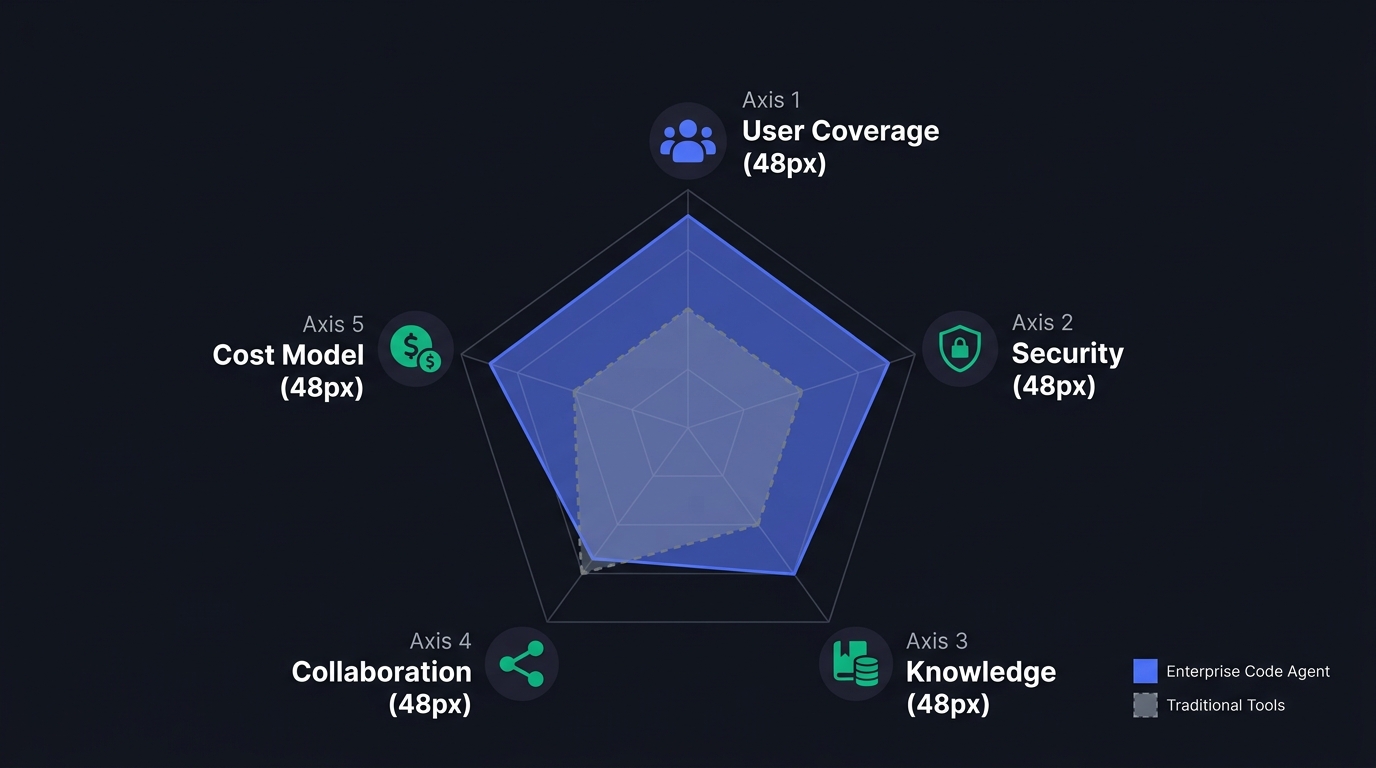
Selection Advice: Don't chase the "most powerful" product. Choose the one that best matches your enterprise's current needs. A powerful tool that ordinary employees can't use is less valuable than a practical tool everyone can pick up.
Code Agent Boundaries: What Scenarios Don't Fit?
After discussing advantages, let's be honest about the limitations. Not every scenario suits a Code Agent:
❌ Unsuitable Scenarios
| Scenario | Why It Doesn't Fit | Better Alternative |
|---|---|---|
| Real-time high-concurrency processing | Code Agent response time is in seconds, not milliseconds | Traditional microservices + rule engine |
| Decisions requiring 100% accuracy | AI-generated code can't guarantee zero bugs | Human-written code + full test suites |
| Core financial transactions | Security risk too high, compliance auditing complex | Certified dedicated transaction systems |
| Simple repetitive queries | Overkill — cost doesn't justify | Traditional FAQ bots or workflows |
| Long-running background tasks | Code Agent sessions have time limits | Traditional cron jobs + schedulers |
⚠️ Scenarios Requiring Careful Evaluation
- Involving personally identifiable information (PII): Requires additional data masking and compliance mechanisms
- Cross-department data access: Permission controls need granular design
- Output directly facing customers: Needs a human review step
Bottom Line: Code Agents excel at "using code to solve tasks with clear inputs and outputs." If the task has vague inputs, unclear output criteria, or zero margin for error, don't use a Code Agent.
How to Get Started: Enterprise Code Agent Adoption Roadmap
Phase 1: Pilot (Weeks 1–2)
- Select 1 scenario — Data analysis reporting is recommended: clear value, low risk
- Choose 5–10 seed users — From business departments, non-technical backgrounds
- Configure the base environment — Model selection, knowledge base integration, permission setup
- Collect feedback — Pain points and pleasant surprises from actual usage
Phase 2: Expand (Weeks 3–4)
- Add 2–3 scenarios — Document processing, process automation, etc.
- Expand user base — 50–100 users
- Build a Skill library — Codify frequently-used Agent configurations as reusable templates
- Quantify ROI — Time saved, errors reduced, employee satisfaction
Phase 3: Scale (Months 2–3)
- Company-wide rollout — IT, Finance, HR, Operations, Legal
- "Publish as Application" — Release mature agents as standardized tools for all employees
- Continuous optimization — Adjust models, prompts, and knowledge bases based on usage data
- Cost management — Establish usage monitoring and budget controls
Frequently Asked Questions (FAQ)
What's the difference between a Code Agent and an AI coding assistant?
AI coding assistants (like GitHub Copilot) primarily help developers write code through auto-completion and code suggestions, boosting coding efficiency. Code Agents go further — they have independent code execution environments, can autonomously write, run, and debug code, and serve all enterprise employees, not just developers. In simple terms: a coding assistant helps you write code; a Code Agent uses code to solve your problems.
Can non-technical people really use Code Agents?
Yes. The core design principle of Code Agents is enabling non-technical staff to describe needs in natural language, with AI handling all the programming automatically. Users don't need to understand Python syntax or data processing logic — they just need to clearly describe "what result they want." Of course, more precise descriptions yield better results.
Is the code generated by Code Agents secure?
Enterprise-grade Code Agents execute code in isolated sandbox environments that don't touch production systems. Each user's execution space is isolated, and all operations have complete audit logs. For operations involving sensitive data, Human-in-the-Loop mechanisms ensure critical steps only execute after human confirmation.
Will my enterprise data be sent to third parties?
It depends on the deployment model. Code Agent platforms supporting private deployment keep all data processing within enterprise-controlled environments. During evaluation, confirm: data storage location, model invocation chain, and whether data isolation is supported.
Will Code Agents replace developers?
No. Code Agents handle "solving common business problems with standardized code" — data cleaning, report generation, format conversion, and similar tasks. Complex system architecture design, core business logic development, and performance optimization still require professional developers. Code Agents are more like freeing up developer time, letting them focus on higher-value work.
How long does it take and how much does it cost to deploy an enterprise Code Agent?
The pilot phase typically takes 2–4 weeks for a single scenario, with costs mainly from platform subscriptions and model API calls. Scaling enterprise-wide takes 2–3 months, requiring investment in knowledge base building, permission configuration, and employee training. Specific costs depend on user scale and usage frequency. We recommend starting with a small pilot to validate ROI before deciding on full-scale rollout.
What if the Agent makes mistakes? How do you control risk?
Three lines of defense: First, sandbox isolation ensures code execution doesn't affect production systems. Second, Human-in-the-Loop mechanisms require human confirmation for critical operations. Third, complete audit logs and rollback mechanisms allow tracing and undoing any operation. We recommend strict approval processes during early adoption, gradually relaxing as the system stabilizes.
What's the difference between Code Agents and RPA (Robotic Process Automation)?
RPA automates processes by recording and replaying UI operations — ideal for scenarios with fixed rules and stable interfaces. Code Agents solve problems by writing code, offering more flexibility for non-standardized scenarios that RPA can't cover. The two complement each other: RPA handles high-frequency fixed processes, while Code Agents tackle low-frequency complex tasks.
Conclusion
Code Agents represent the next evolution of AI coding assistants — from "helping developers write code" to "helping everyone solve problems with code."
For enterprises, this means two things:
- Short-term value: Business teams gain data analysis, document processing, and process automation capabilities without waiting for IT scheduling
- Long-term value: The democratization of programming — every employee becomes "someone who can use code," exponentially boosting the organization's digital capabilities
But remember — technology is just the means. The keys to success are: pick the right scenarios, manage expectations, and build feedback loops. Start with one small scenario, prove value with data, then scale.
Want to learn how to deploy AI Agents in your enterprise? Explore Tencent Cloud ADP , and start by creating your first intelligent agent.
Further Reading

Start building today
If you need more support, please contact us